
Can I add a different custom message to each Facebook group when sharing the same product photo?
November 20, 2026 · MGSApro Team
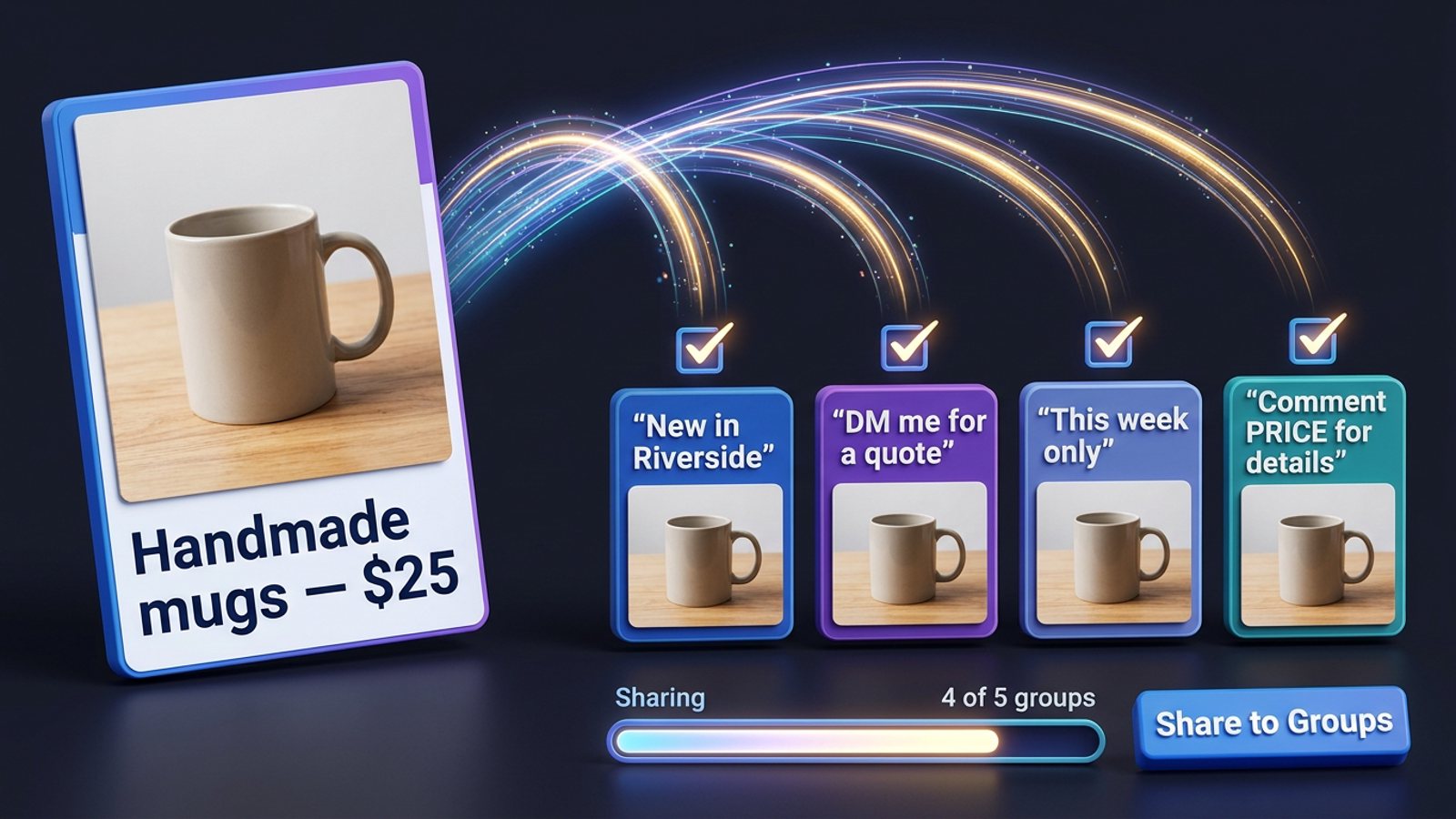
Yes. When you share a post to a Facebook group, Facebook gives you an optional text box, and you fill it in per share — so the same product photo can carry a different caption in every group. The photo and the original post body stay identical; only the line you add on top changes.
That's the whole trick, and it's the part most sellers get wrong when they're sharing one product photo to 20 or 30 groups. Let's walk through how the mechanics work, how to do it by hand, and how to get a different caption per Facebook group without retyping it 30 times.
Key takeaways
- Facebook's Share flow includes an "add optional text" step, and it's typed once per share (Facebook Help Center, 2026).
- The shared post body and photo never change — only your added line varies.
- Doing it by hand means one full Share → pick group → type → Post cycle per group.
- Varying the caption helps, but Meta's spam policy still flags repetitive content, so pacing matters too.
- A Facebook group sharing extension can carry one blurb, or AI-reworded variations, across many groups in a single click.
If you'd rather skip the 30 rounds of clicking, you can get the MGSA Chrome Extension (Free Unlimited) and share from the post you already made.
How does Facebook let you add a different caption per Facebook group?
Facebook builds the optional message into every share, so each group gets its own text box. Facebook's own help instructions for sharing a Page post to a group describe the flow as: pick Share → Share a group → choose the group → add optional text → click Post (Facebook Help Center, 2026). A separate walkthrough from Broadband Properties Magazine (2025) describes the same step — "add an optional message before posting."
Two things follow from that:
- The message is per share, not per post. You're not editing the original post. You're adding a line above the shared card.
- The original post is untouched. The photo, the caption on the original post, and any link preview stay exactly as they were.
Guides describe the result the same way: your line sits above the shared post as a card, so readers see your custom message first and the original post underneath (Lilach Bullock, 2026; MultiGroupPoster, 2026).
Does the custom message replace the original post text?
No. Your added line sits above the shared post card, and the post body underneath is unchanged (MultiGroupPoster, 2026). That's the honest limit of this whole approach: only the added message varies — the photo and the original caption are identical in every group.
For a product seller that's usually fine. The photo is your product; the line is your pitch for that specific group. But it does mean you can't rewrite the original post's body per group through the Share flow. If a group needs a completely different post, you'd post directly in that group instead.
Our recommendation: keep the original post generic enough to work anywhere, and let the per-group line do the targeting — the neighbourhood name, the price hook, the "DM me for a quote" ask.
How do you do it by hand, step by step?
You repeat the same five steps once per group, and that's the whole cost of doing it manually. Here's the loop:
- Find your product post on your Page or profile.
- Click Share → Share to a group.
- Pick the group.
- Type that group's own short message in the optional text box.
- Click Post. Then start again for the next group.
Facebook's Share flow sends a post to one group per share — AutoGP (2026) describes it as "the identical post every time," so 20 groups means 20 full rounds of that loop. There's no saved captions, no queue, and no way to see at a glance which groups you've already done.
Two practical fixes people use:
- Pre-write your variants in a notes file. Draft 20 short lines once, then paste each into the share box. MaherPost (2026) notes that admins and Facebook both flag repeated copy, so pre-writing varied wording is worth the 10 minutes.
- Keep a spreadsheet of your groups. MaherPost recommends columns for "promo allowed," day, links and format per group so you're not re-reading rules every week.
Neither fixes the clicking. They just make the clicking less error-prone.
How do you send a different caption to each group without retyping it?
You use a browser extension that runs the share flow inside your logged-in Facebook session and lets you attach a message — or an AI-reworded variation — as it goes. That's the category MGSApro sits in: a Facebook group sharing extension that adds one "Share to Groups" button to every post.
Here's how it works with MGSApro, straight from the product:
- Tick the groups you want, directly on the Facebook page.
- Optionally type a message for the share.
- Save the selection as a preset so next time it's one click, not 30 ticks.
- Click Share and watch the live progress bar as it posts to each group.
The extension also generates AI text variations for each group, so the wording differs as it goes rather than landing as identical copy — and it uses randomized delays and human-like clicks rather than firing everything at once. It works entirely on top of Facebook with no separate dashboard and no login. If you want to see the flow before installing, the MGSApro tutorial walks through it.
The honest limit: the post body and photo are still the same in every group. Only the added message varies. That's how Facebook's share mechanic works, and no extension changes it.
What should the per-group message actually say?
Keep it short and specific to that group — two or three lines at most. Readytopost.ai (2026) points out that mobile truncates a share's text after roughly 2–3 lines with a "See more" cut, and argues the added line does the real work because a bare share carries no context on its own.
A simple formula that fits:
- One line of context — "New in [neighbourhood]" or "This week only."
- One line of ask — "DM me for a quote" or "Comment PRICE and I'll send details."
- Nothing else. No link dump, no all-caps, no hard-sell opener.
MaherPost (2026) reports that group admins tend to decline posts that open with a hard sell or repeat the same copy across groups, and that most groups allowing promotion limit it by day, thread, link rules or format. So read each group's rules once and note them.
Will different captions stop my posts being flagged?
Partly — varied wording helps, but it isn't a shield. Meta's Spam policy (2024) lists "posting repetitive content" as a spam indicator and says it may restrict even lower-frequency accounts when that's present. Facebook's admin help also notes that posts its system identifies as possible spam go to a group's "potential spam" folder and stay hidden unless an admin publishes them.
So vary the caption, and also vary the pace. Field guidance from Lilach Bullock (2026) suggests a maximum of 5–8 promo groups a day, 10–15 minutes between posts, and rewriting the core message at least three ways. BuzzPost (2026) makes the same point from the other direction: 30 posts spread across 12 hours with randomized delays look human; 30 in a 20-minute burst look like a program.
This is not legal advice, and platform rules vary by place and change often — check Meta's current policies and each group's rules yourself.
Which tools let you send a custom message per group?
Here are the options we compared, with MGSApro first because it's the one built for this exact job.
| Option | Best for | Key features | Price / free option | Watch-outs |
|---|---|---|---|---|
| MGSApro — Our pick | Sellers sharing one product photo to many groups with a per-share message | One-click share to many groups, optional message, saved group presets, live progress bar, randomized delays, human-like clicks, AI text variations, works inside Facebook with no dashboard | Free forever with a small watermark; $9.99/month without watermark; yearly plan from $7.99/month (as of November 2026, prices can change) | Chrome only; operates on top of Facebook; not affiliated with Meta |
| Facebook Share by hand | Anyone who wants total control of every caption | Exact per-share message, no tool risk, works on any account | Free, built into Facebook | One group per share — 20 groups is 20 rounds; identical post every time; no saved captions |
| Notes file + copy-paste | Sellers who want varied wording without a tool | Pre-write variants once, paste each into the share box | Free | Still one share per group; you track which caption went where yourself |
| Serious Poster (Chrome extension) | Sellers who want spintax rewriting and character-by-character typing | Spintax rewriting so no two posts are identical, types into the real composer, randomized delays (default 3–8 minutes), free tier of 500 posts/month | Free tier; paid studio tier with no listed price (vendor-stated, as of November 2026) | Vendor README claims, not independently tested; no listed price for paid tier |
| MaherPost | Sellers who want AI copy variation in one all-in plan | Spintax and AI copy resolving a different version per group, posts from your logged-in browser with no Facebook password | $29/month all-inclusive (vendor-stated, as of November 2026) | Single plan only; same account-risk caveat as any bulk poster |
MGSApro is made by the team behind this blog.
A word on the others: if you mainly need spintax rewriting with character-by-character typing, Serious Poster is the more direct choice. If you want one flat all-in plan and AI copy variation, MaherPost is worth a look. MGSApro's edge, of the tools we compared, is the combination of group presets, an optional message per share, and a free-forever tier — plus it remembers which groups belong to which profile if you run more than one.
Worth knowing: Pak SEO Training (2026, third-party blog) reports that Meta removed the Groups API in Graph API v19.0 effective April 2024, which is why tools in this space are browser extensions clicking inside your logged-in session rather than apps posting through Facebook's official system. Treat that as third-party reporting and check Meta's changelog yourself.
Ready to stop retyping? Add the MGSA Chrome Extension free and send your next product photo to every group with its own line.
Sources
- Como compartilhar uma publicação da sua Página do Facebook em um grupo — Facebook Help Center, 2026
- 在您管理的 Facebook 小组中管理垃圾信息 — Facebook Business Help Center
- Spam policy — Meta Transparency Center, 2024
- How to Share a Post to Multiple Groups on Facebook at Once — AutoGP, 2026
- How to Share a Post to a Facebook Group — MultiGroupPoster, 2026
- Facebook Group Rules for Promotional Posts — MaherPost, 2026
- AI Facebook Ads & Bulk Group Poster – Serious Poster — Socket.dev, 2026
- Comment partager une publication sur Facebook — readytopost.ai, 2026
- How Do I Share a Post In a Group On Facebook? — Broadband Properties Magazine, 2025
- How to Share a Post on Facebook — Lilach Bullock, 2026
- How Many Facebook Groups Can I Post In Each Day? — Lilach Bullock, 2026
- How to Repost on Facebook: Share Posts on PC, iPhone and Android — Rotten WiFi, 2026
- Can You Share One Video in 10 Facebook Groups Without a Ban? — Pak SEO Training, 2026
- How to Auto-Post Properties to Facebook Groups in 2026 — BuzzPost, 2026
Frequently asked questions
Never manually share to groups again
MGSA Pro is the free Chrome extension that shares your posts to every Facebook group for you — safely, with human-like timing.
Keep reading
How do I keep my Facebook group posts looking clean when I share the same offer in bulk?
November 22, 2026
Can I get a slightly different version of my Facebook post for every group without rewriting it 50 times?
November 22, 2026
How do I stop my Facebook group posts looking copy-pasted when I share in bulk?
November 21, 2026