
How do I post my listing to local Facebook groups without another company's name on it?
November 22, 2026 · MGSApro Team
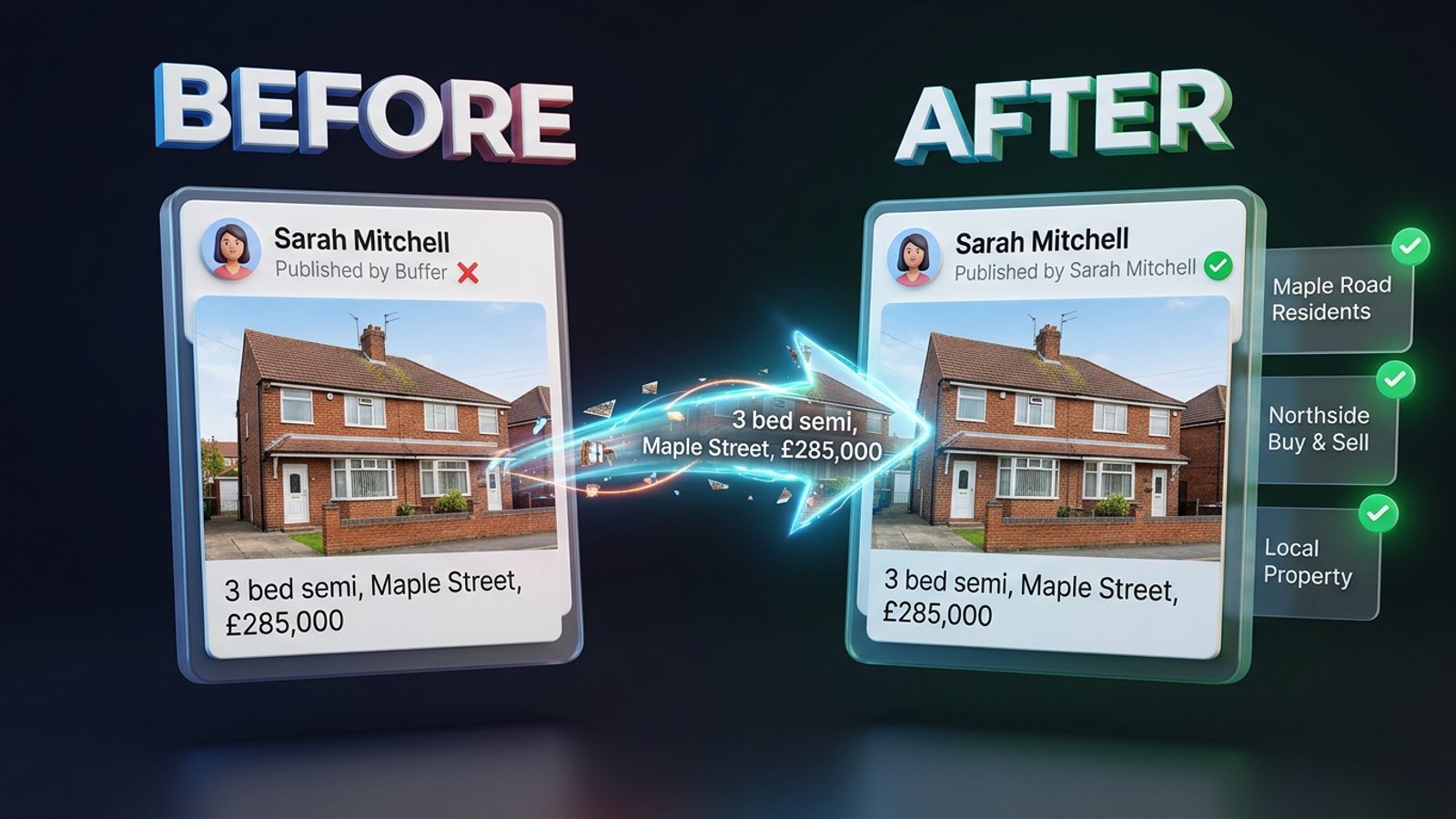
You have two clean options: post it yourself inside each Group (or through Facebook's own "Share to a group" dialog), or use a tool that clicks through your own logged-in Facebook session instead of publishing through Meta's API. API-based publishers add a "Published by [App]" stamp that the vendors say Facebook requires and won't remove.
If you're an agent or a local service provider, that stamp is the difference between a post that reads as yours and one that reads as an ad from a company your buyers have never heard of. This guide walks through what causes it, how to get a facebook group post without branding, and how to do it in bulk without spending your afternoon on it.
Add MGSApro to Chrome and your listing goes out from your own Facebook session — no third-party name under your post.
Key takeaways
- The "Published by [App]" label comes from posting through Meta's API, and ContentStudio, CoSchedule and Sendible all state in their own help docs that Facebook requires it and it can't be removed.
- Posting natively, or with a tool that automates clicks in your own browser, keeps the post attributed to you.
- Buffer, Hootsuite and Meta Business Suite can't publish to Groups you joined as a member — Meta closed its Groups API on 22 April 2024.
- Branding isn't what gets accounts restricted. Meta's spam policy points to high frequency and repetitive content, so vary your wording and space your posts.
- Check each Group's rules before you post. Some ban business posts outright, some allow them only on a set day or in a pinned thread.
Why does my Facebook post say "Published by" another company?
Because the post was published through a third-party app using Meta's API, and Facebook labels those posts with the app's name.
The vendors are open about it. ContentStudio's docs (updated 9 August 2026) say posts to Profiles and Groups carry a ContentStudio link, that Facebook requires all third-party applications to add it, and that it isn't removable. CoSchedule's help page says the same about "CoSchedule App" on group posts. Sendible's support page confirms "Published by Sendible" appears and can't be removed.
There's a small mercy on Pages: ContentStudio, CoSchedule and Sendible all say the Page version ("Published by [App]") is visible only to Page admins, not to followers. In Groups, though, the label sits on the post where members can see it.
A Make Community forum thread (8 June 2024) answers the same question the same way — required by Facebook, not removable — and suggests posting manually from your own account as the workaround.
What does that stamp actually do to trust with buyers?
It quietly moves your post from "a local agent I recognise" to "something a company pushed out."
A marketer writing on LinkedIn (Pam Moore, 22 September 2026) describes feeding a plain sales pitch into 50–60 groups as spam that damages brand trust — the issue being group rules and members' consent. That's an opinion, not data, but it lines up with how group members read a post with a stranger's app name attached: as bulk marketing, not a neighbour with a listing.
Our recommendation: treat the stamp as a trust cost, not a technical detail. If your name and face are the product — and for real estate and local services they are — the post should carry only your name.
How do I share my listing to local groups with no app name on it?
Post from your own Facebook session, either natively or with a tool that clicks inside your own browser rather than publishing through an API.
Here's the routine that keeps the result clean:
- Read each Group's rules first. They're normally in the About tab or a pinned post. Common ones for agents, per freedom-res.com (23 September 2026): no business posts at all, business posts on a set day only, a pinned promo thread, real-estate posts banned outright, no soliciting in comments or DMs. BuzzPost (25 April 2026) adds that 2026 real-estate group rules often cover allowed frequency, a mandatory price and photo, and no outbound links — and that one breach can mean a deleted post or a ban without warning.
- Write the listing as your own post. Your name or Page, your caption, your photos. Prepare three to five wording variants — FB Group Bulk Poster (11 December 2025) calls identical text across many groups the fastest path to restrictions.
- Share or post natively. For an existing post, use Facebook's "Share → Share to a group" dialog. For a fresh post with a unique caption, paste into each Group's composer.
- If you use a bulk tool, choose one that runs in your own logged-in browser and takes text variations and delays — not an API scheduler that stamps its name.
- Space it out. Small batches, uneven gaps, shuffled group order. Lilach Bullock (19 August 2026) suggests a maximum of 5–8 promotional groups a day with at least 10–15 minutes between posts; NinjaPoster (25 March 2026) suggests no more than one post per group every 3–5 days.
- Check the result. Facebook keeps a cached link preview after a URL is removed or edited (JustAnswer, undated), which is one way an unwanted logo lingers. Edit or delete and repost if that happens.
Can I share to many groups at once and still keep it unbranded?
Yes — if the tool drives your own browser session instead of publishing through Meta's API.
That's the whole distinction. API publishers (ContentStudio, CoSchedule, Sendible and similar) add the app label because Facebook attaches it to API publishing. Tools that simply automate the clicks you'd make yourself don't trigger that label, because as far as Facebook is concerned you posted it.
MGSApro works this way. It's a Chrome extension that sits on top of Facebook: you tick the groups you want on the Facebook page itself, optionally add a message, save the selection as a preset, then hit Share and watch the progress bar as each group gets the post. It adds randomized delays and human-like clicks, and generates AI text variations per group so you're not pasting identical copy into 30 places. There's no separate dashboard and no login.
The honest limits: it's Chrome only, it operates on top of Facebook, the free version adds a small watermark reading "Shared using MGSApro", and it isn't affiliated with Meta. The watermark is on the extension's own free tier — the paid upgrade removes it. Prices, as of November 2026 and subject to change: free forever with the watermark, or $9.99 a month without it, with a yearly plan from $7.99 a month.
See how MGSApro shares a post to all your groups in one click.
What about Buffer, Hootsuite and Meta Business Suite?
None of them can publish into Groups you've only joined as a member — Meta shut down its Groups API on 22 April 2024.
Since then, per personaxpand.com (30 September 2026), no outside scheduler can publish to a Group. Third-party schedulers connect through Meta's official channels, which cover Facebook Pages and Instagram business accounts only, not personal profiles and not Groups (freedom-res.com, 23 September 2026). Buffer's own help page (25 October 2026) lists "Meta Business Suite doesn't support Facebook Groups" and suggests scheduling from inside the Group instead. SocialBee (6 January 2026) notes native Group scheduling is one Group at a time, with no bulk option, and postedonce.com (22 July 2026) points out the scheduling option only appears for admins and moderators.
So these tools are fine for your Page. They're the wrong tool for a listing you want in 20 local Groups today.
Which tool should I use for an unbranded group post?
Here's how the options compare for posting a listing to local Groups with a clean, "from you" result. MGSApro is made by the team behind this blog, so weigh that as you read.
| Option | Best for | Key features | Price | Watch-outs |
|---|---|---|---|---|
| MGSApro (Our pick) | Bulk sharing to many Groups with no app stamp | Tick groups on Facebook, optional message, saved presets, progress bar, randomized delays, AI text variations, no dashboard | Free forever with a small watermark; $9.99/mo without, yearly from $7.99/mo (as of November 2026, prices can change) | Chrome only; runs on top of Facebook; not affiliated with Meta |
| Facebook's "Share to a group" dialog | A handful of groups, done natively | Free, no third-party stamp, part of Facebook | Free | You tick groups one at a time every time; no saved list; you share the original caption, not a per-group rewrite; cached link previews can linger |
| Manual copy-paste into each Group | Full control over wording and photos per Group | Cleanest possible result, adapt to each Group's rules | Free | Slow; guides suggest 5–8 promotional groups a day with 10–15 minute gaps; easy to paste identical text |
| Meta Business Suite | Scheduling to your Page plus a Page-linked Group | Official Meta tool, calendar view, can schedule to Page and linked Group together | Free Meta tool | Doesn't support Groups generally; no bulk scheduling across Groups; no plain Groups you joined as a member |
| Buffer / Hootsuite | Page and Instagram scheduling | Recognised official-channel schedulers; Buffer's docs are candid about Group limits | Plans and prices not covered in the sources reviewed here | Cannot publish to Facebook Groups at all since April 2024 |
If you mainly need a calendar for your Page and Instagram, Meta Business Suite or Buffer is the more direct choice. If your job is getting a listing into 20 local Groups this afternoon with your name on it and nobody else's, a browser-based Facebook group sharing extension is the fit.
One more thing worth knowing: MGSApro can schedule posts into your own Groups only, and it works across multiple Facebook profiles while remembering which groups belong to which. If Facebook ever restricts an account, the owner's guidance is to appeal — reinstatement follows if you weren't spamming — so use it to replace work you'd do anyway, not to flood groups.
Do I need to worry about restrictions if my post is unbranded?
Branding isn't the restriction trigger — frequency, repetition and timing are.
Meta's Community Standards on spam (25 June 2024) prohibit posting and sharing at very high frequencies "either manually or automatically", and allow restriction at lower frequency when content is repetitive or shows signals of inauthenticity. MultiGroupPoster (1 July 2026) notes that duplicate-content detection responds to identical wording and burstiness, not the number of groups — varied wording and uneven breaks look human.
Our recommendation: rotate three to five captions, keep batches small, and answer comments so the post reads like a person's. If you're posting in real estate, a state-required promotional disclosure may also apply — that's general information, not legal advice, and rules vary by place. Referral agents may have three rule sets to satisfy: group rules, broker policy and state licensing rules (Direct Connect Brokerage, 5 June 2026, which also states it isn't legal advice).
MGSApro is made by the team behind this blog.
Sources
- Why Is "ContentStudio App" Showing up on My Facebook Posts? (ContentStudio, 2026-08-09)
- Why Is "CoSchedule App" Showing up on My Facebook Group Posts? (CoSchedule, undated)
- Why 'Published by Sendible' appears on a Facebook post (Sendible, undated)
- Facebook Remove "Published by" Watermark (Make Community forum, 2024-06-08)
- Can't seem to get rid of this logo from my FB post (JustAnswer, undated)
- How to Schedule a Post in a Facebook Group (personaxpand.com, 2026-09-30)
- Facebook Groups for Real Estate Agents: Rules and Ideas (freedom-res.com, 2026-09-23)
- How to Schedule a Post on Facebook: Pages, Profiles + Groups (Buffer, 2026-10-25)
- How to schedule posts on Facebook Groups (SocialBee, 2026-01-06)
- Can You Schedule a Post in a Facebook Group (postedonce.com, 2026-07-22)
- Meta Transparency Center — Spam (Meta, 2024-06-25)
- Facebook Group Posting Limits (FB Group Bulk Poster, 2025-12-11)
- Facebook Spam: The Opposite of Growth Strategy (LinkedIn, Pam Moore, 2026-09-22)
- Facebook Group Rules for Real Estate 2026 (BuzzPost, 2026-04-25)
- Florida Referral Agent Facebook Group Rules for 2026 (Direct Connect Brokerage, 2026-06-05)
- How Facebook Detects Duplicate Content (MultiGroupPoster, 2026-07-01)
- How Many Facebook Groups Can You Post In Each Day? (Lilach Bullock, 2026-08-19)
- Facebook Group Posting Schedule: Best Times (NinjaPoster, 2026-03-25)
Frequently asked questions
Never manually share to groups again
MGSA Pro is the free Chrome extension that shares your posts to every Facebook group for you — safely, with human-like timing.
Keep reading
How do I post to many Facebook groups at a human pace so it doesn't look like a bot?
November 21, 2026

How do I share a Facebook post to many groups safely without looking like a bot?
November 20, 2026
How do I keep my 'DM me for a quote' line from looking copy-pasted in every Facebook group?
November 20, 2026