
How do I share the same post to different sets of Facebook groups for two different clients?
November 29, 2026 · MGSApro Team
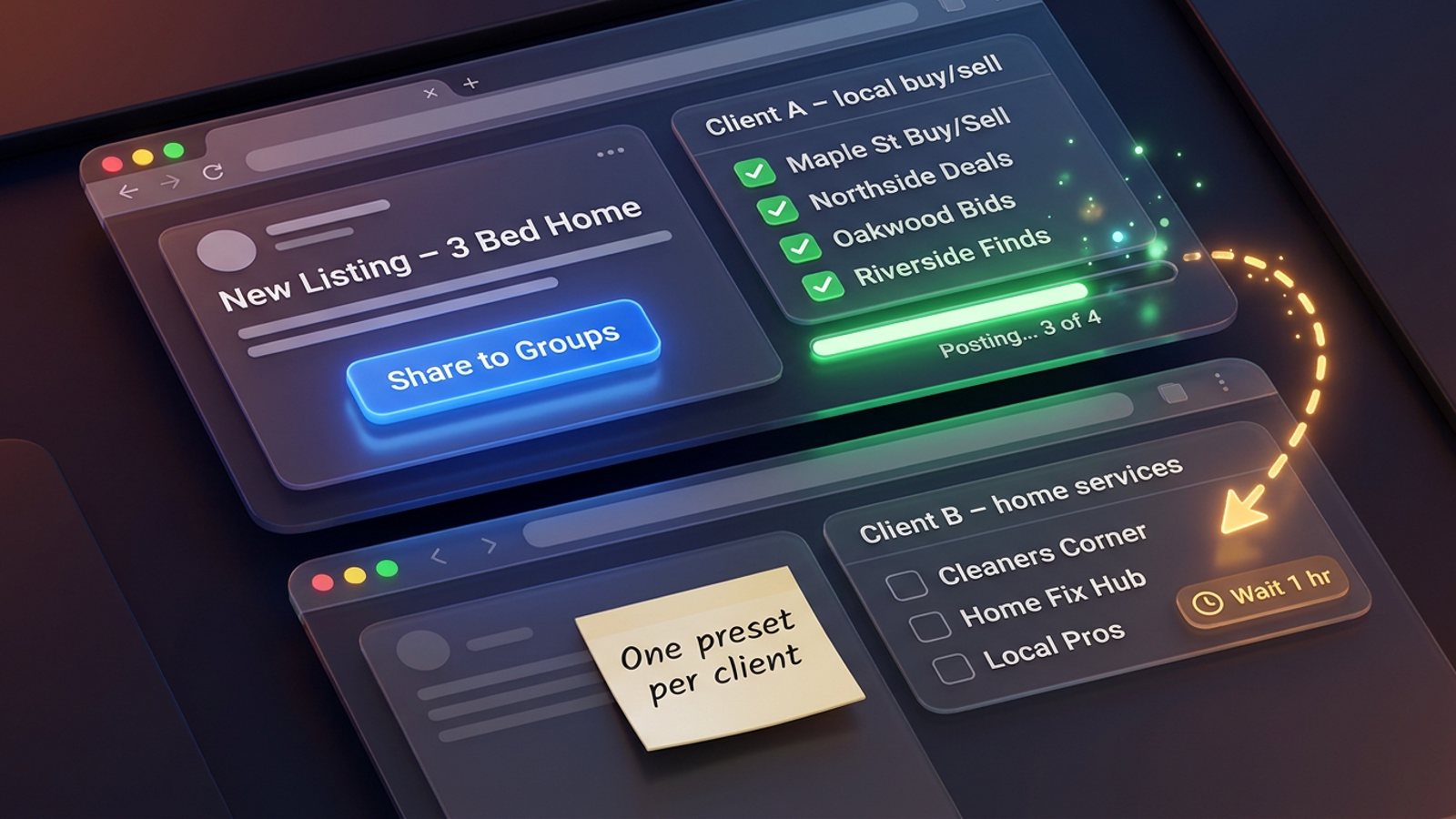
You keep one saved group list per client — never a combined list — and run each client's batch separately, with human-like delays between posts. Facebook has no per-client group sets built in: its Share button handles one group per share, and Meta Business Suite only reaches Groups linked to a Page you manage. So the separation has to come from your tool and your workflow.
Want to see the one-click version before you read the setup? Get MGSA Chrome Extension (Free Unlimited) and it runs right inside Facebook, no dashboard.
Key takeaways
- Different group sets per client means two saved lists, not one big pool — a shared list is exactly how Client A's post lands in Client B's groups.
- Facebook's own Share button posts to one group per share with the same post each time, so two clients means re-picking both sets from scratch every round.
- Meta retired automatic Group posting for third-party apps in April 2024, per RecurPost (2025) — which is why scheduler tools can't do standalone Groups.
- Pace each batch: field guidance suggests 5–8 promotional posts a day, 10–15 minutes apart (Lilach Bullock, 2026).
- Run Client A's batch, pause, then Client B's. Two batches fired together look like a program, not a person.
Why does my client's post keep appearing in the other client's groups?
Because both clients were sharing from one list. When you tick groups once and reuse that same selection for every post, every client's content goes to every group on it.
The fix is structural, not cosmetic. Split the list before you post anything:
- One list per client. Name them plainly — "Client A – local buy/sell", "Client B – home services". No combined master list.
- Check each list's group rules. Group admins set their own rules, and repeatedly breaking them is listed as a spam trigger (NinjaPoster, 2026).
- Rewrite the post for each client. Don't reuse one caption across both — duplicate and repetitive captions are named as the risk pattern (PCNMobile, 2026).
- Run Client A's batch, pause, then Client B's. Spreading posts over hours with randomised intervals is what makes a batch look human (BuzzPost, 2026).
- Log what went where. A shared pool with activity logs stops two people on your team posting the same content to overlapping groups (Đăng Bài Tự Động, 2026).
How do I hold two clients' group lists separately?
Save each client's groups as a reusable preset, then pick the preset instead of re-ticking groups every time. That's the pattern agency tools are built around — Group Posting, for example, keeps reusable group "tags" per client, and a tag belongs to one client account (Group Posting, 2026).
In practice that means: Client A gets a preset of their 18 local groups, Client B gets a preset of their 12 trade groups, and neither preset ever contains the other's groups. When you share, you load one preset, post, then load the other.
Our recommendation: name presets with the client's name and the group type, not "list 1" and "list 2". Three months from now you'll thank yourself.
This is where a Facebook group sharing extension earns its keep — MGSApro lets you save group selections as reusable presets and share to multiple presets, so each client's set stays its own thing.
How do I share the same post to two clients' groups without cross-posting?
Share it twice — once per preset — and never merge the two lists into one batch. The post itself can be the same piece of content; the group sets and the timing must be separate.
A workable agency sequence:
- Open the post you're sharing.
- Load Client A's preset, add their message, click Share, and watch the progress bar.
- Wait. Not two minutes — a real gap.
- Load Client B's preset, add their wording, share.
- Note the time you finished each batch.
The pause matters more than most people think. Facebook's duplicate and spam detection is described as caring "far more about pattern than volume" — identical text and rapid timing read as automation (Lilach Bullock, 2026). Thirty posts spread over twelve hours look human; the same thirty in a 20-minute burst look like a program (BuzzPost, 2026).
How long should I wait between finishing one client's batch and starting the next?
Long enough that the two batches don't overlap in Facebook's eyes. Field guidance puts at least 10–15 minutes between posts within a batch (Lilach Bullock, 2026); for a second client's batch, our recommendation is to leave a clear gap — an hour or more — rather than stacking them back to back.
Suggested randomised delays inside a batch, from a posting-tool blog (FB Group Bulk Poster, 2025):
| Account age | Base delay | Randomisation |
|---|---|---|
| New account | 2–3 min | ±30–60s |
| Established | 1–2 min | ±30s |
| Aged, clean account | 30–60s | ±20s |
Treat those as starting points, not rules. Safe pacing depends on account age, group relevance and content type (Medium / Dented Feels, 2026).
How many groups per client per day is safe?
Practice-based advice puts it at 5–8 groups a day for promotional content and 10–12 a day for conversational posts, at least 10–15 minutes apart (Lilach Bullock, 2026). BuzzPost's rough account-age guide (2026) suggests 5–10 groups a day for a new account's first two weeks, 20–30 a day for an aged clean account, with warnings and bans starting above 50 a day.
Meta's Spam policy bans posting or sharing "at very high frequencies," manually or automatically, and may restrict lower-frequency accounts when other signals like repetitive content are present (Meta Transparency Center, 2024). So volume caps are only half the job — variation and pacing carry the other half.
Our recommendation: cap per client, not per account. If Client A gets 8 promotional posts today, that's Client A's number — don't top it up with Client B's overflow on the same profile.
Does Facebook treat scheduled posting as spam?
No. Scheduling itself isn't the problem — duplicated posts, repetitive captions and bulk distribution patterns are (PCNMobile, 2026).
That distinction matters for agencies, because it tells you where to spend your caution. Two clients, two lists, two differently worded posts, spread over the day: that's a normal workflow. One caption pasted into 50–60 groups is spam, not a growth strategy, and it harms client brand trust (Pam Moore, LinkedIn, surfaced 2026).
One more thing worth knowing: Meta discontinued the Groups API in 2024, so no scheduler can post directly to a standalone Group — Business Suite can only schedule to a Group linked to a Page you manage (Synapse Social, 2026). That's why the practical agency setup is a browser extension running in your own logged-in session, not a cloud scheduler.
Which tools handle different group sets per client?
Browser extensions built for group posting are the category that keeps per-client lists — schedulers like Hootsuite, Buffer and Later can't auto-post to standalone Facebook Groups at all after the 2024 API change.
Here's how the options we compared stack up. MGSApro is made by the team behind this blog, so read the first row with that in mind.
| Option | Best for | Key features | Price / free option | Watch-outs |
|---|---|---|---|---|
| MGSApro — Our pick | Sellers and agencies sharing one post to many groups, per client | Group presets, share to multiple presets, optional message per share, live progress bar, randomised delays, human-like clicks, AI text variations, one "Share to Groups" button | Free with a small watermark; $9.99/month without one (as of November 2026; prices can change) | Chrome only; operates on top of Facebook; free version adds a watermark; not affiliated with Meta |
| Facebook's built-in Share button | Anyone who wants zero cost and zero third-party tools | Free, built in, one share per group keeps each post tied to your original | Free | One group per share, identical post each time, no per-client saved lists — two clients means re-picking both sets every round (AutoGP, 2026) |
| Meta Business Suite | Clients whose Groups are linked to a Page you manage | Pages and Instagram in one place; scheduling, calendar, shared inbox, analytics, roles so agencies work without client passwords | Free | Since the 2024 Groups API removal it can only schedule to a Group linked to a managed Page; standalone Groups must be posted by hand (Synapse Social, 2026) |
| Buffer | Solo owners on a few channels who mostly post to Pages | Cheapest entry price; plain, simple queue | Free plan up to 3 channels with 10 scheduled posts per channel; Essentials from $5 per channel/month (as of October 2026; prices can change) | Facebook Groups not supported for automated publishing after the 2024 API change — Pages only (Holistic Digital, 2026) |
| Hootsuite | Larger teams needing a unified inbox and social listening | Unified inbox and listening as products in their own right | Standard from $99/month per user, no free plan (as of October 2026; prices can change) | Expensive if bought for scheduling alone; per-user pricing; cannot auto-post to standalone Facebook Groups (Singapore Digital Marketing, 2026) |
If you mainly need Page scheduling and a shared inbox for a team, Meta Business Suite or Hootsuite is the more direct choice. If you mainly need to reach standalone Groups with a separate list per client, a group-posting extension is the honest fit — and you can Get MGSA Chrome Extension (Free Unlimited) to try the preset approach on your own lists first.
Extensions in this category work by imitating in-browser clicks, so Page/API scheduling is out of scope for all of them, and no tool can promise zero risk (Group Posting, 2026). MGSApro's own limit is worth stating plainly: it's Chrome only, it runs on top of Facebook, and the free version adds a watermark. If you want the paid tier, it starts at $7.99 a month on the yearly plan (as of November 2026; prices can change).
Can I run two clients from one Facebook profile?
Yes — MGSApro works on multiple Facebook profiles and remembers which groups go with which profile. Whether Facebook treats two clients' batches on one personal account differently from one client's is not something Meta has published, so don't assume either way; keep the lists separate and the pacing human.
For the wording side of this, see how to keep every Facebook group post sounding different when you're sharing the same offer for a client. And if you're setting up the extension for the first time, the MGSApro tutorial walks through presets.
MGSApro is made by the team behind this blog.
Sources
- Spam | Transparency Center (Meta, 2024-06-25)
- How to share a Facebook post to multiple groups (AutoGP, 2026-10-15)
- Facebook Post Scheduler: Native Limits vs Tools (Synapse Social, 2026-08-14)
- Facebook Scheduler for Pages, Groups, and Profiles (RecurPost, 2025-04-29)
- How Many Facebook Groups Can I Post To Per Day? (Medium / Dented Feels, 2026-05-28)
- How many Facebook groups can you post in per day? (Lilach Bullock, 2026-08-19)
- How to Auto-Post Properties to Facebook Groups in 2026 (BuzzPost, 2026-05-13)
- Facebook Group Posting Limits (FB Group Bulk Poster, 2025-12-11)
- Facebook Spam: The Opposite of Growth Strategy (LinkedIn / Pam Moore, surfaced 2026-09-22)
- Facebook Spam Crackdown (PCNMobile, 2026-09-21)
- Write and send your client's first posts (Group Posting, 2026-10-23)
- Agency FAQ: Passwords, Privacy, White-Label (Group Posting, updated 2026-10-14)
- Group Sharing Pool: Permissions, Logs, Multi-Account (Đăng Bài Tự Động, 2026-05-02)
- Facebook Group Posting Rules (NinjaPoster, 2026-03-25)
- How to manage multiple Facebook profiles and Pages (SocialBee, 2026-09-20)
- Hootsuite vs Buffer vs Later: Small Business Prices (Datallatte, 2026-05-11)
- Social Media Schedulers for Singapore Businesses 2026 (Singapore Digital Marketing, 2026-08-29)
- Social Media Scheduling Tools Compared By Business Type (Holistic Digital, 2026-10-12)
Frequently asked questions
Never manually share to groups again
MGSA Pro is the free Chrome extension that shares your posts to every Facebook group for you — safely, with human-like timing.
Keep reading
How do I keep my listing posts from looking identical when I share to 30 neighbourhood groups?
November 26, 2026
How do I post a price reduction to every local Facebook group the same afternoon?
November 25, 2026
Why does sharing to lots of Facebook groups take so long, and how do I cut it down?
November 25, 2026