
Can I share one Facebook post to groups across more than one profile?
November 20, 2026 · MGSApro Team
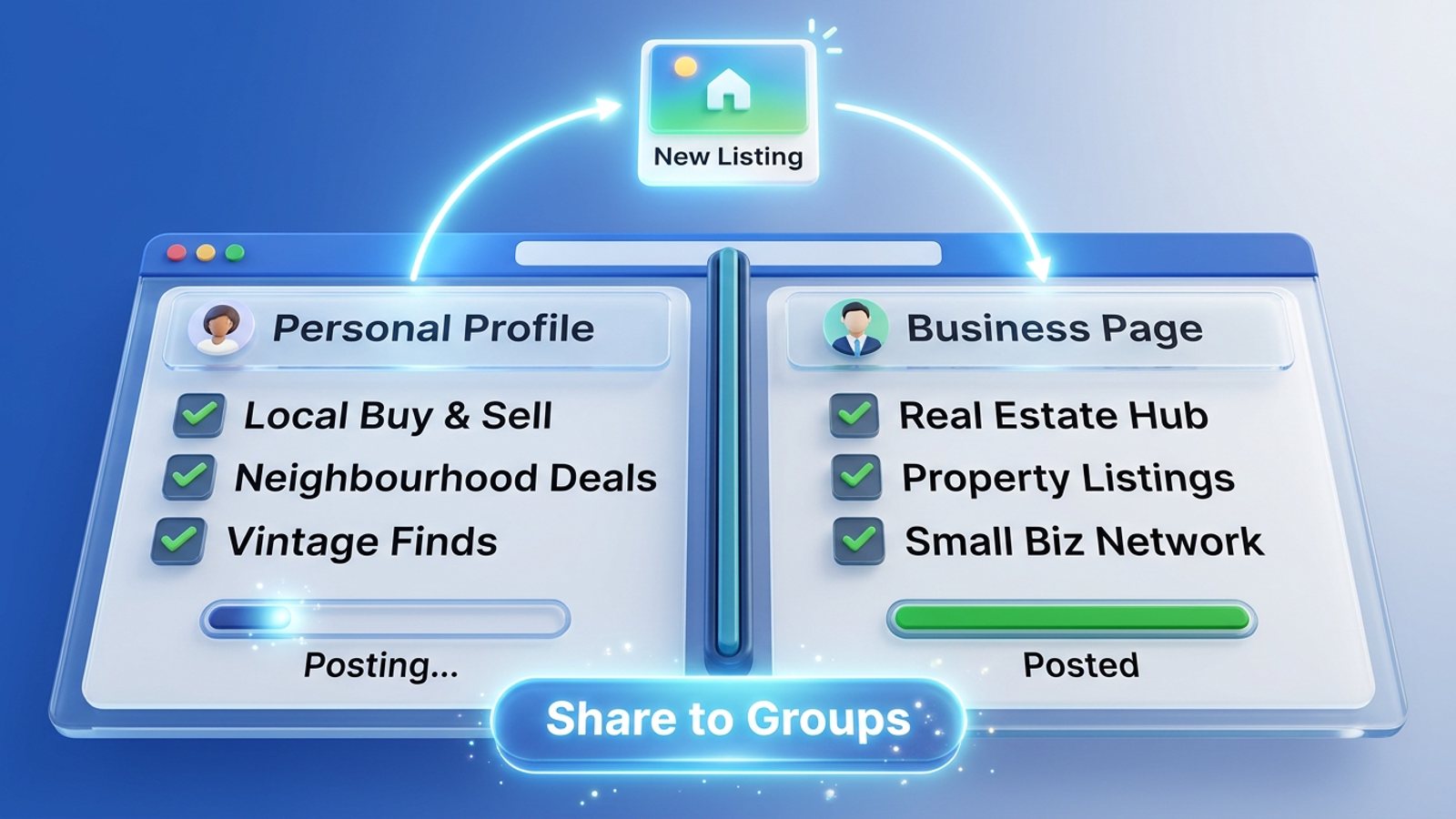
Yes — but not from Facebook's own Share menu. Facebook shares one group per click and posts as whichever profile or Page you're currently switched to, so a personal-plus-Page setup means switching identity and repeating the flow for every group. A Facebook group sharing extension like MGSApro keeps a separate saved group list for each profile, so you switch profile once and share facebook post groups multiple profiles in one click.
Get MGSA Chrome Extension (Free Unlimited) — free forever with a small watermark, and it remembers which groups belong to which profile.
Key takeaways
- Facebook's Share menu gives you one destination per share, and it posts as the identity you're switched to at that moment (Facebook Help, Portuguese edition, 2 March 2026).
- Up to two profiles from the same account can join the same group, but only one profile can interact with a given group post (Facebook Help, Danish edition, undated).
- You can no longer create new extra profiles — existing ones keep working (Facebook Help, Polish edition, undated).
- MGSApro saves group selections as presets and remembers which groups go with which profile, so your personal list and your Page list stay separate.
- Rapid identity switching can trigger Facebook security checks, so pace yourself (Position Is Everything, 24 February 2026).
How does Facebook handle sharing when you run two profiles?
Facebook treats each switch as a fresh identity, and the Share menu only ever targets one group at a time. To share a Page's post into a group as the Page, Facebook's documented flow is: click your profile photo → "See all profiles" → select the Page → under the post click Share → "Share in a group" → pick the group → add optional text → Post (Facebook Help, Portuguese edition, 2 March 2026).
That's one group. Now do it again for the next group, and again, and then switch to your personal profile and start over. Mundobytes (updated 4 October 2024) notes desktop sharing to groups is done one group at a time.
A few things worth knowing before you plan your workflow:
- The Share option can disappear. Share options can be restricted by the original post's privacy settings — if sharing is limited, the Share option may not appear at all (Facebook Help, Polish edition, undated).
- Pages need a link to the group. To post as a Page in a group, the Page has to be linked to that group as an admin (MarketOmation help centre, undated).
- Groups often restrict Pages. NinjaPoster (25 March 2026, vendor blog) reports personal profiles get more reach and engagement in groups, and many groups restrict or ban Page posting.
Our recommendation: decide per group whether you'll show up as yourself or as your Page, and write that down once. It stops you mid-share wondering which hat you're wearing.
Can I be in the same group with two profiles?
Yes — up to two profiles from the same account can join the same group, but only one profile can interact with a given group post (Facebook Help, Danish edition, undated). So you can't comment on your own group post with your second profile.
Each extra profile has its own @username, feed, friend list, Pages it follows and groups it's in, and you can switch between them without logging out (Facebook Help, Danish edition, undated). Multiple profiles rolled out globally from September 2023, aimed at separating personal and professional life (News18, 21 September 2023 — dated but the announcement).
One limit to plan around: existing extra profiles are unaffected, but you can no longer create new extra profiles (Facebook Help, Polish edition, undated). And Facebook says people may not have more than one personal account (Rotten WiFi, 7 October 2026) — separate accounts are a different thing from extra profiles and Pages.
What's the fastest way to share one post across profiles and their groups?
The fastest honest route is to keep a saved group list per profile, switch identity once, and share to that list in a single action. Manually, that means repeating "Share → Share in a group → pick group → Post" for every single group, twice over.
Here's the manual version, step by step:
- Switch to the identity you want to post as: click your profile photo → "See all profiles" → pick your personal profile or the Page (Facebook Help, Portuguese edition, 2 March 2026).
- Find the post and click Share → "Share in a group" (sometimes under More options).
- Pick the group, tick "include the original post" if the group bans bare links, add your own intro line, click Post (Scotland's Gardens Scheme PDF, undated).
- Repeat for every group — Facebook allows only one group per share (Facebook Help, Polish edition, undated).
- Switch profile again for the second identity and repeat the whole loop.
- Stagger your timing: field guidance suggests 5–8 promotional groups per day, 10–15 minute gaps, and the message reworded at least three ways (Lilach Bullock, 19 August 2026).
That's the technique. It works, and it's free. It's also the reason people go looking for a tool.
How does MGSApro keep each profile's groups separate?
MGSApro saves your group selections as reusable presets and remembers which groups go with which profile, so you never mix your personal list with your Page list. You select groups directly on the Facebook page, optionally add a message, save the selection as a preset, then click Share and watch the live progress bar as each group is posted.
It runs entirely on top of Facebook — no extra dashboard, no separate login. To keep things human, it uses built-in randomized delays and human-like clicks, plus AI-generated text variations for each group so you're not pasting identical wording 20 times. It also supports scheduling, into your own groups only, and works across multiple Facebook profiles.
If you want to see the flow in action, the MGSApro tutorial walks through presets and profile switching. And if you're still working out your group lists, this guide on posting the same listing to Facebook groups under different profiles covers the setup side.
Which tool should I use to share across multiple profiles?
For most people running a personal profile plus a Page, MGSApro is the most direct fit of the tools we compared — it saves per-profile group presets and shares in one click without leaving Facebook. Here's how the realistic options stack up.
MGSApro is made by the team behind this blog.
| Option | Best for | Key features | Price / free option | Watch-outs |
|---|---|---|---|---|
| MGSApro — Our pick | Sellers and small businesses sharing one post to many groups across profiles | One-click share to many groups, reusable group presets, optional message, live progress bar, randomized delays, human-like clicks, AI text variations, works inside Facebook, no extra dashboard | Free forever with a small watermark; $9.99/month without it (as of November 2026; prices can change) | Chrome only; operates on top of Facebook; not affiliated with Meta |
| Facebook's own Share menu | Occasional sharing from any device | Free, built in, add your own line above the shared post | Free | One group per share; posts as the identity you're switched to; the Group option is sometimes missing |
| Meta Business Suite | Scheduling across Pages you manage | Calendar view, scheduling, can post to a group linked to a Page | Free with a Page | No group support unless the group is linked to a Page; one group at a time; group scheduling is admin-only (Buffer, 25 October 2026; SocialBee, 6 January 2026) |
| Chrome person profiles | Keeping two Facebook logins fully separate in the browser | Separate cookies per browser profile, no in-app switching | Free, built into Chrome | You still share one group at a time in each profile; frequent switching can trigger security checks (Position Is Everything, 24 February 2026) |
| Group Post Helper / Group Posting Pro | Users who want a multi-identity extension with spintax | Switch between profiles and managed Pages, group collections, spintax variations, adjustable delays, local-only storage | Free listings; no price stated on the store pages we checked (as of November 2026) | Independent tools, not affiliated with Meta; Group Posting Pro is an Edge add-on, not Chrome |
If you mainly need scheduled posting to Pages you manage, Meta Business Suite is the more direct choice. If you want two completely separate browser logins, Chrome person profiles do that job well. And if spintax is your priority, Group Post Helper is worth a look.
One thing no tool changes: Meta removed the Groups API (publish_to_groups) on 22 April 2024, so tools like Buffer and Hootsuite can't publish to groups at all (Group Posting, 28 September 2026, vendor blog). That's why extensions that work inside your own signed-in browser are the practical route.
Ready to stop repeating the loop twice? Get MGSA Chrome Extension (Free Unlimited) and set up one preset per profile.
Is sharing to many groups across profiles safe?
No tool makes group posting risk-free. What the sources do say is that rapid posting across 10–15+ groups gets accounts flagged (Medium, Dented Feels, 28 May 2026), and aggressive sharing can lead to penalties including permanent account closure (Mundobytes, updated 4 October 2024).
Practical guardrails:
- Keep volumes modest. Field guidance suggests 5–8 promotional groups per day and 10–15 minutes between posts (Lilach Bullock, 19 August 2026).
- Vary your wording. Copy-paste duplicates are exactly the repetitive pattern Facebook's automated spam detection is built to flag (Conbersa, 1 July 2026, vendor blog).
- Don't hammer the profile switcher. Frequent account switching can trigger security checks (Position Is Everything, 24 February 2026).
- Follow each group's rules. Many groups restrict Page posting (NinjaPoster, 25 March 2026).
If Facebook suspends an account while you're using MGSApro, the owner's guidance is to appeal it — reinstatement happens as long as you weren't spamming. Use the tool to replace work you'd do anyway, not to flood groups. This is general guidance, not legal advice, and platform rules vary by place and change over time.
Sources
- Facebook Help — sharing a post (Polish edition), undated
- Facebook Help — sharing a Page post to a group (Portuguese edition), 2 March 2026
- Facebook Business Help — switching between profile and Page (Polish edition), undated
- Facebook Help — how extra profiles work in groups (Danish edition), undated
- Facebook Help — extra profiles in groups (Polish edition), undated
- Meta Business Help Centre — Pages, profiles and groups (Chinese edition), undated
- News18 — multiple profiles rollout, 21 September 2023
- Position Is Everything — switching accounts guide, 24 February 2026
- Rotten WiFi — switching accounts, profiles and Pages, 7 October 2026
- NinjaPoster blog — posting as Page vs profile in groups, 25 March 2026
- MarketOmation help — posting as a Page in groups, undated
- Buffer — scheduling Facebook posts, 25 October 2026
- SocialBee — scheduling posts to Facebook groups, 6 January 2026
- Group Posting — Facebook group marketing playbook, 28 September 2026
- Mundobytes — posting from a Page to groups, updated 4 October 2024
- Chrome Web Store — Group Post Helper, updated 8 October 2026
- Microsoft Edge Add-ons — Group Posting Pro, 7 November 2026
- Lilach Bullock — how many groups per day, 19 August 2026
- Medium (Dented Feels) — daily group posting limits, 28 May 2026
- Conbersa — Facebook groups anti-spam, 1 July 2026
Frequently asked questions
Never manually share to groups again
MGSA Pro is the free Chrome extension that shares your posts to every Facebook group for you — safely, with human-like timing.
Keep reading
How do I keep my Facebook group posts looking clean when I share the same offer in bulk?
November 22, 2026
Can I get a slightly different version of my Facebook post for every group without rewriting it 50 times?
November 22, 2026
How do I stop my Facebook group posts looking copy-pasted when I share in bulk?
November 21, 2026