How do I share one product photo to 20 Facebook groups with a 'DM me for a quote' line each time?
November 20, 2026 · MGSApro Team

You do it by preparing the photo and caption once, then either repeating Facebook's Share → Share to a Group → add message → post flow 20 times by hand, or using a Chrome extension that saves your 20 groups as a preset and your "DM me for a quote" line as a template, then posts to all 20 in one click.
Key takeaways
- Facebook has no native button that sends one photo plus one message to 20 groups at once — the built-in Share option picks one destination per share (Lilach Bullock, 2026).
- Doing it by hand takes roughly 2 minutes per share, so 20 groups is about 40 minutes of clicking, typing and ticking groups off (Chrome Web Store listing, updated November 2026).
- Facebook has no default share message, so your "DM me for a quote" line has to be added on every single share unless your tool saves it as a template (WordPress.org forum, 2024).
- Identical copy posted in bulk is a named spam signal, so vary the wording and space out the posts (AutoGP, vendor blog, 2026).
- A saved group preset plus a saved message template turns the whole job into one click — that's what the Facebook group sharing extension from MGSApro does, free to start.
If you're a small shop with one good product photo and 20 local groups, here's the practical way to share product photo to facebook groups with your quote line attached — without losing your afternoon.
How do I share one product photo to 20 Facebook groups step by step?
Start by preparing the photo and the caption once, then decide whether you'll post by hand or with a tool. The prep work is the same either way, and it's what makes the difference between a post that gets replies and one that gets ignored.
- Check each group's rules first. Some groups ban selling outright, some want a weekly promo thread, and buy-and-sell groups want a proper listing with title, price, condition and location (MaherPost, vendor blog, 2026; MultiGroupPoster, vendor blog, 2026). Skip the groups where selling isn't welcome — that alone protects your account.
- Crop the photo to 4:5 vertical. Single-image posts carry medium-high weight in group feeds, and vertical crops take up more screen (MultiGroupPoster, vendor blog, 2026).
- Write the caption once, ending with your "DM me for a quote" line. Add price, size and location if the group expects them.
- Share it. Manually: click Share → Share to a Group → pick the group → paste your line → post, then tick the group off your list so you don't double-post (Broadband Properties Magazine, 2025). Or with a tool: select all 20 groups, paste the line once, click Share.
- Watch what happens. If posts fail silently — they look posted but never appear in the group — pause for at least an hour and lengthen your delays to five minutes or more (MultiGroupPoster, vendor blog, 2026; FB Group Bulk Poster, vendor blog, 2025).
- Rotate, don't repeat. Post the same product to the same group roughly once every 3–7 days at most, and change the photo or caption between runs (FB Group Bulk Poster, vendor blog, 2026).
Why does the manual way take so long?
Because Facebook's Share button handles one destination at a time. The Share option lets you pick a single place — your feed, a story, one group, a Page or Messenger — and add a line of your own before posting (Lilach Bullock, 2026).
MGSApro's own walkthrough of the manual loop describes it plainly: click Share, click Groups, search the group, click it, type a blurb, click share, then note down which group you've done. That's roughly 2 minutes per share — about 40 minutes for 20 groups (Chrome Web Store listing, updated November 2026).
And there's a second problem: Facebook has no setting for a default automated share message. You can add a custom message each time you share, but you can't save it (WordPress.org forum, 2024). So your "DM me for a quote" line gets retyped 20 times, and by group 14 it's easy to skip it or paste the wrong thing.
Can I put the same "DM me for a quote" line on every share automatically?
Not with Facebook alone — but yes with a tool that stores your message as a template. That's the single biggest time saver in this whole job.
MGSApro keeps a post template and smart signature so your contact info or call to action stays correctly placed across shares, even when the text varies (Chrome Web Store listing, updated November 2026). You type the quote line once, save it, and it rides along on every share in the preset.
You can see the exact flow in the MGSApro tutorial if you want to watch it before installing anything.
How do I stop identical wording across 20 groups getting flagged?
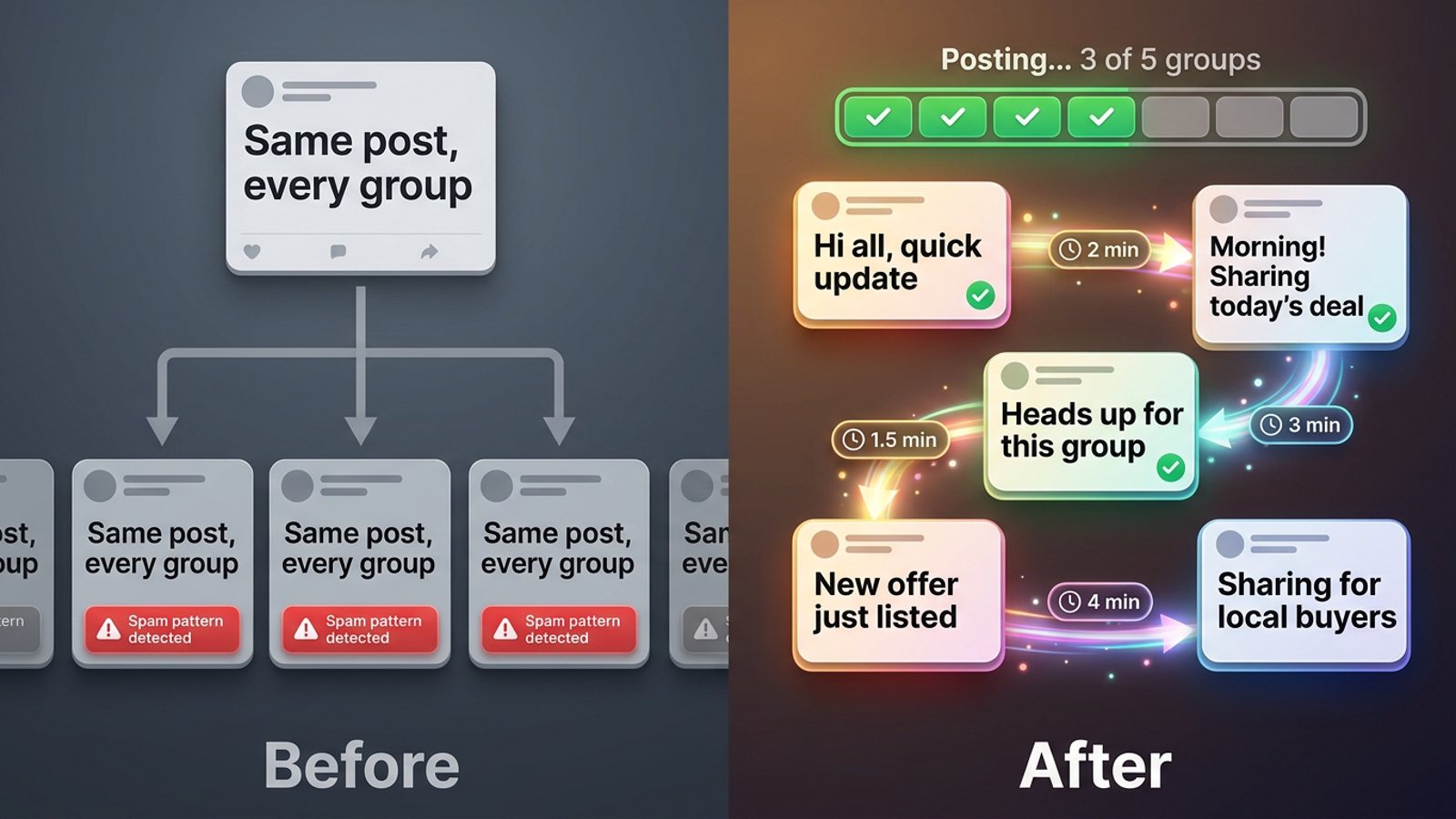
Vary the text and space the posts out. Meta's spam policy prohibits posting or sharing at very high frequency, by hand or automated, and names repetitive content as a spam signal — though Meta publishes no numeric threshold (AutoGP, vendor blog, 2026). Duplicate, identical copy is also a common reason group posts get hidden, limited, stuck in pending or rejected (MaherPost, vendor blog, 2026).
The practical fix is threefold:
- Different wording per group. MGSApro includes free AI text variations, so each group sees a slightly different version of your caption instead of the identical block 20 times (Chrome Web Store listing, updated November 2026). There's a full walkthrough in how to share the same post to many groups with different wording each time.
- Human-paced delays. Randomized delays between shares mimic how a person actually clicks through groups.
- A sensible daily volume. Facebook publishes no official daily group-posting limit. A vendor guide suggests roughly 25 posts a day for a brand-new account building up over about two months — treat that as one vendor's estimate, not a rule (AutoGP, vendor blog, 2026).
Our recommendation: if your account is new, start with 5–10 groups a day for the first week and add more as posts keep landing.
What's the fastest safe way to send one photo to 20 groups?
Save your 20 groups as a preset and your caption as a template, then share once. That's the route MGSApro is built for, and it's the one that removes the repetition rather than just speeding it up.
Here's how it works, per the product facts:
- Browse your Facebook groups and tick the ones you want.
- Optionally type your message — your "DM me for a quote" line.
- Save the selection as a preset for next time.
- Click Share and watch the live progress bar as each group gets posted.
The extension runs entirely on top of Facebook with no separate dashboard and no login, and it uses randomized delays and human-like clicks between shares. You can also save several presets and share to more than one without double-posting the same group (Chrome Web Store listing, updated November 2026).
If you want the broader comparison of routes, how to post the same message to 20 Facebook groups without doing it one by one covers the options in more depth.
Which tool should I use to share a product photo to 20 Facebook groups?
For most small sellers, a browser extension built for group sharing is the most direct fit — and of the tools we compared, MGSApro is our pick because it saves both the group list and the message, and runs inside Facebook with no login.
Here's the honest comparison, with the caveats each option carries.
| Option | Best for | Key features | Price / free option | Watch-outs |
|---|---|---|---|---|
| MGSApro — Our pick | Sellers sharing one photo to many groups with a saved quote line | Select groups on the Facebook page, optional message, saved presets, live progress bar, randomized delays, AI text variations, one Share to Groups button | Free forever with a small watermark; $9.99/month without it (as of November 2026; prices can change) | Chrome only; operates on top of Facebook; free version adds a watermark; not affiliated with Meta |
| Facebook's built-in Share button | One-off shares to a single group with a personal line | Native, free, no install | Free | One group per share; you repeat the flow every time; no saved default message |
| Meta Business Suite | Admins scheduling posts in a Group they own or that's linked to their Page | Free calendar view; can publish to Page and group together | Free | One Group at a time; group scheduling is admin-only, not for regular members; needs full control of the Page |
| Buffer / Hootsuite | Page and profile scheduling across accounts | Mainstream schedulers | Not stated in our sources | Facebook no longer lets third-party tools publish directly to Groups via API, so a cloud scheduler can't do this job for member groups |
| Doing it by hand | Under ~10 groups, or occasional posts | Total control, easy to respect each group's rules | Free | ~2 minutes per share → ~40 minutes for 20 groups; easy to double-post or skip a group |
A couple of honest notes. If you mainly need to schedule posts inside a group you administer, Meta Business Suite is the more direct choice — group scheduling is offered to admins, and regular members get no scheduling option (PostedOnCe, 2026). If you mainly manage Pages and profiles across several networks, Buffer or Hootsuite fit that job better; the catch is that Facebook stopped allowing third-party tools to publish directly to Groups via API, which is why cloud schedulers had to change how they post (SocialBee, vendor blog, 2026). And if you only have eight groups, doing it by hand is genuinely fine.
On price: MGSApro is free forever with a small watermark, or $9.99 per month without one, as of November 2026 — prices can change. The owner also confirms a yearly plan from $7.99 a month.
MGSApro is made by the team behind this blog.
Ready to send that photo to all 20 groups with your quote line attached? Get MGSA Chrome Extension (Free Unlimited) and run your first preset today.
Is it safe to post the same product photo to 20 groups?
It's safe if you respect each group's rules, vary the wording, space the posts and don't treat it as a numbers game. This isn't legal advice, and Facebook's enforcement varies by place and by account history.
A few things worth knowing. Meta may throttle an account even when each group's admin approves posts individually (MaherPost, vendor blog, 2026). Posts that fail silently are an early warning sign that you're approaching a restriction (FB Group Bulk Poster, vendor blog, 2025). And the extension itself warns against extreme bulk runs like 1,000 groups in a day, and says to only share where content is genuinely welcome (Chrome Web Store listing, updated November 2026).
If Facebook does suspend an account while you're using a group-sharing tool, the owner's guidance is to appeal it — reinstatement happens as long as you weren't spamming, because they check. Use the tool to replace the work you'd do anyway, not to flood groups.
Our recommendation: mix your product posts with useful content, never post where selling is banned, and keep to roughly one post per group every 3–7 days (MaherPost, vendor blog, 2026; FB Group Bulk Poster, vendor blog, 2026).
Sources
- Share Post to Multiple Facebook™ Groups — Chrome Web Store, updated 2026-11-15
- How to Share a Post on Facebook — Lilach Bullock, 2026-10-15
- How Do I Share a Post In a Group On Facebook? — Broadband Properties Magazine, 2025-02-09
- Facebook Business Help Center — spam/messages policy — Facebook, date not given
- Facebook Group Posting Limits — AutoGP (vendor blog), 2026-09-12
- How to Avoid Facebook Group Post Rejection — MaherPost (vendor blog), 2026-08-05
- Facebook Group Post: Reach Members, Skip the Filters — MultiGroupPoster (vendor blog), 2026-05-08
- How to Sell in Facebook Groups — MultiGroupPoster (vendor blog), 2026-11-13
- How to Sell Products in Facebook Groups Without Getting Removed — MaherPost (vendor blog), 2026-10-28
- Recommended Posting Frequency — FB Group Bulk Poster (vendor blog), 2026-02-19
- Facebook Group Posting Limits — MultiGroupPoster (vendor blog), 2026-06-14
- Facebook Group Posting Limits — FB Group Bulk Poster (vendor blog), 2025-12-11
- How to schedule posts on Facebook Groups — SocialBee (vendor blog), 2026-01-06
- Programmer des publications sur les groupes Facebook — SocialBee (vendor blog), 2026-01-06
- Can You Schedule a Post in a Facebook Group — PostedOnCe, 2026-07-22
- Editing default message — WordPress.org forum, 2024-09-11
Frequently asked questions
Never manually share to groups again
MGSA Pro is the free Chrome extension that shares your posts to every Facebook group for you — safely, with human-like timing.