
How do I post my weekly offer to 25 local Facebook groups while I'm out on jobs?
November 21, 2026 · MGSApro Team
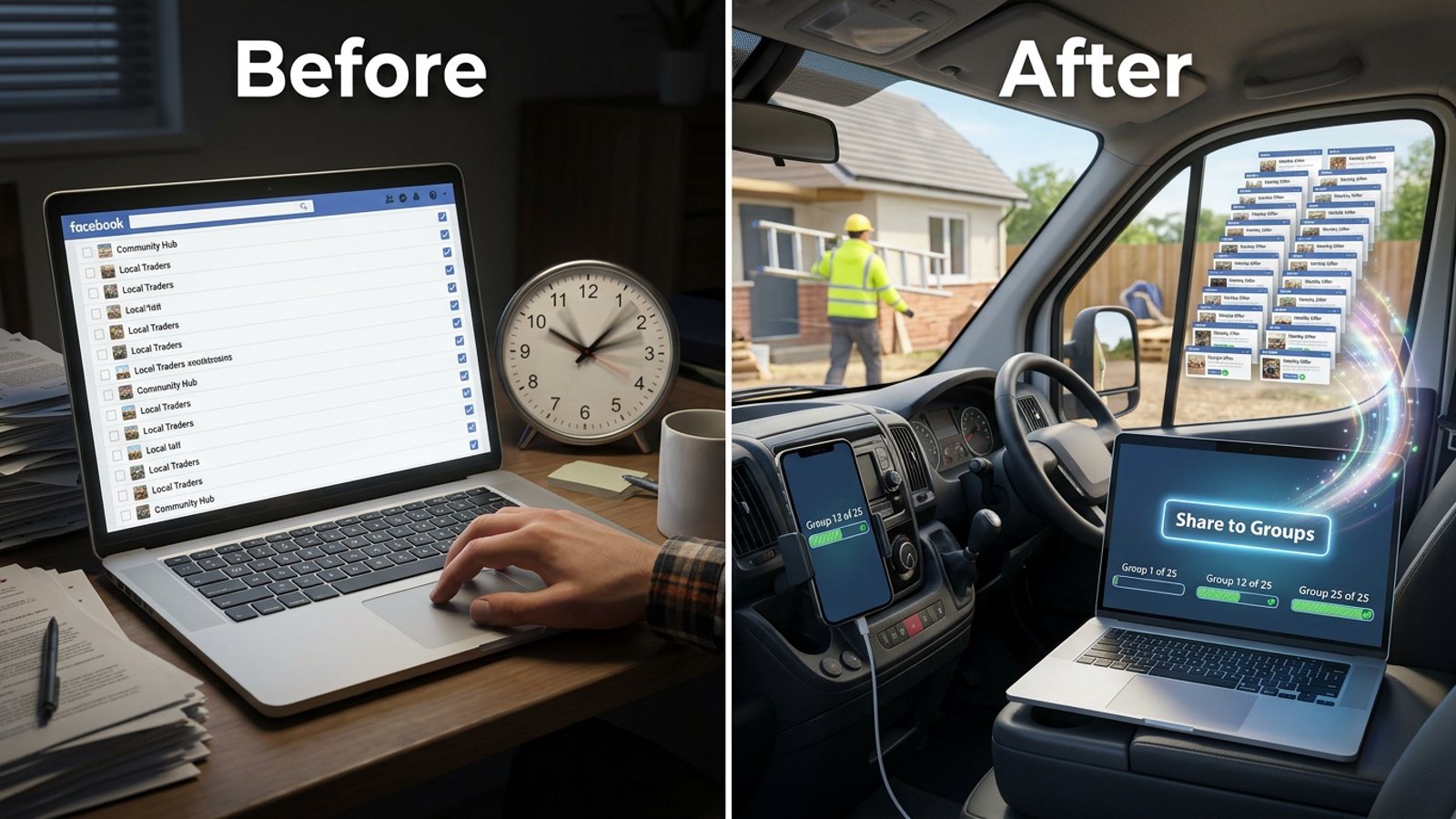
Save your 25 local groups as one preset once, keep a short weekly offer ready in a few different wordings, and share it to that preset in a single paced run from your own browser. Facebook's own scheduler can't post into groups you're only a member of, so a browser extension that works inside Facebook is the practical way to do it while you're on a job.
Get MGSA Chrome Extension (Free Unlimited) and your weekly offer run becomes one click instead of 25 copy-pastes — grab it here and set up your first group preset in a few minutes.
Key takeaways
- Build your local group preset once, then reuse it every week instead of re-ticking 25 groups by hand.
- Facebook's native scheduler only posts to Pages, professional-mode profiles, or groups you admin — not the community groups you've joined (Buffer, 2026).
- Posting identical text to many groups fast is the top spam trigger, so vary the wording and space the posts out (Conbersa, 2026; Lilach Bullock, 2026).
- A practitioner guide suggests 5–8 promo groups per day with 10–15 minute gaps, not 25 in one burst (Lilach Bullock, 2026).
- Read each group's promo rules first — many local groups restrict or ban business posts (The Yardstick Agency, 2026).
How do I post my weekly offer to 25 local groups without doing it one by one?
Build a saved list of those 25 groups once, then share your offer to that whole list in one run instead of opening each group. The trick is that the list is reusable — you set it up a single time and every week after that is a two-minute job.
Here's the real technique, whether you use a tool or not:
- Pick your 25 groups properly. Choose the neighbourhoods where you already have clients rather than the whole county — My Service Area (2026) advises dominating a small area first, then expanding.
- Read each group's promo policy before you post anything. Many local groups ban business promotion outright or restrict it to set days, pinned threads, link-in-comments, or a required format (MaherPost, 2026; The Yardstick Agency, 2026).
- Be a member for a week or two first. Answer recommendation threads and comment before you promote — gtstu.com (2026) says bans for self-promotion are "almost always avoidable" and usually come from ignoring rules or pitching before adding value.
- Save the group list as one preset. This is the step that makes "while I'm out on jobs" possible.
- Write your offer in three or more versions. Byte-identical text across many groups is a top spam signal (Medium, Reham, 2026), and a practitioner guide recommends rewriting the core message at least three ways (Lilach Bullock, 2026).
- Run it with human-like gaps, split across the day rather than all at once.
- Answer replies fast. Post-and-ghost hurts trust and kills next week's conversion (The Yardstick Agency, 2026).
That's the honest version. Now here's how the product handles it.
How does MGSApro handle a weekly 25-group run?
MGSApro is a Chrome extension that shares a Facebook post to many groups in one click, directly on Facebook. No login, no separate dashboard — it works on top of the Facebook you're already signed into.
The weekly routine looks like this:
- Browse your Facebook groups and tick the ones you want — your 25 local groups.
- Optionally type a message or blurb for the share.
- Save the selection as a preset so next week you click the preset instead of re-ticking 25 boxes.
- Click Share and watch the live progress bar as each group is posted.
For a cleaner, landscaper or local service provider, that's the whole job: one preset, one click, done before you pack up the van. The extension includes built-in randomized delays and human-like clicks, plus AI-generated text variations so each group gets a slightly different version of your offer rather than the same block of text 25 times.
It also remembers which groups go in which profile if you run more than one Facebook profile.
Our recommendation: build two presets — one for your core 15 neighbourhood groups and one for the wider 10 — so you can run the core list on a busy week and the full 25 when you have time to answer replies.
Can I schedule my weekly offer to post itself while I'm working?
Not into groups you're only a member of. Facebook's own scheduling only works on a Page, a professional-mode profile, or a group you admin or moderate — in a group where you're a regular member, the scheduling option isn't there (Buffer, 2026).
Third-party schedulers can't fill that gap either. Meta removed the Groups API and the publish_to_groups permission on 22 April 2024 — as reported by third-party sources including RedReplier (2026) and Eden (2026) — so no app can create a group post through the official API. Buffer's own documentation says it sends a phone notification at the scheduled time for you to publish into the group yourself (Buffer, 2026).
What you can do: schedule into your own groups. MGSApro can schedule posts into your own groups only — the ones you admin. For member-only community groups, the practical pattern is a saved preset plus a paced one-click run when you take a break.
If scheduling is your main need, our guide to scheduling a post to all your Facebook groups at once walks through what's possible and what isn't.
How many of the 25 groups should I post to at once?
Fewer than you think. A practitioner guide recommends a ceiling of 5–8 promo or link groups per day, with at least 10–15 minutes between posts (Lilach Bullock, 2026).
Facebook publishes no official daily group-posting limit. Field observation suggests rapid posting across 10–15+ groups gets flagged (Medium, @liran151, 2026). A vendor risk benchmark — illustrative only — says restrictions often appear in the first 30 days when activity exceeds 25 groups a day, and suggests randomized gaps of 5–20 minutes (PostSyncer, 2026).
The key idea from Medium's Reham (2026): the limit is a comparison against your own account history. A five-year-old account posting to 40 groups in a day looks less suspicious than a three-week-old account doing the same.
So a 25-group weekly offer is realistically a three- or four-day spread, not one sitting. Our recommendation: run 6–8 groups a day Monday to Thursday, vary the wording each day, and keep the offer live all week instead of dumping it once.
What makes a local group post get flagged as spam?
Posting identical content to several groups in a short window is the most common trigger — Conbersa (2026) describes cross-group posting velocity as the number one spam signal, citing identical content to five groups in 30 minutes getting flagged.
Intervals measured in seconds read as automation; intervals in minutes read as a person (Medium, Reham, 2026). A vendor blog on posting limits recommends varying the gaps — 47 seconds, 2 minutes 12, 2 minutes 58 — rather than fixed intervals (FB Group Bulk Poster, 2025).
Two more things that matter for local service sellers:
- Post as your business Page where the group allows it, so readers instantly see a business is talking (Digital Hark, 2026). Some groups don't allow Page posts at all.
- Don't ignore the group's format rules. Admins approve promo posts that follow their specific rule — weekly promo day, pinned thread, no links, or a required template — and decline hard-sell or too-frequent posts even when technically within the rules (MaherPost, 2026).
No tool can guarantee zero risk. Meta runs automated spam detection, and what you control is how you post, how fast, and whether the copy reads human (MaherPost, 2026). This is general guidance, not legal advice, and platform rules vary by place and change often.
For the pacing side in more depth, see posting your offer to Facebook groups at a natural pace.
Which tool should I use to post my weekly offer to 25 local groups?
For most local service providers, a browser-based group poster is the fit — because it's the only category that can reach member-only groups from your own signed-in browser. Of the tools we compared, MGSApro is our pick for this specific job.
MGSApro is made by the team behind this blog. Here's the honest comparison:
| Option | Best for | Key features | Price / free option | Watch-outs |
|---|---|---|---|---|
| MGSApro (Our pick) | Local service providers running one weekly offer to a fixed group list | One-click share to many groups, saved presets, optional message, live progress bar, randomized delays and human-like clicks, AI text variations, works inside Facebook with no dashboard, multi-profile group memory | Free forever with a small watermark; $9.99/month without watermark; $7.99/month on the yearly plan (as of November 2026, prices can change) | Chrome only; operates on top of Facebook; free version adds a watermark; not affiliated with Meta |
| Facebook native scheduler / Meta Business Suite | Scheduling your business Page's weekly offer | Free, native, edit and reschedule later | Free | Doesn't post to groups you're only a member of; no repeat option, so a weekly offer is re-scheduled by hand each time (Buffer, 2026; MultiGroupPoster, 2026) |
| Group Posting PRO (Chrome extension) | Users who want scheduled campaigns inside a browser extension | Group collections, AI-written variations, publishing in your own signed-in browser, schedules and campaigns on higher plans | Plans run through groupposting.com; pricing not listed on the Chrome store page (as of November 2026) | Requires Chrome open and your computer awake for schedules to run; its own changelog notes past freeze fixes in v1.9.x (Chrome Web Store, 2025) |
| Facebook Groups Post Bot (Chrome extension) | Trying a group poster at low cost | Free tier of 3 groups per run, 3 schedules, 3 campaigns; paid tiers up to unlimited groups | Free $0; Pro $6.99/mo or $49.99/yr; Business $12.99/mo or $99/yr USD (as of November 2026, prices can change) | Free tier's 3-groups-per-run cap doesn't suit a 25-group weekly list |
| Manual posting, one group at a time | Total control over every group's promo rule | Hand-tailored copy per group, zero automation signal | Free — just your time | 25 groups exceeds the 5–8/day promo ceiling a practitioner recommends (Lilach Bullock, 2026), and it doesn't fit "while I'm out on jobs" |
If you mainly need to schedule Page posts and Instagram together, Meta Business Suite is the more direct choice — it's free and native. If you want scheduled campaigns inside a browser extension and don't mind keeping Chrome open, Group Posting PRO is worth a look.
New to the extension? The MGSApro tutorial walks through building your first preset.
Your weekly offer shouldn't cost you a working afternoon. Set the preset once, keep three wordings ready, and let one click do the rest — get MGSA Chrome Extension (Free Unlimited) and post this week's offer before you leave the job.
Sources
- How to Schedule a Post on Facebook — for Pages, Profiles + Groups (Buffer, 2026-10-25/26)
- How Facebook Group Post Approval Works (RedReplier, 2026-09-12)
- How to schedule Facebook posts in 2026 (Eden, 2026-08-19)
- How to Automate Facebook Posts: Pages & Groups (2026) (MultiGroupPoster, 2026-05-07)
- Facebook Group Rules for Promotional Posts (MaherPost, 2026-10-28)
- Is Facebook Auto Poster Safe? (MaherPost, 2026-08-05)
- How financial advisers can use local Facebook groups (The Yardstick Agency, 2026-10-06)
- Post in Local Facebook Groups Without Getting Banned (gtstu.com, 2026-11-07)
- How to Dominate Your Service Area (My Service Area, 2026-03-05)
- Facebook Groups for Home Service Businesses (AutoGP, 2026-10-25)
- Local Facebook Groups for Contractors (Digital Hark, 2026-11-10)
- Facebook Groups Grow Without Spam (PostOwl, 2026-11-04)
- How Many Facebook Groups Can I Post To Per Day? (Medium, @liran151, 2026-05-28)
- Your Facebook Account Got Restricted for Group Spam… (Medium, Reham, 2026-09-17)
- Posting in Facebook Groups: 5 to 8 a Day (Lilach Bullock, 2026-08-19)
- Facebook Group Posting Limits (FB Group Bulk Poster, 2025-12-11)
- How to post in multiple groups on Facebook (PostSyncer, 2026-09-23)
- How to Avoid Facebook Group Spam Detection (Conbersa, updated 2026-07-02)
- Group Posting: AI Group Auto Poster, Scheduler & Lead Radar (Chrome Web Store, undated)
- Group Posting PRO (Chrome Web Store, page dated 2025-09-03)
- Facebook Groups Post Bot (Chrome Web Store, undated)
Frequently asked questions
Never manually share to groups again
MGSA Pro is the free Chrome extension that shares your posts to every Facebook group for you — safely, with human-like timing.
Keep reading
What's the best way to vary the wording of the same post across 50 buy-and-sell groups?
November 22, 2026
How do I post to Facebook groups fast without looking spammy to admins?
November 21, 2026
How do I keep my Facebook group posts looking human when I share the same offer to 40 groups?
November 21, 2026