
Can I share one Facebook post to 40 groups and watch each one post in real time?
November 22, 2026 · MGSApro Team
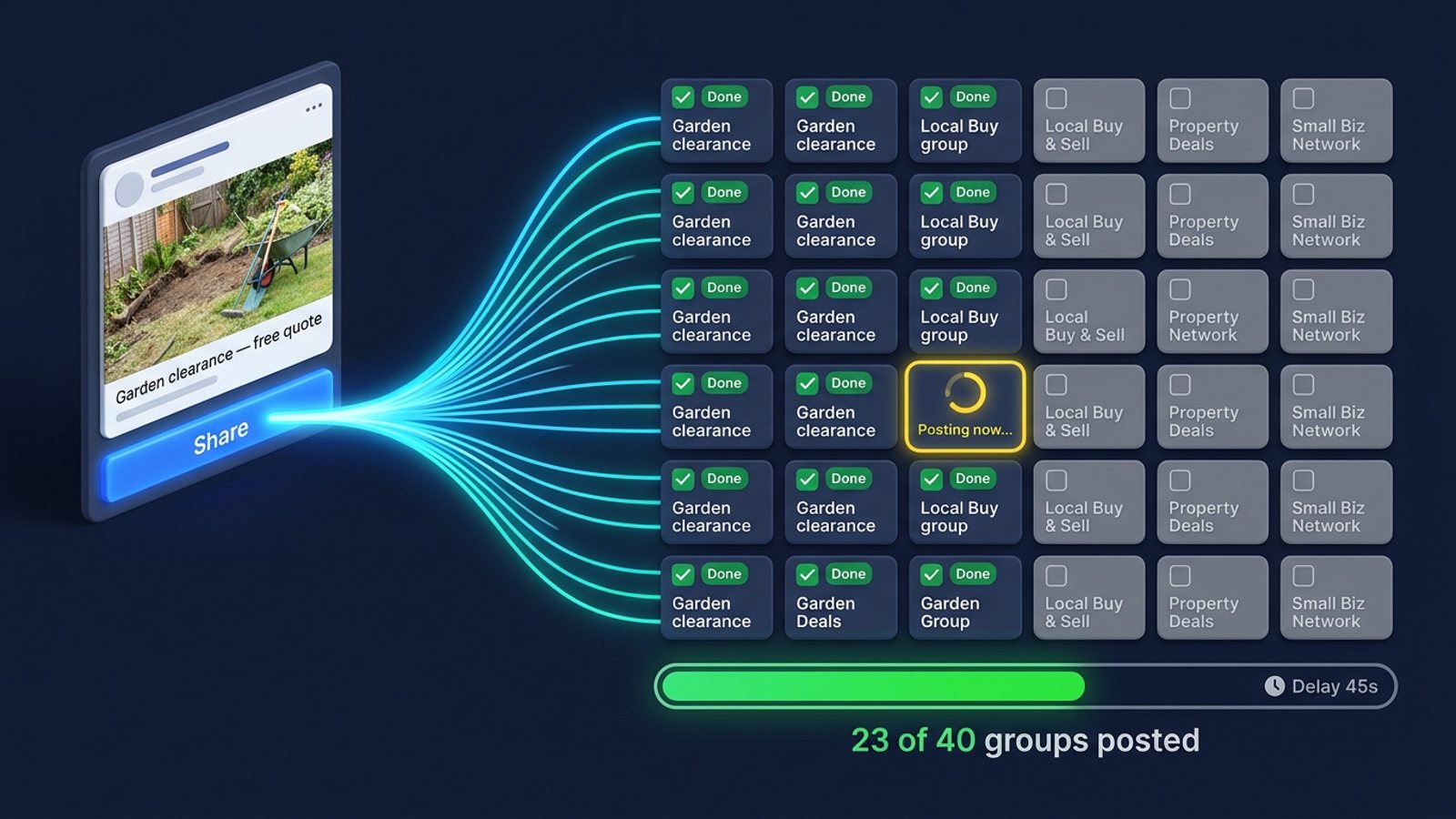
Yes — with a tool that shows a live progress bar, you can share one Facebook post to 40 groups and watch each group tick off as it fires, one after another. MGSApro does exactly that inside Facebook, with randomized human-like delays between shares. "Real time" means you see each share in order, not instantly — the delays are deliberate.
Get MGSA Chrome Extension (Free Unlimited) and watch your next 40-group run tick off group by group.
Key takeaways
- Facebook's own Share button gives you no run-level view: it's one group per share, and you track the list yourself.
- A facebook group share progress bar shows each group being posted in order, so you know exactly where you are.
- Randomised delays mean a 40-group run is a long session by design — that's the safe part, not a flaw.
- A progress bar shows the share fired; group admins and Facebook's own checks still decide whether it appears.
- Keep Chrome open and the machine awake — browser tools stop when the session stops.
What does "real time" actually mean for a 40-group run?
It means you see each group being posted as it happens, in sequence — not that all 40 go live at once. Any tool that repeats Facebook's share flow does it group by group, and Multigroup Poster's listing describes its auto-share as running Facebook's own Share → Share to a group flow repeatedly, with randomised human-paced delays. So "real time" is a live feed of shares firing in order, with a pause between each one.
That pause is the whole point. Multigroup Poster suggests delays of 30 to 300 seconds between shares with jitter on top, plus pauses and shuffled group order, and slows pacing automatically as daily volume rises. FB Group Bulk Poster's guidance says a 60-second delay with 50% randomisation sends posts 30–90 seconds apart, which reads far more natural than fixed timing.
Do the maths and a 40-group run at those settings is a long session. That's not a bug — it's what keeps the pattern looking human.
Why does watching each group post beat a silent bulk post?
Because a silent run leaves you guessing, and a visible one tells you where you stand. When you share manually, the flow is Share → Groups → search the group → pick it → type a blurb → Share, then note down which group you already shared to so you don't double post — roughly 2 minutes per group, per a Crx搜搜 listing of Multiple Group Share Assistant (2026). Forty groups that way is over an hour of clicking, and your only record is your own memory.
A progress bar fixes three things at once:
- You know which group is being posted right now, so you're not wondering if the tool froze.
- You know which groups are done, so you don't re-share and double post.
- You can stop cleanly if something looks wrong, instead of discovering a mess afterwards.
Our recommendation: treat the progress bar as your run log. Watch it, note any failures, and leave the completed groups alone.
If you'd rather see how the whole one-click flow works first, the MGSApro tutorial walks through it.
How do you share one post to 40 groups and watch the progress?
Set up the list once, set a sensible pace, then start the run and watch. Here's the sequence that works, drawn from the research:
- Check the post and the group rules. Confirm the post is shareable and each group allows shares or promos — admin approval still governs what appears (Group Posting Pro listing).
- Build a named group list once. Save your 40 groups as a preset so you're not re-typing them every run (Multigroup Poster listing).
- Set delays well above the floor. Thirty seconds is the floor, not the target (FB Group Bulk Poster, 2025; MaherPost). Switch on randomisation and shuffled order.
- Split the volume. Spread 40 groups across morning and evening rather than one 2am burst — FB Group Bulk Poster's 2025 guide warns that posting to 40 groups at 2am with 30-second delays breaks velocity norms however good the content is.
- Start the run and watch the bar. Don't switch tabs; note any failures and leave already-shared groups alone.
- Check Account Status afterwards. Facebook lets you see your violation history, any restrictions and how long they last (Facebook Help Center) — so a quiet restriction doesn't go unnoticed.
- Vary the wording next time. Lilach Bullock (2026) notes Facebook's spam detection cares far more about pattern — identical text, rapid timing, many groups in one session — than raw volume.
How does MGSApro show facebook group share progress?
MGSApro puts a live progress bar on the run so you see each group being posted, one after another, without leaving Facebook. You tick your groups directly on the Facebook page, optionally add a message, save the selection as a reusable preset, then hit Share and watch the bar move. It works entirely on top of Facebook — no extra dashboard, no separate login.
The safety features are built around that bar:
- Randomised delays and human-like clicks between shares, so the run doesn't fire like a machine gun.
- AI-generated text variations for each group, so 40 shares aren't 40 identical copies.
- Presets, including sharing to multiple presets, so a 40-group run is two clicks to set up next time.
- Multiple profiles supported, and it remembers which groups go with which profile.
On price: MGSApro is free forever with a small watermark ("Shared using MGSApro"), or $9.99 per month without the watermark, as of November 2026 — prices can change. The owner also confirms a yearly plan from $7.99 a month.
One honest limit: the bar shows the share fired. It can't promise the post is approved and live — group rules, admin approval, account restrictions and Facebook's own checks decide that, and Group Posting Pro's listing says plainly that it can't bypass moderation or promise publication.
How long does a 40-group run take — and is 40 in one sitting safe?
A 40-group run at 30–300 second delays with jitter and pauses is a long session by design. At a 60-second setting with 50% randomisation, expect roughly 30–90 seconds per group, per FB Group Bulk Poster's 2025 guidance. That puts a full 40-group run somewhere in the 20-minutes-to-two-hours range depending on your settings — plan to be at the machine.
Is 40 in one sitting safe? Most guides argue pattern and timing matter more than the count, and suggest splitting volume across the day. Facebook has no published daily group-posting number, so any figure you see online is an estimate (AutoGP, 2026). Lilach Bullock's 2026 routine caps promotional or link content at 5–8 groups a day and conversational content at 10–12, with 10–15 minutes between posts — a far more conservative pace than a single 40-group blast.
Meta's Spam policy bans posting, sharing or engaging "at very high frequencies," whether manually or automatically (Meta Transparency Center, updated June 2024). Its enforcement ladder means a first strike is a warning, two to six strikes restrict features such as posting in groups for a limited time, and ten or more strikes block content creation for 30 days (Meta Transparency Center, updated November 2024).
This is general information, not legal advice, and Facebook's rules and enforcement vary by account and region. Our recommendation: start below your maximum, watch your Account Status, and only scale up once a few runs have gone cleanly. If you want to keep the wording varied across a big run, see how to share the same post to many Facebook groups with different wording each time.
Which tools show progress on a bulk Facebook group share?
Here's how the options compare for a 40-group run, based on the research we checked in November 2026.
| Option | Best for | Key features | Price / free option | Watch-outs |
|---|---|---|---|---|
| MGSApro (Our pick) | Sellers and marketers who want one-click sharing with visible progress inside Facebook | Live progress bar, randomised human-like delays, AI text variations, group presets, multiple profiles, works on top of Facebook | Free forever with a small watermark; $9.99/month without, as of November 2026 — prices can change | Chrome only; operates on top of Facebook; not affiliated with Meta |
| Facebook's built-in Share button | A handful of groups, full control per share | Nothing to install; you see each share immediately | Free | One group per share, ~2 minutes each, no progress view, no double-post guard — you track the list yourself (AutoGP, 2026; Crx搜搜, 2026) |
| Multigroup Poster | Users who want a post history that explains failures | Shares to 50+ groups in one click, randomised delays, post history, browser-based scheduling | Free trial, then paid — prices not confirmed in our material | Scheduling needs Chrome and the right profile open at the time; delays mean long runs (Chrome Web Store) |
| Group Posting Pro | Teams wanting tiered plans and an Activity view | Posts one group after another at your pace, results in one Activity view, scheduling | Lite/Plus/Pro/Agency tiers — prices not confirmed in our material | Scheduling needs Chrome open; can't bypass moderation (Chrome Web Store) |
| Buffer / Metricool | Planning and analytics across Pages and Instagram | Calendars, approvals, reports | Not confirmed in our material | The API limit applies: scheduling tools reach Pages and Instagram professional accounts, not joined groups (freedom-res.com, 2026) |
MGSApro is made by the team behind this blog.
A note on honesty: if you mainly need a post history that explains why individual shares failed, Multigroup Poster's listing describes that directly. If you need proper calendars and reports across Pages and Instagram, a management tool like Buffer or Metricool is the more direct choice — it just can't post into groups you've joined, because Meta cut third-party API publishing to Groups (Medium / Denied Feels, 2026; freedom-res.com, 2026). And if you only post to three or four groups, Facebook's own Share button is free and fine.
One more thing worth knowing: browser-based tools stop when Chrome or the session stops. Group Posting Pro's listing states plainly that publishing, schedules and monitoring need an available browser and an active Facebook session — nothing runs when the computer is off. So keep the machine awake during a 40-group run.
Ready to watch your own run tick off? Get MGSA Chrome Extension (Free Unlimited) and set up your first 40-group preset.
Sources
- Spam (Meta Transparency Center, updated 2024-06-26)
- Restricting accounts (Meta Transparency Center, updated 2024-11-12)
- Check your Account Status on Facebook (Facebook Help Center, no date)
- Multiple Group Share Assistant listing (Crx搜搜, 2026-10-06)
- Multigroup Poster – Facebook Group Auto Poster, Bulk Post & Scheduler (Chrome Web Store, no date)
- Group Posting PRO: AI Auto Poster | Scheduler (Chrome Web Store, no date)
- FB-Group-Bulk-Poster (Chrome Web Store, 2025-03-27)
- Facebook auto share vs posting in groups you're in 2026 (Medium / Denied Feels, 2026-10-04)
- Facebook groups for realtors (freedom-res.com, 2026-09-23)
- How to share a Facebook post to multiple groups (AutoGP, 2026-10-15)
- How many Facebook groups can I post in per day? (Lilach Bullock, 2026-08-19)
- Facebook group posting limits (FB Group Bulk Poster, 2025-12-11)
- Facebook posting limits (MaherPost, no date)
- How many Facebook groups can I post in per day (AutoGP, 2026-09-12)
Frequently asked questions
Never manually share to groups again
MGSA Pro is the free Chrome extension that shares your posts to every Facebook group for you — safely, with human-like timing.
Keep reading
How do I keep my Facebook group posts looking clean when I share the same offer in bulk?
November 22, 2026
Can I get a slightly different version of my Facebook post for every group without rewriting it 50 times?
November 22, 2026
How do I stop my Facebook group posts looking copy-pasted when I share in bulk?
November 21, 2026