Why do my Facebook group posts get cut short or fail halfway when I share in bulk?
November 22, 2026 · MGSApro Team
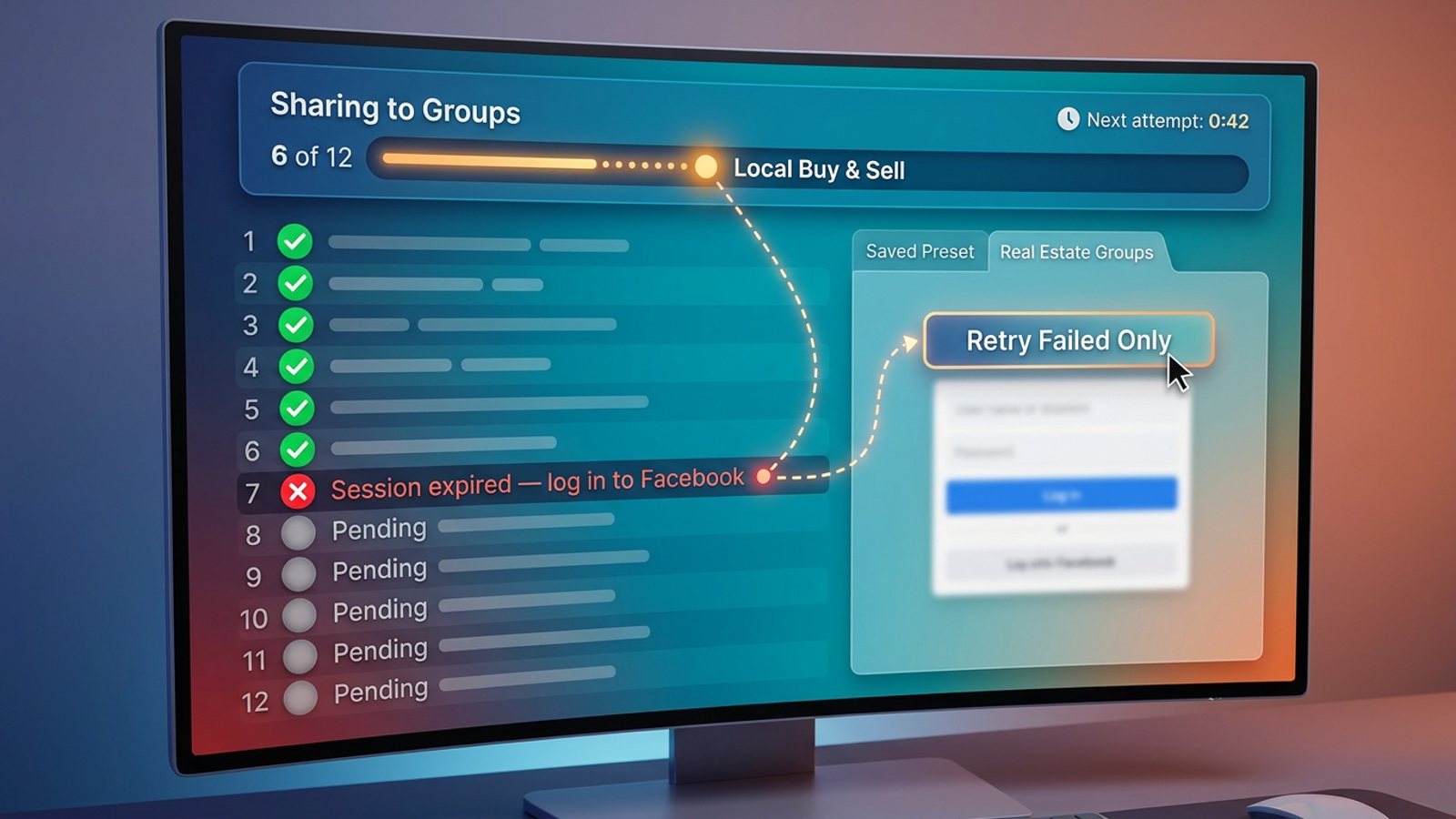
If your facebook group posts fail halfway through a bulk share, it's almost always one of four things: your Facebook session dropped out, Facebook rate-limited you for posting too fast, some groups on your list no longer accept your posts, or the browser tab doing the work got closed or suspended. Slow down, keep Facebook active in one tab, and retry only the groups that failed.
Get MGSA Chrome Extension (Free Unlimited) — share a post to many groups in one click, right inside Facebook.
Key takeaways
- A bulk run that stops partway is usually a session dropout, a rate limit, a group rejection, or a browser interruption — not a ban.
- Facebook's own Share menu only lets you pick one group per share, so a "bulk" run is really Facebook's share flow repeated group by group (PurePrivacy, 2025).
- Facebook's "going too fast" message is a temporary rate limit on the action you were doing; stop that action and use Facebook normally until it lifts (AwareXone, 2026).
- Groups that reject your post without a message often have keyword or link filters that auto-flag it (HeyCatch, 2026).
- A live progress bar and saved presets let you see exactly where the run stopped and retry only the failed groups.
Why did my posts stop halfway — was it a Facebook ban or just a rate limit?
It's usually a rate limit, not a ban. Facebook's "It looks like you were misusing this feature by going too fast" block is a limit on the specific action you were doing — posting, sharing, commenting, reacting or messaging — and the advice is to stop that action and use Facebook normally otherwise until it lifts (AwareXone, 2026).
The softer version is the message "We limit how often you can post, comment or do other things…" — a short rate limit one step before a full block (MultiGroupPoster, 2026). Posting many items across many different groups is listed as a direct cause of that temporary block (Windows Report, updated 2025).
How long does a temporary "going too fast" block last?
Vendor reports put group-posting blocks at roughly 24–72 hours, with newer accounts hitting limits faster (HeyCatch, 2026). Short rate limits clear sooner. Either way, stop posting to groups, keep using Facebook normally, and come back slower.
How fast should I post to avoid tripping the limiter?
Vendors suggest randomized gaps of 5–20 minutes between group posts, and capping activity at around 25 groups per day — especially in your first 30 days (postsyncer, 2026). Those are vendor figures, not Meta rules. Our recommendation: start well under whatever number you think you can get away with, and only raise it once a few clean runs have gone through.
Why did only some groups fail while others went through?
Because those groups never accepted the post in the first place. Facebook group post failures split into two events: declined (the post never went live — it's waiting for admin or Admin Assist approval, and shows in your Content → Declined tab) and removed (it was live, then an admin, moderator or Facebook took it down) (MultiGroupPoster, 2026).
Admin Assist is Meta's tool that lets admins auto-decline posts matching preset criteria such as likely spam or specific links, so a post can be silently stopped before it ever appears (AutoGP, 2026). Groups that reject posts without a message often have keyword or link filters that auto-flag the post (HeyCatch, 2026). One vendor's delivery logs found that half a campaign never going live was rarely a Facebook ban — the frequent causes were an admin rule, a link policy, or a moderation queue the poster hadn't accounted for (MaherPost, 2026).
What to do about it: check the failing groups one by one. Is your post in the Declined tab, or was it removed after going live? Then read that group's rules and link policy before you try again. And don't just fire the same copy back in — a second copy of a declined or removed post doesn't move the first one up; it goes to the back of the queue and looks like spam to admins and to Facebook (AutoGP, 2026).
Why did my whole run stop at once?
Because your Facebook session ended. A posting tool that works through your logged-in Chrome session never holds your Facebook password, so when the session ends, Facebook shows the login page instead of the group — and nothing further can post (AutoGP, 2026). That's why some tools stop the entire run when the session drops: every remaining group would just show the same login page (AutoGP, 2026).
Facebook's "session expired" error means your login token was invalidated. Listed causes include inactivity timeout, corrupt cache or cookies, an outdated app or browser, unstable internet or IP changes, conflicting browser extensions, suspicious account activity, or a Facebook server outage (CyberYozh, 2026). When a Facebook tab is left open but idle for a long time, the session token can expire silently in the background, and the next click triggers the error (CyberYozh, 2026). Extensions that block or alter Facebook's cookies — ad blockers, privacy tools, some VPN extensions — can break session verification and log you out mid-task (CyberYozh, 2026).
The tell: if you see Facebook's login page instead of a group page, the run stopped because the session dropped. Log back in in the same browser profile before retrying anything.
Why does closing the tab or leaving it idle break a bulk run?
Because the tab is the engine. Browser-level interruptions are a real cause of half-finished bulk runs: duplicate Facebook tabs, aggressive ad blockers, privacy, auto-refresh and tab-suspension extensions, stale site data, and sleeping-tab or tab-discard features can all disrupt a long browser task (Rotten WiFi, 2026). An idle Facebook tab can also auto-reload after a period of inactivity — there's even a dedicated "disable auto-reload" extension built to keep the tab in place (ExtPose, 2026).
What to do about it:
- Keep one Facebook tab open and active for the whole run.
- Close duplicate Facebook tabs before you start.
- Pause aggressive ad-blocker, privacy, auto-refresh and tab-suspension extensions while posting.
- Don't switch the laptop off, close the lid, or leave the tab buried behind twenty others.
- If you must step away, check the tab is still on Facebook when you come back — before you assume the run finished.
How do I retry only the failed groups instead of reposting everywhere?
Work from a list, not from memory. The whole reason a bulk run feels unfixable is that once it stops, you don't know which groups got the post and which didn't. Reposting everywhere to be safe is how you end up with duplicates and an admin complaint.
Tools that run inside your own browser session report failures per group with a reason: signed out of Facebook, Facebook limiting posting frequency, a group that doesn't accept your posts, or a post waiting for an admin (MultiGroupPoster docs, updated 2026). That's the pattern to look for — a per-group result, not a single "done" at the end.
Then retry only the failures — and vary the wording so a retry doesn't look like spam (AutoGP, 2026). If every group got identical copy the first time, a second identical blast is the worst possible retry. If your captions are the problem rather than the run, our guide to keeping Facebook group posts from looking copy-pasted covers the wording side in detail.
How does MGSApro help you see where a bulk share stopped?
MGSApro shows you a live progress bar as each group is posted, so the moment a run stalls you can see which group it stopped on instead of guessing. It's a Chrome extension that shares a Facebook post to many groups in one click, right on top of Facebook — no separate dashboard and no login to a second system.
Here's how the workflow handles the four failure causes above:
- Browse your Facebook groups and tick the ones you want, directly on the Facebook page.
- Optionally type a message or blurb to go with the share.
- Save the selection as a preset so next time you pick the preset instead of re-ticking every group — and you can share to multiple presets.
- Click Share and watch the progress bar as it posts to each group.
On the failure side, MGSApro builds in randomized delays and human-like clicks, plus AI-generated text variations for each group, so a run doesn't go out as one identical burst. It also remembers which groups go in which profile if you run more than one.
Honest limits: MGSApro is Chrome only, it operates on top of Facebook rather than replacing it, the free version adds a small watermark, and it's not affiliated with Meta. It's one way to run a bulk share — not a magic fix for a group that has banned your links.
Pricing, as of November 2026 and subject to change: free forever with a small "Shared using MGSApro" watermark, or $9.99 per month without the watermark (a yearly plan starts from $7.99 a month). You can add the Facebook group sharing extension here and see the whole flow in the MGSApro tutorial.
One more thing worth knowing: if Facebook suspends an account while you're using a tool like this, you can appeal it, and accounts are typically reinstated as long as you weren't spamming — Facebook checks. So don't spam with it. Use it to replace the manual work, not to multiply it.
What are the best options for sharing a post to many Facebook groups?
Here's how the main routes compare, based on the sources we checked. MGSApro is made by the team behind this blog, so treat this table as our comparison of the options we looked at — not an independent review.
| Option | Best for | Key features | Price / free option | Watch-outs |
|---|---|---|---|---|
| MGSApro (Our pick) | Sellers, marketers and small businesses who share the same post to many groups regularly | One-click sharing to many groups, group presets, optional blurb, live progress bar, randomized delays, AI text variations, works inside Facebook with no dashboard | Free with a watermark; $9.99/month without (yearly from $7.99/month), as of November 2026, prices can change | Chrome only; operates on top of Facebook; not affiliated with Meta |
| Facebook's native Share menu | Reaching one group you care about with full control | Free, native, one group per share | Free (built into Facebook) | One group per share at roughly 2 minutes each; no progress tracker; easy to lose your place |
| Copy-paste posting by hand | A fully hand-written message per group | Maximum variation, no tooling risk | Free | Slow, manual tracking, higher chance of accidental repeat or double-posting |
| Meta Business Suite / Hootsuite / Buffer | Scheduling Facebook Pages and Instagram Business accounts | Official-channel scheduling for Pages and Instagram | Pricing not covered in our sources — check each vendor's own page | These schedulers cover Pages and Instagram Business/Creator accounts, not personal profiles or Groups; Facebook removed third-party API publishing to Groups |
If you mainly need to schedule Page and Instagram content through official channels, Meta Business Suite, Hootsuite or Buffer are the more direct choice — group posting just isn't what they do. If you need to reach the groups you've joined as a member, a browser-based tool is the route that fits.
A few more posts that pair with this one: if you're still working out the basic flow, start with how to share your Facebook post to all your groups in one click. And if you're weighing whether a bulk share is the right move at all, read how to share a Facebook post to many groups safely without looking like a bot.
This is a practical guide, not legal advice, and Facebook's rules and enforcement vary by place and change over time.
Get MGSA Chrome Extension (Free Unlimited) and watch the progress bar finish the run instead of wondering where it stopped.
MGSApro is made by the team behind this blog.
Sources
- Facebook session expired — causes and fixes (CyberYozh, 2026-03-31)
- Facebook Temporarily Blocked for Going Too Fast? Fix It (AwareXone, 2026-09-28)
- Sembra che tu Abbia Abusato di Questa Funzionalità (Windows Report, updated 2025-10-03)
- Facebook you were logged out while posting (AutoGP, 2026-09-13)
- Why Your Facebook Group Post Won't Publish: 8 Reasons (MultiGroupPoster, 2026-03-03)
- Troubleshooting (MultiGroupPoster docs, updated 2026-10-29)
- Why Was My Post Declined or Removed in a Facebook Group? (MultiGroupPoster, 2026-11-13)
- Why Can't I Post in Facebook Groups? 9 Reasons and Fixes (AutoGP, 2026-09-12)
- How to Avoid Facebook Group Post Rejection (MaherPost, 2026-08-05)
- How to Post in Multiple Facebook Groups Safely (HeyCatch, 2026-10-29)
- How to Post in Multiple Groups on Facebook Safely (postsyncer, 2026-09-23)
- How to Stop Facebook From Refreshing on Any Device (Rotten WiFi, 2026-09-03)
- Disable FB Auto-Reload extension listing (ExtPose, 2026-03-01)
- Post on multiple Facebook groups — how to (PurePrivacy, 2025-01-02)
- Share post to multiple Facebook groups (Chrome Web Store listing, no date)
- Facebook Groups for Realtors — schedulers can't post to groups (freedom-res.com, 2026-09-23)
- Facebook auto-share vs posting in groups you're in (Medium/Denied Feels, 2026-10-04)
Frequently asked questions
Never manually share to groups again
MGSA Pro is the free Chrome extension that shares your posts to every Facebook group for you — safely, with human-like timing.