
Is a group-posting extension worth it for a cautious small business owner?
November 27, 2026 · MGSApro Team
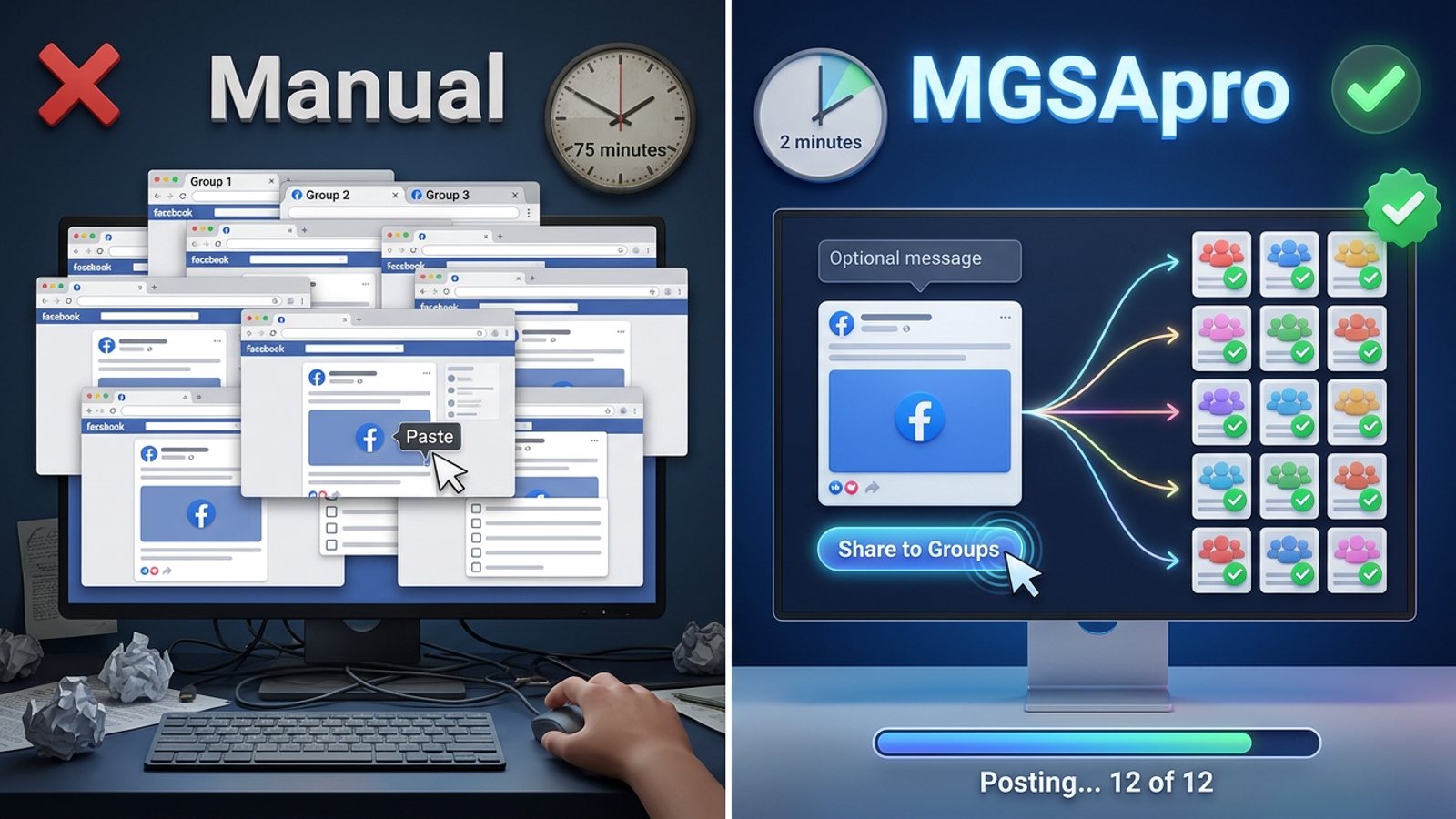
If you share one offer to a dozen or more groups you've joined, a facebook group posting extension worth it decision usually lands on yes: manual sharing runs 40–90 minutes per post, and most owners quietly skip groups. An extension works inside your own logged-in Chrome and posts only to groups you've joined.
Key takeaways
- Manual group sharing is the slow baseline: Postly (2026) puts it at 40–90 minutes per post depending on group count, and says owners in practice post to five or six groups and skip the rest.
- A group-posting extension doesn't log into your account — reviewed ones run on your own logged-in Facebook session and only post to groups you've joined.
- The honest limits: Chrome only, operates on top of Facebook, a watermark on the free plan, and no affiliation with Meta.
- Start free on a small batch, time it against your manual baseline, and only pay once the savings are obvious.
- No tool can promise posts go live — group admins and Meta's repetitive-content checks still decide that.
If you'd rather see the time savings on your own group list before reading further, you can get the MGSA Chrome Extension free and test it on five groups today.
What does a group-posting extension actually touch on my Facebook account?
It touches your Facebook page and your own joined groups — nothing else. A group-posting extension is a browser add-on that clicks through Facebook's normal share flow for you, inside the Chrome window where you're already logged in.
That matters for a cautious buyer. Meta removed the Groups API, including the publish_to_groups permission, from every Graph API version on 22 April 2024 (RedReplier, updated 2026-10-20). That's why group auto-posting now happens in your own browser rather than through an approved app. A reviewed rival extension, Postly (Chrome Web Store, undated), describes the same model: it runs on the user's own logged-in Facebook session, only posts to groups the user has joined, and keeps post content and media in the browser.
So the extension isn't a separate account, a dashboard, or a cloud service holding your login. It's a helper sitting on top of the Facebook tab you already have open.
How much time does manual group posting actually cost?
Manual posting costs roughly 40–90 minutes per post across many groups, and most owners respond by quietly posting to five or six and skipping the rest (Postly, 2026). GroupBlaster's own page (undated) estimates about 4 minutes per post by hand, and puts 50 groups at 90 seconds of tab-hopping each at 75 minutes every morning — over six hours a week.
A Hebrew-language piece from postpro.co.il (2026-08-16) breaks it down by volume: one item to five groups takes about 20 minutes, while several items across 20+ groups can reach four hours a day, split morning and evening.
Our recommendation: before you install anything, time one real post across five groups. Multiply by your actual group count. That number is your honest baseline — and the only fair way to judge whether any tool earns its place.
What are the honest limits of a Facebook group posting extension?
The limits are Chrome-only operation, running on top of Facebook, a watermark on the free plan, and no affiliation with Meta. None of those are dealbreakers for most small businesses, but you should know them before you install.
- Chrome only. If you work in Safari, Firefox or on a phone, this category of tool isn't for you.
- It runs on top of Facebook. It doesn't replace Facebook, and it can't post anywhere you couldn't post by hand.
- Free plans add a watermark. MGSApro's free version adds a small "Shared using MGSApro" watermark; the paid plan removes it (prices below).
- Not affiliated with Meta. A Chrome Web Store listing for a comparable tool (updated 2026-10-03) states plainly that it is "not affiliated with, endorsed by, sponsored by, or associated with Meta Platforms, Inc. or Facebook." Same goes for MGSApro.
Is it safe to install a Chrome extension at all?
Mostly yes, if you install from the official Chrome Web Store and read the permission prompt before accepting. Chrome's own privacy guidance (Chrome for Developers, undated) says users shouldn't install an extension that asks for more permissions than it seems to need, and extensions should request only the minimum access.
Two cautions worth carrying with you. MacPaw (2026-11-15) warns that installed extensions can change after updates and ownership changes, so a one-time safety check isn't permanent. And ESET's WeLiveSecurity (2025-07-28) reports rogue extensions masquerading as legitimate tools were used to steal data and push malicious traffic, with an earlier 2025 campaign that may have hit dozens of extensions and nearly three million users. A national cybersecurity body (NCSA, 2025-06-26) recommends installing only from official stores for exactly this reason.
Our recommendation: check the developer, read the permissions, and re-check the listing every few months. It takes two minutes.
Will posting to many groups get me flagged as spam?
Possibly — frequency plus identical content is the pattern that gets flagged, whichever tool you use. Meta's Spam policy (Meta Transparency Center, 2024-06-25) bans posting, sharing or engaging at "very high frequencies," manually or automatically, and allows restrictions at lower frequencies when other signals like repetitive content are present. Meta also said in an April 2025 newsroom post that it is reducing the reach of accounts that share repetitive and spammy content.
NoobClaw (2026-09-16) argues that pasting the same promo into many groups is what Meta's policy describes as spam. On volume, a widely-cited practitioner view (Medium, Dented Feels, 2026-05-28) warns that accounts posting across 10–15+ groups in rapid succession get flagged, and that steady daily posting across a handful of groups outperforms bursts.
This is general information, not legal advice, and rules vary by place. Our recommendation: vary your text per group, space your posts out, and post to the groups where your offer genuinely fits.
How does MGSApro handle the safety and time problem?
MGSApro is a Chrome extension that shares your Facebook post to all your groups in one click, with built-in randomized delays, human-like clicks and AI-generated text variations for each group. It works entirely on top of Facebook — no login, no dashboard.
Here's how it fits the cautious-buyer checklist:
- Browse your Facebook groups and tick the ones you want — only your own joined groups.
- Optionally type a message or blurb to go with the share.
- Save the selection as a preset for next time (it remembers which groups go with which profile if you run more than one).
- Click Share and watch the live progress bar as it posts to each group.
The randomized delays and per-group text variations are aimed squarely at the repetitive-content signal described above. It also schedules posts into your own groups only. For a fuller walk-through, the MGSApro tutorial shows the click path end to end.
Pricing (as of November 2026, prices can change): free forever with a small watermark, or $9.99 per month without one. The owner also confirms a yearly plan from $7.99 a month.
How does it compare with the alternatives?
Of the tools we compared, MGSApro is our pick for a small business owner who wants one-click sharing to many groups inside Facebook. Here's the honest picture.
MGSApro is made by the team behind this blog.
| Option | Best for | Key features | Price / free option | Watch-outs |
|---|---|---|---|---|
| MGSApro (Our pick) | Small business owners sharing one offer to many joined groups | One-click share to many groups, group presets, optional message, randomized delays, human-like clicks, AI text variations, live progress bar, works inside Facebook, no dashboard | Free with watermark; $9.99/month without (as of Nov 2026, prices can change); yearly from $7.99/month | Chrome only; runs on top of Facebook; not affiliated with Meta |
| Posting manually | Anyone who wants zero install risk | Facebook's own composer; "Add groups" can push a plain-text post (up to one image, no links) to up to nine eligible groups at once | Free, no install | One share per group otherwise; ~4 minutes per post; 40–90 minutes across many groups; needs posting permission in each group |
| Facebook's built-in scheduling | Pages that want the safest native option | Native scheduling for Pages works reliably, no third-party access | Free, no install | No native multi-group bulk posting or cross-group scheduling; group posting can hit admin review |
| Buffer | Scheduling to Facebook Pages and Instagram | Official-channel scheduling for Pages and Instagram | Pricing not confirmed from an official Buffer page in our material (as of Nov 2026) | Can't publish automatically into groups; only "notification publishing" — a mobile nudge you copy into the group yourself (Buffer Help Center, 2026-07-01) |
| Hootsuite | Scheduling to Pages and Instagram via approved channels | Approved-channel scheduling | Pricing not confirmed from an official Hootsuite page in our material (as of Nov 2026) | Can't publish into Facebook groups after Meta's April 2024 Groups API removal (SocialBee, 2026-01-06) |
| Meta Business Suite | Free first-party Page scheduling | Free with a Facebook Page; safest place to schedule Page content | Free with a Facebook Page | No group scheduling; one group at a time, no bulk cross-group posting (Buffer, 2026-10-25) |
If you mainly need safe, native scheduling for a Facebook Page and Instagram, Meta Business Suite is the more direct choice — it's free and first-party. If you want a single tool that schedules across many networks, Buffer or Hootsuite are built for that, but neither can publish into groups automatically.
Why the big schedulers can't help here: Meta removed the Groups API on 22 April 2024, and Adobe's own help centre (updated 2026-02-02) confirms that no third-party app can publish to Facebook Groups. That's the gap a browser extension fills.
Ready to put it on your own group list? Get MGSA Chrome Extension (Free Unlimited) and run it on five groups before you decide anything.
When is it not worth it?
It's not worth it if you post to fewer than about five groups, work mainly on mobile, or only need Page scheduling. In those cases Facebook's own composer and Meta Business Suite cover you for free.
It's also not worth paying for until you've tested. Run the free plan on a small batch, compare the time against your manual baseline, and watch whether any posts get held for admin review. If the savings are obvious after a week or two, the paid plan is easy to justify. If not, you've lost nothing.
Sources
- Postly for realtors (Postly, 2026-08-12)
- GroupBlaster for real-estate agents (GroupBlaster, undated)
- כמה זמן לוקח לפרסם בקבוצות (postpro.co.il, 2026-08-16)
- How Facebook Group Post Approval Works (RedReplier, updated 2026-10-20)
- Facebook auto poster extension risks 2026 (NoobClaw, 2026-09-16)
- Spam policy (Meta Transparency Center, 2024-06-25)
- Reducing spammy content on Facebook (About Meta Newsroom, 2025-04-24)
- How to publish to multiple Facebook groups at once (Tecnoblog, 2025-04-09)
- Facebook Group Posting Questions, Answered (Group Posting, 2026-11-07)
- Connect to Facebook (Adobe Help Center, updated 2026-02-02)
- Connecting and publishing to your Facebook Group with Buffer (Buffer Help Center, 2026-07-01)
- The only way to schedule a Facebook group post (Medium, Dented Feels, 2026-10-24)
- How to schedule posts on Facebook Groups (SocialBee, 2026-01-06)
- How to Schedule a Post on Facebook (Buffer, 2026-10-25)
- How many Facebook groups can I post to per day? (Medium, Dented Feels, 2026-05-28)
- Protect user privacy (Chrome for Developers, undated)
- Are browser extensions safe? (MacPaw, 2026-11-15)
- The hidden risks of browser extensions (WeLiveSecurity/ESET, 2025-07-28)
- 6 Best Practices for Securing Browser Extensions (NCSA, 2025-06-26)
- Groups Auto Poster & Automation Assistant (Chrome Web Store, updated 2026-10-03)
- Postly — Auto Poster & Scheduler for Facebook Groups (Chrome Web Store, undated)
Frequently asked questions
Never manually share to groups again
MGSA Pro is the free Chrome extension that shares your posts to every Facebook group for you — safely, with human-like timing.
Keep reading

Is a Chrome extension worth it for posting to multiple Facebook groups as a realtor?
November 26, 2026

What is the best tool for a small business owner to post to 40 Facebook groups every morning?
November 26, 2026

Posting to Facebook groups by hand vs a browser macro script: which is safer for a small business?
November 27, 2026

What are the best alternatives to Meta Business Suite for posting to many Facebook groups at once?
November 26, 2026