
How do I save a list of Facebook groups so I don't have to tick them every time?
November 20, 2026 · MGSApro Team
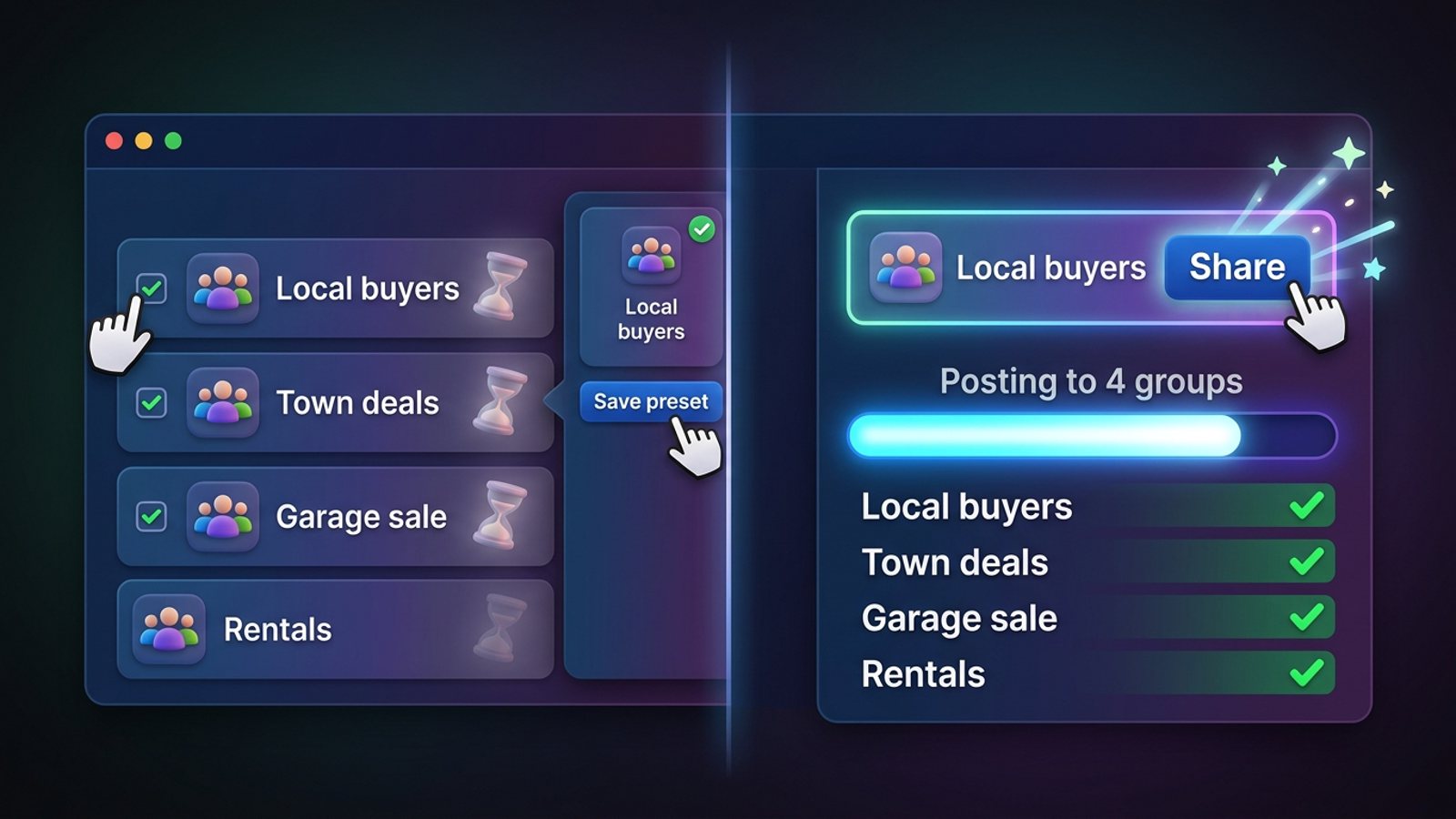
If you share to the same Facebook groups over and over, save them as a save facebook group list preset inside a Chrome extension that works on top of Facebook — Facebook itself has no way to pre-tick groups for a post. You tick your groups once, name the selection, and from then on you pick the preset instead of the groups.
Get MGSA Chrome Extension (Free Unlimited) and you can build your first saved group list in a couple of minutes.
Key takeaways
- Facebook's own tools (sidebar shortcuts, Favourites, the Groups feed) help you find groups, not pre-select them for a share — Meta's 2022 announcement describes them as finding and connecting features.
- A spreadsheet, notes file or bookmark folder keeps your group links tidy, but you still tick groups by hand on every post.
- A preset tool stores your selection under a name, so one click covers the whole list — and some tools, MGSApro included, can share to several presets at once.
- MGSApro also remembers which groups go with which profile, so you don't mix business and personal audiences.
- Saved presets save clicks, not judgement: group rules and admin approval still decide whether your post goes live.
Can I save a group list inside Facebook itself?
No — Facebook has no built-in "save this group selection" for posting. Meta's own 2022 announcement of sidebar group shortcuts and feed channels describes features that help you find and connect with groups quickly; they don't pre-tick groups in the share dialog.
What Facebook does give you is navigation help. Favourites is a hand-picked list of the friends and Pages that matter most — a 2026 third-party explainer citing TIME puts the cap at up to 30 favourites and warns that the number and account types can change, so check your own Favourites screen. The Groups feed and sidebar show your groups and recent activity so you can jump in faster. Meta also launched a Groups app called Forum for iPhone, which pulls every group an account belongs to into one feed.
All of that is a reading and finding surface. Every share still means searching the group and clicking it. That's the gap a preset fills.
Why does re-ticking groups waste so much time?
Because a single manual group share runs about seven steps and roughly two minutes, according to a Chrome Web Store listing for a group-sharing extension. Click Share → Groups → search the group → click the group → type a blurb → click share → note which group you already used so you don't double post.
Do that for 20 groups and you've spent the better part of an hour on clicking. Do it three times a week and it's a part-time job. The ticking isn't the work — the listing is the work. A saved preset removes the ticking.
How do I save my Facebook groups as a reusable preset?
Build the list once, name it well, then reuse it. Here's the sequence that works whether you're setting up a tool or just getting organised:
- Decide the sets you actually post to. For example "local buyers", "national deals" or "Page audience", so each preset has one clear job. A master list with a label, topic and location note per group is the advice from a 2026 vendor blog on organising group URLs.
- Build a master list of group links with those labels and notes — one row per group.
- Prune duplicates and groups you've been removed from or that don't allow promotion, so the preset stays clean.
- Add the groups to your tool — scan your joined groups, import a CSV/Excel file or paste links — and save the set under a name, as the Multigroup Poster listing describes.
- Link each profile or Page to its matching preset if you run more than one, so you're not posting a personal offer from a business profile.
- Combine presets when a post belongs in more than one audience, checking for overlaps so no group gets it twice.
- Review the preset before you reuse it. Group rules, admins and approval settings change; a 2026 RedReplier piece on group post approval covers how much of your reach depends on them.
- Keep it human. Spread runs out, vary the text, and don't treat a saved preset as a licence to blast 1,000 groups. A 2026 MaherPost vendor blog notes that rapid posting across many groups gets accounts flagged and no tool can guarantee zero risk.
How to do it in MGSApro
MGSApro is a Chrome extension that shares your Facebook post to many groups in one click, directly on Facebook — no login, no extra dashboard. To save a preset:
- Browse your Facebook groups and tick the ones you want.
- Optionally type a message or blurb.
- Save the selection as a preset for next time.
- Click Share and watch the progress bar as it posts to each group.
You can share to multiple presets, and MGSApro remembers which groups go with which profile — the owner confirms it works across multiple Facebook profiles and keeps each profile's groups straight.
Can one preset cover several sets of groups?
Yes, in tools that support combining lists. One extension listing describes a 25-group city list plus a 20-group national list sharing to every unique group across both, never the same one twice. That's the practical way to handle "my town" and "my whole region" without maintaining two overlapping lists.
Our recommendation: keep presets small and purposeful — one for local buyers, one for a wider region, one for a specific service — then combine only when a post genuinely fits both. A 60-group mega-preset is harder to review and easier to spam with.
Does the tool remember which groups go with which profile?
Some do. Multigroup Poster's listing says it links a Page or profile to a group list once so new posts auto-share there. Group Posting PRO (Chrome and Edge) lets you organise the groups you belong to and pick who you post as — a profile or a Page you manage. MGSApro does the same job for profiles: it remembers which groups go in which profile.
If you run one profile, this doesn't matter much. If you run two or three — say a personal one for local groups and a Page for a wider audience — it's the difference between a clean post and an embarrassing mix-up. Our guide to posting the same listing under different profiles walks through that setup.
What are the best tools for saving Facebook group lists?
Here's how the options compare, ours first. Of the tools we compared, MGSApro is our pick for sellers who want one-click sharing with human-like pacing built in.
| Option | Best for | Key features | Price / free option | Watch-outs |
|---|---|---|---|---|
| MGSApro (Our pick) | Sellers and small businesses sharing to the same groups repeatedly | Tick groups on Facebook, save reusable presets, share to multiple presets, optional message, live progress bar, randomized delays and human-like clicks, AI text variations per group, remembers groups per profile | Free with a small watermark, or $9.99/month without it as of November 2026; prices can change | Chrome only; operates on top of Facebook; free version adds a watermark; not affiliated with Meta |
| Multigroup Poster | People who want to import a group list from CSV/Excel | Scan joined groups, import CSV/Excel or paste links, named collections, links a Page or profile to a list | Free trial, then paid plans; a directory listing states "Pro from $9.99/mo" as of November 2026 — check the vendor's own page | Pricing details not confirmed beyond the directory claim |
| Group Post Helper | Tagging and organising groups locally | Syncs your joined groups from the active browser session, tag and organise into collections stored on your machine | Pricing not stated in the listing we reviewed | Pricing and plan details weren't in the material we reviewed |
| AutoPost Grupos FB | Moving a group list between computers | Back up and restore your group list as a JSON file | Pricing not stated in the listing we reviewed | Backup-focused; check the listing for current features |
| Facebook shortcuts, Favourites and sidebar | Finding your favourite groups fast | Sidebar shortcuts, Favourites, Groups feed | Free — part of Facebook | Doesn't pre-tick groups for a share; Favourites limits can change |
| Spreadsheet or notes file | Keeping a labelled master list | Labels, topic and location notes, easy to share with a team | Free | A reference list only — you still tick each group by hand |
A few honest notes. If you mainly need to import an existing spreadsheet of groups, Multigroup Poster is the more direct choice. If you just want a tidy reference list you can hand to a teammate, a spreadsheet is free and good enough. And if you need to post from a Page rather than a profile, check that the tool supports it before you commit.
MGSApro is made by the team behind this blog.
Will a saved preset stop me double-posting?
Partly. Some extensions track duplicates so a combined preset won't hit the same group twice, per a Chrome Web Store listing. But the gap is usually human: two presets that overlap, or a run you forgot you did yesterday.
Our recommendation: before a big push, check your recent group activity, and keep one preset per audience so overlaps are obvious. If tracking which groups already got a post is your main headache, our guide to posting to 40 groups without losing track covers a simple system.
Can a cloud scheduler post to my saved groups?
No — not through the official API. Meta removed the Groups API and the publish_to_groups permission from every Graph API version on 22 April 2024, according to a 2026 RedReplier article. That's why cloud schedulers can't post to groups, and why tools that do must run inside your own logged-in browser session, as a 2026 tools directory listing puts it.
Post Planner's Lists feature, which let you save named lists of Pages or Groups and pick them from a dropdown, dates from a 2012 article — well before the API removal. Meta Business Suite is free and good for Pages and Instagram, but it's built around Pages, not a personal profile's group shares.
This is where a browser extension earns its place: it works inside the Facebook session you're already logged into, so your saved preset sits right where you post.
Get MGSA Chrome Extension (Free Unlimited) and stop re-ticking the same groups on every post.
Sources
- Presentamos funciones para encontrar y conectar rápidamente con Grupos de Facebook — Facebook (Meta), 2022-06-27
- Facebook Favorites vs. Feeds: Which Gives More Control? — Rotten WiFi, 2026-10-12
- Meta launches Forum app for Facebook Groups with AI tools — systemreport.net, 2026-05-21
- Share Post to Multiple Facebook™ Groups | Multiple Group Share Assistant — Chrome Web Store, date not given
- Multigroup Poster – Facebook Group Auto Poster, Bulk Post & Scheduler — Chrome Web Store, date not given
- MultiGroup Poster — Launch Llama Tools Directory, 2026-11-19
- Group Post Helper: Facebook Multi-Group Auto Poster & Scheduler — Chrome Web Store, date not given
- AutoPost Grupos FB — Chrome Web Store, date not given
- Group Posting: AI Group Auto Poster, Scheduler & Lead Radar for Facebook™ — Microsoft Edge Add-ons, 2026-11-07
- Group Posting PRO — Chrome Web Store, date not given
- Group Posting Q&A — ExtPose, 2026-11-08
- How to post to Lists of Pages and Groups with Post Planner — Post Planner, 2012-05-15
- Meta Business Suite – do czego służy? — Inpost.pl, 2025-06-12
- Facebook Group Not Showing Up in Meta Business Suite — CodeMasters Agency, 2024-12-20 (updated 2025-02-01)
- How to Organize Facebook Group URLs for Posting Campaigns — getbuildmint.com, 2026-07-15
- Facebook Group Post Approval — RedReplier, 2026-09-12
- Is Facebook Auto Poster Safe? — MaherPost, 2026-08-05
- facebook-post-automation README — GitHub, 2025-08-05
- Facebook Group Post Sharing Automation — GitHub, 2025-04-03
Frequently asked questions
Never manually share to groups again
MGSA Pro is the free Chrome extension that shares your posts to every Facebook group for you — safely, with human-like timing.
Keep reading
How do I stop my Facebook group posts from all reading the same when I share in bulk?
November 22, 2026
How do I share a Facebook post to all my buy-and-sell groups in one click from Chrome?
November 21, 2026
How do I share a new listing to every local Facebook group without hunting for group names?
November 21, 2026