How do I share the same listing to many Facebook groups as a realtor?
November 20, 2026 · MGSApro Team

You can't pick several groups for a normal Facebook post — only buy-and-sell listings get a group list — so realtors either share by hand, group by group, or use a Chrome extension that runs those share clicks inside their own logged-in browser with spaced-out timing and varied wording. Realtor Facebook group posting works best when you check each group's rules first and keep the post short.
Get MGSA Chrome Extension (Free Unlimited) — share one listing to all your groups in one click, right on Facebook.
Key takeaways
- Facebook has no multi-group picker for regular posts; only buy-and-sell style listings get one (Groupboss, 2025; MultiGroupPoster, 2026).
- The share flow is manual per group: Share → Groups → search → blurb → share, roughly a couple of minutes each (Crx搜搜 mirror, 2026).
- Identical wording and metronome-regular timing are what Facebook's spam systems pattern-match, not just volume (Conbersa, 2026; MultiGroupPoster, 2026).
- Each group's rules live under "About"/"Info" or the pinned post; one breach can mean a deleted post or a group ban (BuzzPost, 2026).
- A short post — hook, 3–5 key facts, one next step, strong lead photo — outperforms a wall of text (AutoGP, 2026).
How do realtors share one listing to many Facebook groups?
They either do it by hand or use a browser extension that clicks through the share flow for them. Facebook's built-in "Add groups" option lets you tick several groups when you compose a new post, provided you have posting permission in each (Tecnoblog, 2025). For sharing an existing listing post, though, there's no group picker — each share to a group is its own Share → Groups → search → blurb → share run (MultiGroupPoster, 2026; Crx搜搜 mirror, 2026).
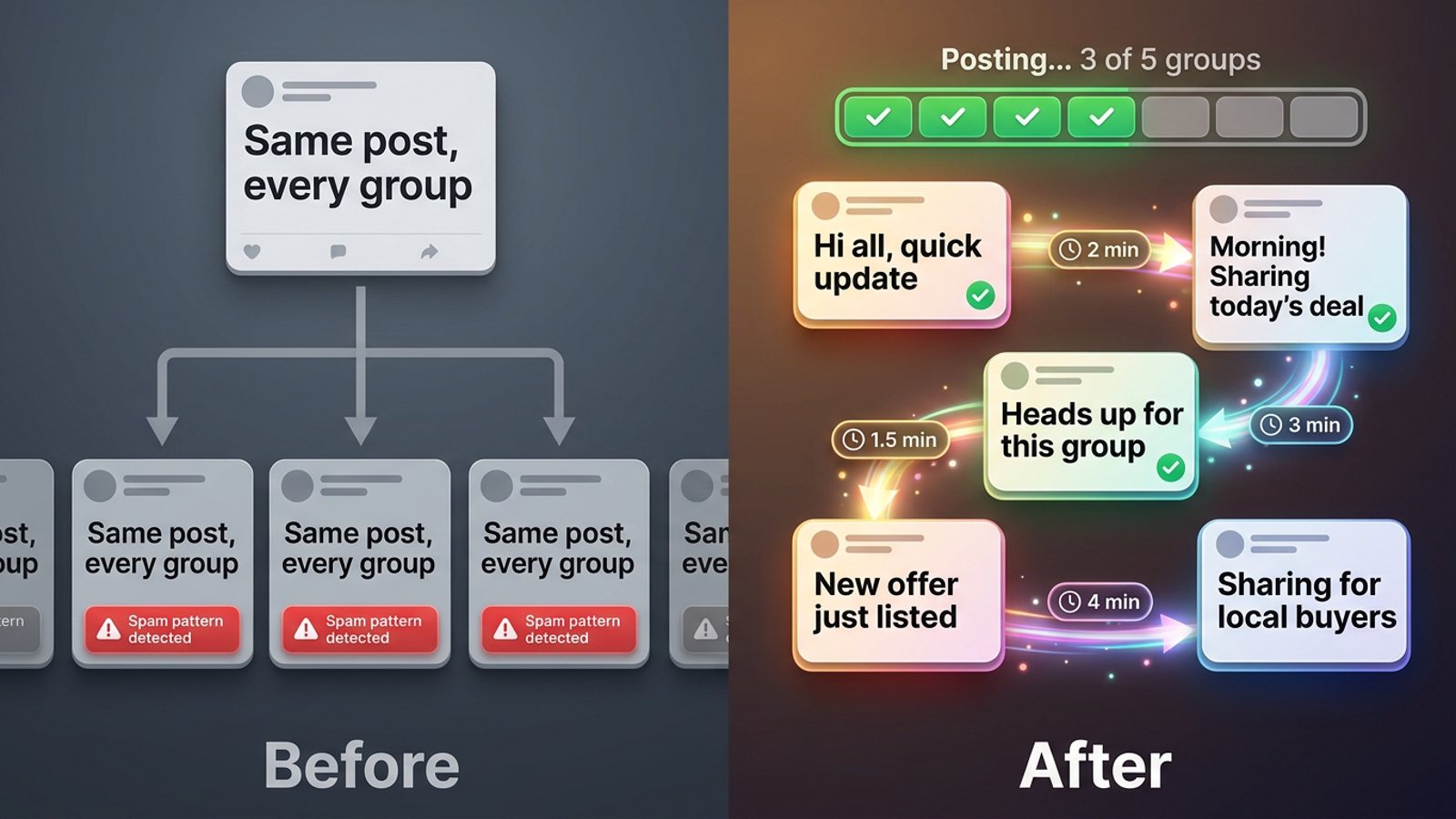
That's why volume posters reach for a Facebook group sharing extension. MGSApro sits on top of Facebook in your own Chrome: you tick the groups on the page, add an optional message, save the list as a preset, and click Share once. A live progress bar shows each group being posted. If you want the step-by-step walkthrough, the MGSApro tutorial shows the whole flow.
What should a realtor's listing post say in a group?
Keep it short: a hook, 3–5 key facts, one next step, and a strong lead photo. AutoGP's 2026 real-estate guide recommends exactly that shape — "Just listed" plus where and the price, then beds, baths, size, standout feature and parking, then one clear call to action.
Agent Abby Goodell, in a 2025 Inman interview, describes her template: a "New Listing!" headline with bed/bath emojis, a short description plus CTA, and MLS-quality photos reused each time. That's one agent's practice, not a rule — but it's a sensible shape to copy.
Our recommendation: write two or three versions of the same listing blurb before you post. Then each group gets slightly different words instead of the same paragraph pasted everywhere.
Which Facebook groups should a listing go into?
Match the group type to whether listings are allowed there. MaherPost's 2026 guide breaks local groups into four buckets:
- Neighbourhood community groups — often limit or ban listing posts.
- Town or suburb news groups — usually allow listings on a set day.
- Local buy-and-sell groups — usually allow them.
- Relocation groups — often allow them if you add real value.
Goodell told Inman (2025) she shares to up to 20 local buy/sell/swap groups inside a 30–60 mile radius. She also admits she posts even when she can't see a group's rules ("If they remove it or kick me out, it's fine"). Treat that as one agent's practice, not advice — BuzzPost's 2026 guide on group rules warns a single breach can mean a deleted post and sometimes a permanent ban without warning.
How do I stop my listing posts looking copy-pasted?
Vary the wording and leave gaps between shares. Facebook's automated spam systems flag accounts by pattern-matching, often before a human moderator sees anything — and the patterns they look for include bursts of identical posts in a short window and metronome-like timing (Conbersa, 2026; MultiGroupPoster, 2026).
A cautious operating model from PostSyncer (2026): new or reactivated accounts start with a small set of highly relevant groups and engage through comments and reactions first; established accounts work in small batches, vary wording, and leave gaps between posts.
This is where MGSApro's built-in randomized delays and human-like clicks, plus AI-generated text variations for each group, do the boring part for you. You write the listing once; the extension varies it as it goes.
How many groups a day is safe for realtor Facebook group posting?
Meta's own documentation gives no daily group-posting figure; what the sources offer are field estimates. One practitioner guide (Medium / Dented Feels, 2026) claims systems flag accounts posting across 10–15+ groups in rapid succession — that's a vendor-blog field estimate, not an official number, so don't treat it as a target.
Our recommendation: start smaller than you think you need to. Post your first listing to your five most relevant local groups, watch what happens, then add more. If you want a deeper look at pacing, our guide to posting to 30 Facebook groups in a few minutes walks through it.
Can I schedule a listing to post to groups automatically?
Not through Meta Business Suite — it posts to Pages and Instagram Business accounts, not Groups (MultiGroupPoster, 2026; Freedom Res, 2026). Meta withdrew third-party Groups API access in 2024, so mainstream schedulers no longer post into groups at all (Farsem, 2026).
What's left, per Farsem's 2026 roundup: native scheduling for group admins, manual sharing, browser extensions (which need a computer left on), and platforms posting from a hosted browser. MGSApro can schedule posts into your own groups only — and it remembers which groups belong to which profile if you run more than one.
What tools can share a listing to many Facebook groups?
Here's how the options we compared stack up, cheapest effort first.
| Option | Best for | Key features | Price / free option | Watch-outs |
|---|---|---|---|---|
| MGSApro (Our pick) | Realtors sharing one listing to many groups fast, on Facebook itself | One-click share to many groups, group presets, optional message, live progress bar, randomized delays, AI text variations, no dashboard | Free with a small watermark; $9.99/month without, or from $7.99/month on the yearly plan (as of November 2026; prices can change) | Chrome only; operates on top of Facebook; not affiliated with Meta |
| Facebook's built-in share / "Add groups" | Occasional posting with zero tools | Free, native, nothing to install; "Add groups" works when composing a new post | Free | No multi-group option when sharing a regular post; each group share is a separate manual flow |
| Manual copy-paste posting | Realtors posting to a handful of rule-heavy groups | Full control of wording per group; easiest way to respect each group's rules | Free | Slow — roughly a couple of minutes per share, plus you must track which groups you used |
| Meta Business Suite | Scheduling to your Page and Instagram | Native, cross-posts to Instagram, bulk CSV scheduling up to 100 posts per upload | Free | Does not post to Facebook Groups or personal profiles |
| Multigroup Poster (extension) | High-volume bulk posting with spintax | Bulk post or share to 50+ groups in one click, spintax variations, randomized 30–300s delays, named group lists, scheduling | Free trial then paid plans; price figures not shown on the listing (as of November 2026) | Needs Chrome open at the scheduled time; a completed run isn't proof every post went live |
| Group Posting PRO (extension) | Posting as a profile or Page from your own browser | Bulk group posting, Lite/Plus/Pro/Agency plans, used by property professionals for listings | Plans named; prices not shown on the listing (as of November 2026) | Same browser-extension constraints; check each result on Facebook |
MGSApro is made by the team behind this blog. Of the tools we compared, it's our pick for realtors because the whole job happens on the Facebook page you're already looking at — no second dashboard, no login, and presets mean your "Anytown buy/sell" list is one click next time. If you mainly need spintax-heavy bulk posting with long custom delay ranges, Multigroup Poster is the more direct choice. If you want to post as a Page rather than your profile, Group Posting PRO is built around that.
Either way, extensions work by automating your browser, not through an official API (Farsem, 2026). They need your computer on and Chrome open, and a finished run doesn't prove every post is live — check each group afterwards (MultiGroupPoster, 2026). For a wider look at the category, see the best tool to share one Facebook post to all my groups at once.
What's the step-by-step for a new listing?
- Build your group list. Search your town name plus "buy sell", "homes", "relocation" and "community", and join the ones that fit.
- Check each group's rules. Open the "About"/"Info" tab or the pinned post; in the app it's under the three dots (BuzzPost, 2026).
- Sort by type. Buy-and-sell and town news groups first; neighbourhood groups last, if at all (MaherPost, 2026).
- Write the post. Hook, 3–5 facts, one next step, best photo first (AutoGP, 2026).
- Prepare variations. Two or three blurb versions so no two groups get identical text.
- Share. Tick your groups on the Facebook page, add your message, save the selection as a preset, and hit Share once.
- Space it out. Small batches with gaps, not one burst (PostSyncer, 2026).
- Check the results. Confirm each post is actually live in each group.
- Reply fast. Goodell reports spending under an hour a week per listing on messages and comments (Inman, 2025) — speed there is what turns a group post into a showing.
Ready to stop clicking through groups one at a time? Get MGSA Chrome Extension (Free Unlimited) and share your next listing in one click.
Sources
- How to Post to Multiple Facebook Groups at Once (MultiGroupPoster blog, 2026-01-14)
- How to Post in Multiple Facebook Groups (Groupboss, 2025-01-20)
- Как публиковать в нескольких группах Facebook одновременно (Tecnoblog, 2025-04-09)
- Share Post to Multiple Facebook™ Groups | Multiple Group Share Assistant (Crx搜搜 mirror, 2026-10-06)
- Facebook Marketplace: The effective tool most agents skip (Inman, 2025-06-23)
- Facebook Group Rules for Real Estate 2026: What Gets You Banned (BuzzPost, 2026-04-25)
- Facebook Groups for Real Estate Agents: A Lead Playbook (MaherPost, 2026-10-28)
- How Facebook Detects Duplicate Content (MultiGroupPoster blog, 2026-07-01)
- How to Avoid Facebook Group Spam Detection as a B2B Founder (Conbersa, 2026-07-01)
- How to Post in Multiple Groups on Facebook Safely (PostSyncer, 2026-09-23)
- How Many Facebook Groups Can I Post To Per Day? (Medium / Dented Feels, 2026-05-28)
- Best tools to post in Facebook groups (Farsem, 2026-10-21)
- Facebook Groups for Real Estate Agents: Schedulers Can't Post to Groups (Freedom Res, 2026-09-23)
- Facebook Post Scheduler App: 8 Tools Compared (MultiGroupPoster blog, 2026-05-08)
- Facebook Groups for Real Estate Agents: Post Listings (AutoGP, 2026-10-25)
- Multigroup Poster – Facebook Group Auto Poster (Chrome Web Store, date not given)
- Group Posting PRO: Facebook™ Group Bulk Poster (Chrome Web Store, 2025-04-08)
Frequently asked questions
Never manually share to groups again
MGSA Pro is the free Chrome extension that shares your posts to every Facebook group for you — safely, with human-like timing.