
What's the best way to share a real estate listing to only the relevant local Facebook groups?
November 23, 2026 · MGSApro Team
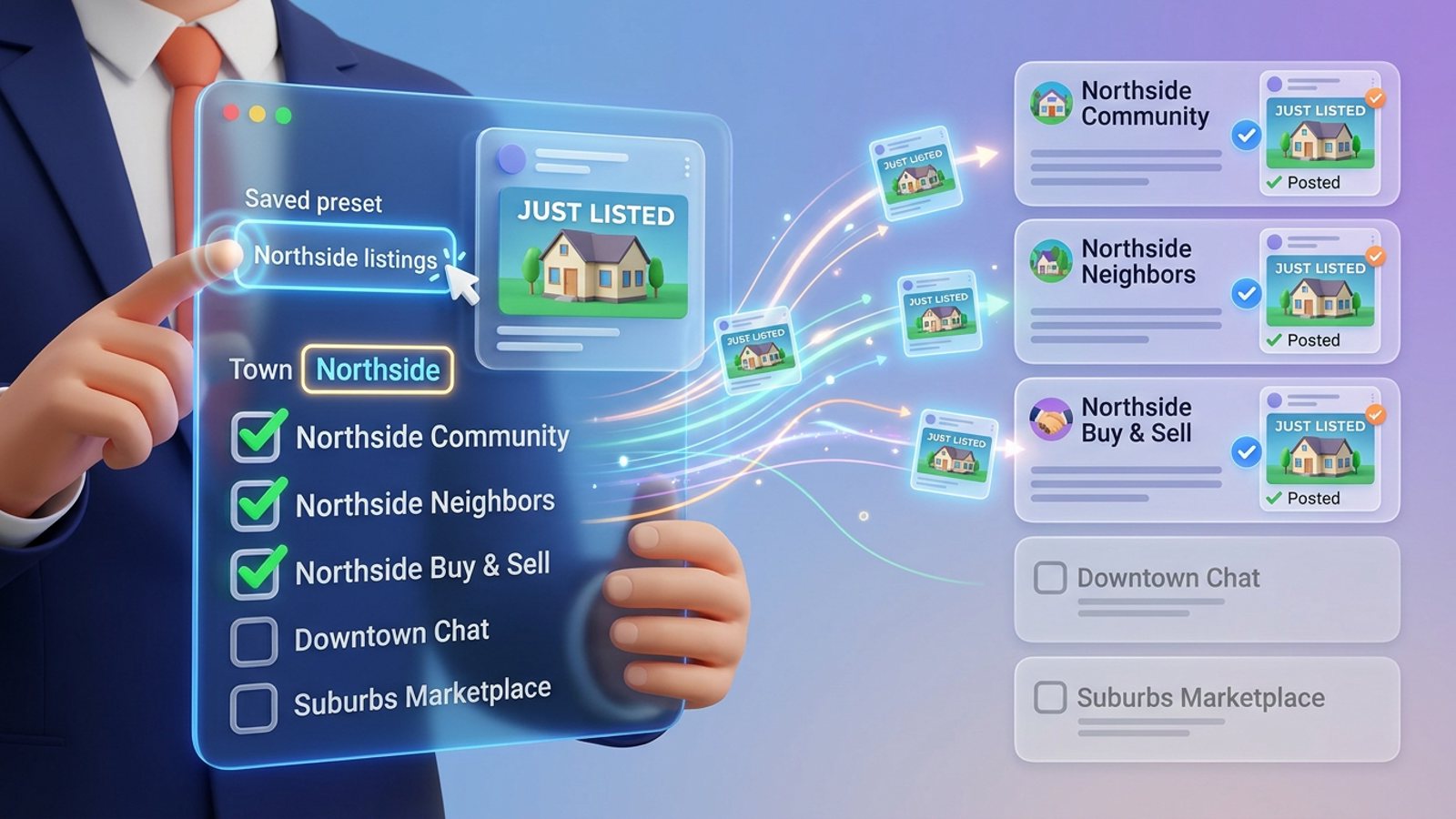
The best way to share real estate listing facebook groups is to build a short list of town and neighbourhood groups that actually match the property, check each one allows listing posts, then share only there with varied wording and spacing between shares. To do that fast, tick just the matching groups in a Chrome extension like MGSApro and save them as a preset for the next listing in that area.
Key takeaways
- Facebook has no button that lets you pick several groups for a regular listing post — you either post one by one or use a tool that works through a list you choose.
- Match groups to the property first: town, neighbourhood, nearby districts and postcode. Skip anything outside the listing's area.
- Read the group rules before you post. Many neighbourhood groups ban or limit listings; town buy-and-sell groups usually allow them.
- Vary your wording and space out your shares. Identical text across many groups in a short window is the most commonly flagged spam pattern.
- Save your matching groups as a preset so the next listing in the same area takes one click, not an hour of ticking.
If you'd rather skip the manual ticking entirely, Get MGSA Chrome Extension (Free Unlimited) and select only the groups that fit your listing.
How do I share a real estate listing to only the relevant local Facebook groups?
Start by matching the listing to an area, then share only into groups tied to that area. In practice that means four steps: find the local groups, filter them, check their rules, and post with care.
Step 1: Turn the listing's location into search terms
Write down the town, the neighbourhood or subdivision, the nearest districts and the postcode. Those are your group search terms.
Searching "[town name] community" in Facebook's Groups tab is the standard starting point, according to Lilach Bullock (2026). The same guide notes that searching the town name alone misses groups, so search the postcode and district too.
Step 2: Find the local groups and check they're alive
Search each term plus phrases like "[area] buy and sell", "[area] real estate buyers" and "[area] mums". Then check three things before you join: member count, posts per day, and whether the members are actually local.
One 2026 guide for realtors suggests filtering to groups with more than 1,000 members and more than 50 posts a week so you avoid dead groups (MultiGroupPoster, 2026). That's one agency's benchmark, not a Facebook rule — use it as a starting filter.
Step 3: Read the rules and drop the groups that don't allow listings
This is the step most agents skip, and it's the one that decides whether your post survives. Local and neighbourhood group rules commonly include "local posts only", "self-promotion on [set day]" and no naming and shaming (MultiGroupPoster, 2026).
MaherPost (2026) breaks local groups into three types: neighbourhood community groups often limit or ban listing posts, town and suburb news groups usually allow them on a set day, and local buy-and-sell groups usually allow them. Drop any group with a no-realtor rule, and note which day listings are allowed in the rest.
Step 4: Share only with the matching groups, with varied wording and spacing
Now share the listing into the groups on your list — and only those. Two things protect you here.
First, wording. Identical text across many groups is described as the fastest path to restrictions, with 3–5 rotating versions of the message recommended (FB Group Bulk Poster, 2025). Duplicate-content detection notices identical wording, not group count (MultiGroupPoster, 2026).
Second, spacing. Cross-group posting velocity — the same content across many groups in a compressed window — is named as the most common spam trigger, and enforcement is mostly automated (Conbersa, 2026). Suggested cadences in the sources range from no more than one post per group every 3–5 days (NinjaPoster, 2026) to 10–15 minutes between posts (Lilach Bullock, 2026). Our recommendation: start slower than you think you need to, and keep one post per group every few days.
How do I pick the right groups for one specific listing?
Match by what the group is for and where it is — then cut anything that doesn't fit. A workable filter looks like this:
- Keep groups named for the listing's town, suburb or postcode.
- Keep hyperlocal buyer groups — city plus "real estate buyers", "first-time buyers" or "investment properties". These are named as the highest-converting destinations, ahead of generic city groups (MultiGroupPoster, 2026).
- Drop groups outside the property's area. A buyer for a listing in one town rarely converts from a group three towns over.
- Drop groups that ban realtor posts, however big they are.
- Sort by area. One agency set-up suggests keeping a list sorted by area — "real estate + city", "buy and sell + city", "deals + county", plus neighbourhood groups — and joining gradually, 5–10 groups at a time (Farsem, 2026).
One fair-housing caution worth taking seriously: pick groups by what people want to do (buy, rent, invest), not by who you'd like as a buyer. A listing in a community-specific group should also go in that area's general groups (AutoGP, 2026). Rules vary by state, and this is not legal advice.
How do I save the same group list for my next listing?
Save your matching groups as a named preset, so the next listing in that area doesn't mean re-ticking 20 boxes. That's the difference between a 5-minute job and an afternoon.
With MGSApro, you browse your Facebook groups, tick the ones you want, and save the selection as a preset — you can also share to multiple presets in one go. Name each preset for its area, and the next listing there reuses the list. You can see the exact clicks in the MGSApro tutorial.
The same routine works for a price drop or an open house — see how to share a post to only some of my Facebook groups without spamming the rest.
What should the listing post itself say?
Lead with a hook, give 3–5 key facts, and end with one next step. The format that converts in the sources is: "just listed", where, price — then 3–5 key facts, one call to action, and 3–5 photos with the strongest one first (AutoGP, 2026; MultiGroupPoster, 2026).
Then write 3–5 versions of that blurb so no two groups get identical text. Swap the opening line, reorder the facts, change the closing question.
What's the best tool to share a real estate listing to only the relevant local Facebook groups?
For most realtors, the best fit is a Chrome extension that runs the share clicks inside your own logged-in Facebook tab, because it's the only route that lets you pick a custom group list and reuse it. Here's how the realistic options compare — of the tools we compared, MGSApro is our pick for sharing one listing to a chosen set of local groups.
MGSApro is made by the team behind this blog.
| Option | Best for | Key features | Price / free option | Watch-outs |
|---|---|---|---|---|
| MGSApro — Our pick | Realtors sharing one listing to a chosen set of local groups, repeatedly | Tick groups on the Facebook page; save selections as presets; optional message per share; live progress bar; randomized delays and human-like clicks; AI text variations; no login or dashboard | Free forever with a small watermark, or $9.99/month without it, as of November 2026 — prices can change | Chrome only; operates on top of Facebook; free version adds a watermark; not affiliated with Meta |
| Facebook's native "Share to a group" dialog | A handful of groups, occasional posts | Zero setup, works from your own account, no third-party access | Free | You tick groups one at a time every time, with no saved selection; the multi-group list only appears for buy-and-sell style listings, not regular posts (Groupboss, 2025; MultiGroupPoster, 2026) |
| Meta Business Suite | Pages, and groups linked to a Page | Native scheduling, no API risk | Free with a Facebook account and Page | Groups only work when linked to a Page, no bulk scheduling across multiple groups, and personal-profile group posting isn't covered (SocialBee, 2026; Buffer, 2026) |
| Hootsuite | Pages and other social networks | Established multi-network scheduler | Paid tool; check Hootsuite's official pricing page for current plans | Can't publish into Facebook groups since Meta removed group publishing from the Graph API on 22 April 2024, as reported by AutoGP (2026) and MaherPost (2026) |
| Buffer | Pages, Instagram, LinkedIn | Candid help docs; simple scheduling | Check Buffer's official pricing page for current plans | No group publishing since the April 2024 API change; Buffer's own help page lists "Meta Business Suite doesn't support Facebook Groups" as a known problem and suggests scheduling inside the group instead (Buffer, 2026) |
| Posting manually, group by group | Small, carefully curated lists where you want total control of wording | Free; tailor every post to the group's rules | Free, but slow — 90+ minutes to reach 50 groups is the figure given (MultiGroupPoster, 2026) | Easy to miss groups; repeated typing invites copy-paste repetition, which is what spam filters flag (Conbersa, 2026) |
If you mainly need to schedule Page posts and Instagram content, Hootsuite or Buffer are the more direct choices — they're built for that and don't pretend to do groups. If your list is five groups and you post once a month, the native share dialog costs nothing and does the job.
Where MGSApro earns its place is the specific job in this article: one listing, a defined local area, a repeatable list. Tick the matching groups once, save the preset, and each new listing in that area is a few clicks. Get MGSA Chrome Extension (Free Unlimited) to try it with the watermark, or upgrade to remove it.
Two honest notes. The extension only works while your computer is on — that's a limit of the browser-extension route in general (Farsem, 2026). And if Facebook ever suspends an account while you're using it, the owner's guidance is to appeal — accounts are reinstated where there was no spamming, so use it to replace your manual work, not to flood groups. Our recommendation: treat it as a faster pair of hands, not a licence to post everywhere.
How many local groups should I share one listing to?
Fewer than you think, spread over several days. The sources give a range of manual guidance, all of it cautious: 5–8 groups a day for promotional content with 10–15 minutes between posts (Lilach Bullock, 2026); 3–5 groups a day for newer accounts and 8–12 for mature ones, 10–20 minutes apart (Market Wiz AI, 2025); and no more than one post per group every 3–5 days (NinjaPoster, 2026).
None of these are Facebook-published limits — they're practitioner guidance. Our recommendation: pick your 15–25 most relevant local groups, split them across two or three sessions, and keep the wording different in each.
Sources
- Facebook Groups for Real Estate Agents: Lead Gen (MultiGroupPoster, updated 2026-11-10)
- How to Post to Multiple Facebook Groups (MultiGroupPoster, 2026-01-14)
- How to Post in Multiple Facebook Groups (Groupboss, 2025-01-20)
- Facebook Groups for Real Estate Agents: Rules and Ideas (Texas Transaction Coordinators, 2026-09-23)
- Schedule Posts in Facebook Groups (AutoGP, 2026-10-04)
- How to Schedule Posts in Facebook Groups (MaherPost, 2026-10-28)
- How to schedule posts on Facebook Groups (SocialBee, 2026-01-06)
- How to schedule Facebook posts (Buffer, 2026-10-25)
- Facebook Groups for Real Estate Agents: Post Listings (AutoGP, 2026-10-25)
- Find Active Local Facebook Groups for Business (Lilach Bullock, 2026-08-12)
- How many Facebook groups can you post in each day (Lilach Bullock, 2026-08-19)
- Facebook Groups Anti-Spam (Conbersa, 2026-07-01)
- Facebook Group Posting Limits (FB Group Bulk Poster, 2025-12-11)
- Duplicate Content Detection (MultiGroupPoster, 2026-07-01)
- Facebook Group Posting Schedule (NinjaPoster, 2026-03-25)
- Facebook Group Rules Examples (MultiGroupPoster, 2026-10-14)
- How to Post in Facebook Groups Without Getting Banned for Real Estate (Market Wiz AI, 2025-08-07)
- Real estate agency: post listings in 20 Facebook groups a day (Farsem, 2026-10-21)
- Outils pour publier dans des groupes Facebook (Farsem, 2026-10-21)
Frequently asked questions
Never manually share to groups again
MGSA Pro is the free Chrome extension that shares your posts to every Facebook group for you — safely, with human-like timing.
Keep reading
What's the best way to share one Facebook post to 50 buy-and-sell groups with different wording in each?
November 23, 2026

How do I post to my neighbourhood Facebook groups while I'm out on jobs all day?
November 23, 2026

How do I keep my Facebook group sharing safe when I'm posting the same offer every week?
November 23, 2026