
How do I share a post to only some of my Facebook groups without spamming the rest?
November 23, 2026 · MGSApro Team
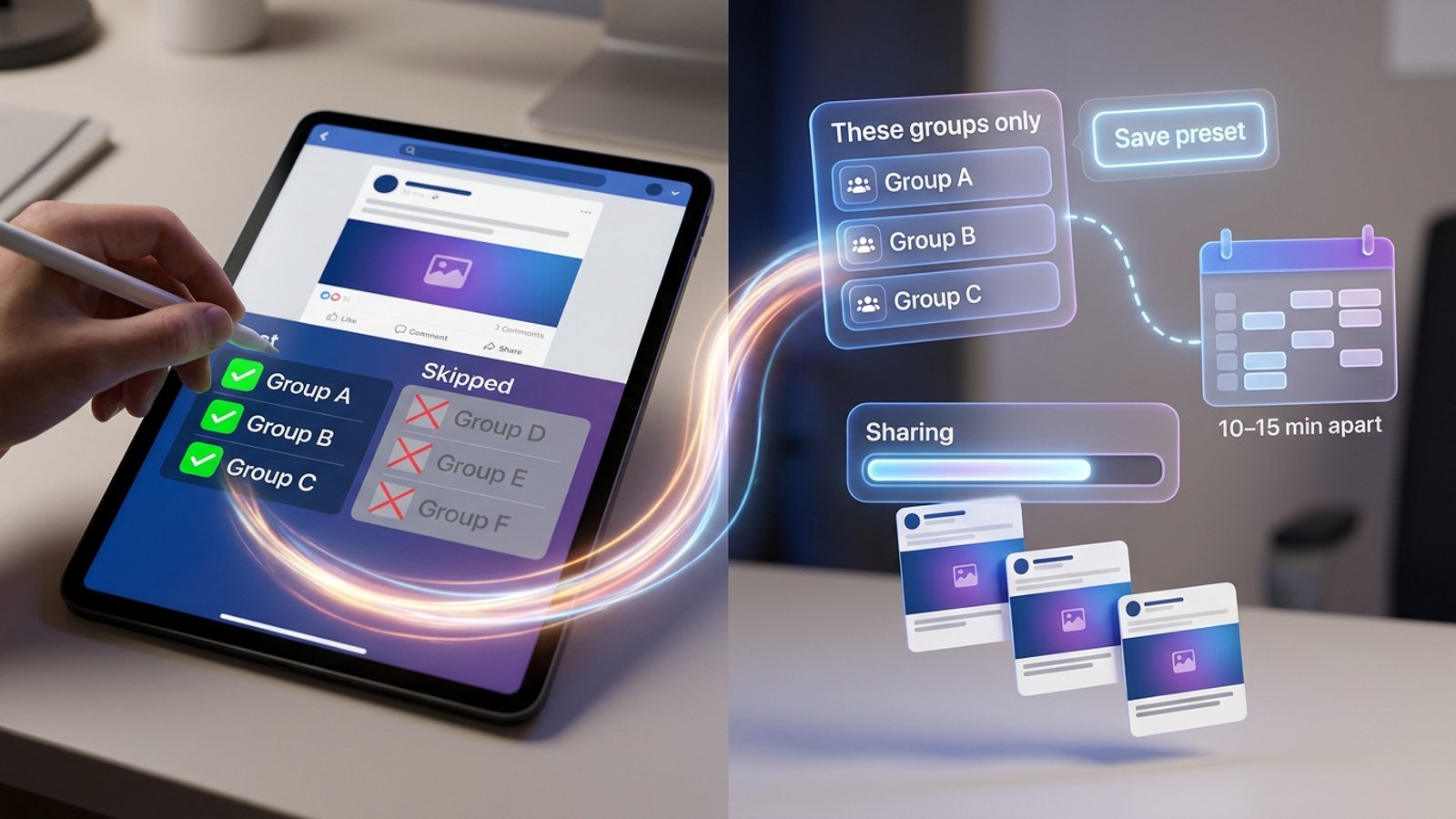
If you want to share to specific Facebook groups only, check each group's pinned promo rules first, then tick just the groups where the offer fits. On mobile you can tick several groups in one share; on desktop it's one group per share. Vary the wording and space the posts out — that's what keeps you out of spam trouble.
That's the whole job in one paragraph. The rest of this guide is the detail: how the built-in share flow actually works, how to keep a shortlist you can reuse, and how a Chrome extension can save your ticked groups as presets so you're not re-selecting them every time.
Key takeaways
- Facebook's Share menu doesn't sort or segment your groups for you — you keep your own shortlist of the ones that fit.
- On mobile you can tick several groups in one share (one source puts it at about 10); on desktop it's one group per share.
- Identical text across many groups is the most common spam trigger, per vendor blogs — vary the wording.
- Suggested cadence from one marketing blog: 5–8 promo/link shares a day, 10–15 minutes apart.
- MGSApro saves your ticked group selections as presets, so the same "these groups only" list is one click next time.
Ready to stop re-ticking the same groups every day? Get MGSA Chrome Extension (Free Unlimited) and save your chosen groups as a preset the first time you use it.
Why does sharing to every group backfire?
Because Facebook's spam policy reacts to pattern, not just volume. Meta's Spam policy (updated 25 June 2024) bans posting, sharing or engaging "at very high frequencies," whether you do it manually or automatically — and it can restrict accounts showing other spam signals, such as repetitive content.
In practice, one marketing blog (Lilach Bullock, August 2026) says Facebook's detection responds more to identical text, rapid timing and hitting many groups in one session than to the raw count. So the fix isn't only "post to fewer groups" — it's "post to the right groups, with different words, at a human pace."
There's a second cost, and it's the one sellers feel fastest: admins. A 2026 post from MaherPost on group promo rules says admins approve posts that read like a useful contribution and decline hard sells, repeats across groups, or posts that show up too often. Posting your cleaning offer into a group about vintage guitars doesn't just fail — it burns goodwill in a group you might need later.
How do I choose which Facebook groups actually fit the post?
Read the group's rules before you read your own caption. MultiGroupPoster (July 2026) recommends checking the group's Featured or pinned section for its self-promotion policy — look for words like "promo", "self-promotion", "links" or "vendors". MaherPost (October 2026) adds that groups usually run one of four patterns: a weekly promo day, a single pinned thread, a no-links rule, or a required format.
Our recommendation: before you share anything, score each group on three quick questions.
- Does the offer match the group's topic? A local real estate listing belongs in local community and neighbourhood groups, not in a national hobby group.
- Does the group allow promo at all, and when? If it's a weekly promo day, that's the day you share — not today.
- Has this group seen this offer recently? If yes, skip it this round.
Three yeses, and the group goes on your shortlist. Anything less, and it stays off. That shortlist is the whole answer to sharing to only some groups.
What's the step-by-step way to share to specific Facebook groups only?
Here's the native method, step by step.
- Build your shortlist first. Facebook's UI has no built-in way to sort or group your joined-groups list — a Web Applications Stack Exchange answer states there's no such option in the Facebook UI, and the API doesn't allow it either. So keep the list yourself: a note on your phone, a spreadsheet, or a saved preset if you use an extension.
- Find the post you want to share and click or tap Share.
- Choose "Share to a group." MultiGroupPoster (November 2026) notes this option sometimes sits under More options or is labelled just "Group." You must be a member of the group to share into it (Vpage/Nhanh.vn, March 2026).
- On mobile, tick several groups at once. CellphoneS Sforum (updated July 2026) describes the flow as Share → Groups → tick groups → Continue → add text → Share now, and puts the cap at about 10 groups per share. Treat that number as approximate — it's one secondary source.
- On desktop, repeat the share once per group. The same CellphoneS source says the multi-group tick doesn't work on a computer; you do one group per share.
- Add a group-specific line above the post. One sentence on why it matters here — that's what turns a share into a contribution.
- Space them out. Lilach Bullock (August 2026) suggests at least 10–15 minutes between posts and a cap of 5–8 groups a day for promotional or link posts, or 10–12 for conversational ones. Those are that blog's suggested ranges, not a Meta rule — Facebook publishes no official daily group-posting limit in the sources reviewed.
- Note what you've done. Double-posting the same thing to the same group is exactly the pattern you're trying to avoid.
If you're sharing a client's content rather than your own, the same shortlist logic applies — our guide to sharing a client's post to 25 groups without losing the afternoon walks through that version.
Can I save my chosen groups so I don't re-select them every time?
Not inside Facebook — but yes with an extension built for it. Facebook itself offers no way to save a "these groups only" list, which is why people rebuild the same selection every single day.
MGSApro handles that with group presets. You browse your Facebook groups, tick the ones you want, and save the selection as a preset. Next time you share, you pick the preset instead of re-ticking 15 boxes. You can also share to multiple presets in one run, and the extension remembers which groups belong to which profile if you run more than one.
It all happens on top of Facebook — one "Share to Groups" button on every post, no separate dashboard, no login. There's a live progress bar so you can see each group being posted, randomised delays and human-like clicks to keep the pace natural, and AI-generated text variations so no two groups get the identical caption.
One honest note on scope: it's Chrome only, and it operates on top of Facebook rather than replacing it.
How do I stop it looking like spam when I do share?
Vary the words and slow the rhythm. BuzzPost (May 2026) says the most common cause of trouble is identical text in every group, and that randomised delays make a run look human. NinjaPoster (March 2026) describes spintax — curly-brace alternatives like {Hello|Hi|Hey} — as a way to generate multiple unique versions of one template.
Our recommendation, if you're doing it by hand: write three versions of your blurb before you start, and rotate them. If you're using MGSApro, the AI text variations do that rotation for you per group.
And keep the content itself clean. Facebook's Business Help Center says it doesn't allow promoting products, services or business opportunities by sending messages, and it flags repeated or identical messages as spam. If you want the fuller safety picture, read our guide to sharing a Facebook post to many groups safely without looking like a bot.
A quick word on the rules: group posting rules vary by group and by place, and this article is general guidance, not legal advice.
Which tools let me share to selected Facebook groups?
Here's how the realistic options compare, as of November 2026. Prices can change.
| Option | Best for | Key features | Price / free option | Watch-outs |
|---|---|---|---|---|
| MGSApro (Our pick) | Sellers and marketers who share to a chosen subset of groups repeatedly | Tick groups on the Facebook page, save selections as presets, optional message, live progress bar, randomised delays, AI text variations, one Share to Groups button | Free with a small watermark; $9.99/month without it (from $7.99/month on the yearly plan) | Chrome only; runs on top of Facebook; not affiliated with Meta |
| Facebook's built-in Share menu | Sharing to exactly one group at a time with your own line above the post | Free, native, no third-party tool; mobile lets you tick several groups (about 10, per CellphoneS) | Free | Desktop is one group per share; no saved shortlist; no way to sort your group list |
| Meta Business Suite | Scheduling Pages and Instagram content ahead of time | Free queue for Pages/Instagram | Free | Can't publish into groups you've only joined; Meta removed Groups API publishing on 22 April 2024 |
| Buffer | Standard social scheduling for Pages and Instagram | Familiar scheduling workflow | Plans not covered in the sources reviewed | Can't publish into Facebook Groups — the Groups API restriction hits all schedulers equally (SocialKit, May 2026) |
| Hootsuite | Scheduling Page content through Meta's API | Scheduling for supported destinations | Plans not covered in the sources reviewed | Can't post into member groups (Medium, October 2026) |
| Manual posting with your own curated list | Full control, zero third-party risk, matching each group's rules | You decide every group and every word | Free (your time) | Slow — one vendor estimate puts it around 2 minutes per group; easy to lose track and double-post |
MGSApro is made by the team behind this blog.
If you mainly need to schedule Page and Instagram content, Meta Business Suite is the more direct choice. If you mainly need to publish into groups you've joined as a member, no scheduler can do it — the Groups API route closed in April 2024 — which is why the extension route exists.
Want the preset workflow in action? The MGSApro tutorial shows the tick-and-save steps, or you can add the Facebook group sharing extension and build your first preset today.
Sources
- How to Share a Post to a Facebook Group — MultiGroupPoster, 2026-11-13
- Cách chia sẻ bài viết vào nhóm trên Facebook — CellphoneS Sforum, updated 2026-07-16
- Hướng dẫn chia sẻ bài viết vào nhóm — Vpage/Nhanh.vn, 2026-03-23
- Facebook UI group sorting — Web Applications Stack Exchange
- Facebook auto-share vs posting in groups — Medium, Denied Feels, 2026-10-04
- I tried every way to schedule a group post — Medium, Dented Feels, 2026-10-24
- How many Facebook groups can I post to per day — Medium, Dented Feels, 2026-05-28
- Schedule Facebook posts — postify.tech, updated 2026-11-08
- How to schedule Facebook group posts — SocialKit, updated 2026-05-20
- Facebook group marketing for agencies — Group Posting, 2026-09-28
- Posting to Facebook Groups — AppSumo, 2025-10-02
- Post an update to multiple Facebook groups — Lilach Bullock, 2026-07-28
- How many Facebook groups can you post in each day — Lilach Bullock, 2026-08-19
- Facebook group rules for promotional posts — MaherPost, 2026-10-28
- Facebook group promotion rules — MultiGroupPoster, 2026-07-02
- Spam policy — Meta Transparency Center, updated 2024-06-25
- Spintax for group posts — NinjaPoster, 2026-03-25
- Auto-post to Facebook groups 2026 — BuzzPost, 2026-05-13
- Facebook Business Help — spam warning — Facebook
- Chrome Web Store — share post to multiple groups
Frequently asked questions
Never manually share to groups again
MGSA Pro is the free Chrome extension that shares your posts to every Facebook group for you — safely, with human-like timing.
Keep reading
How do I keep separate Facebook group lists for each service I sell without re-ticking boxes?
November 23, 2026
What's the best way to vary the wording of the same post across 50 buy-and-sell groups?
November 22, 2026

How do I post my weekly offer to 25 local Facebook groups while I'm out on jobs?
November 21, 2026