Is there a Chrome extension to post to multiple Facebook groups?
November 11, 2026 · MGSA Team

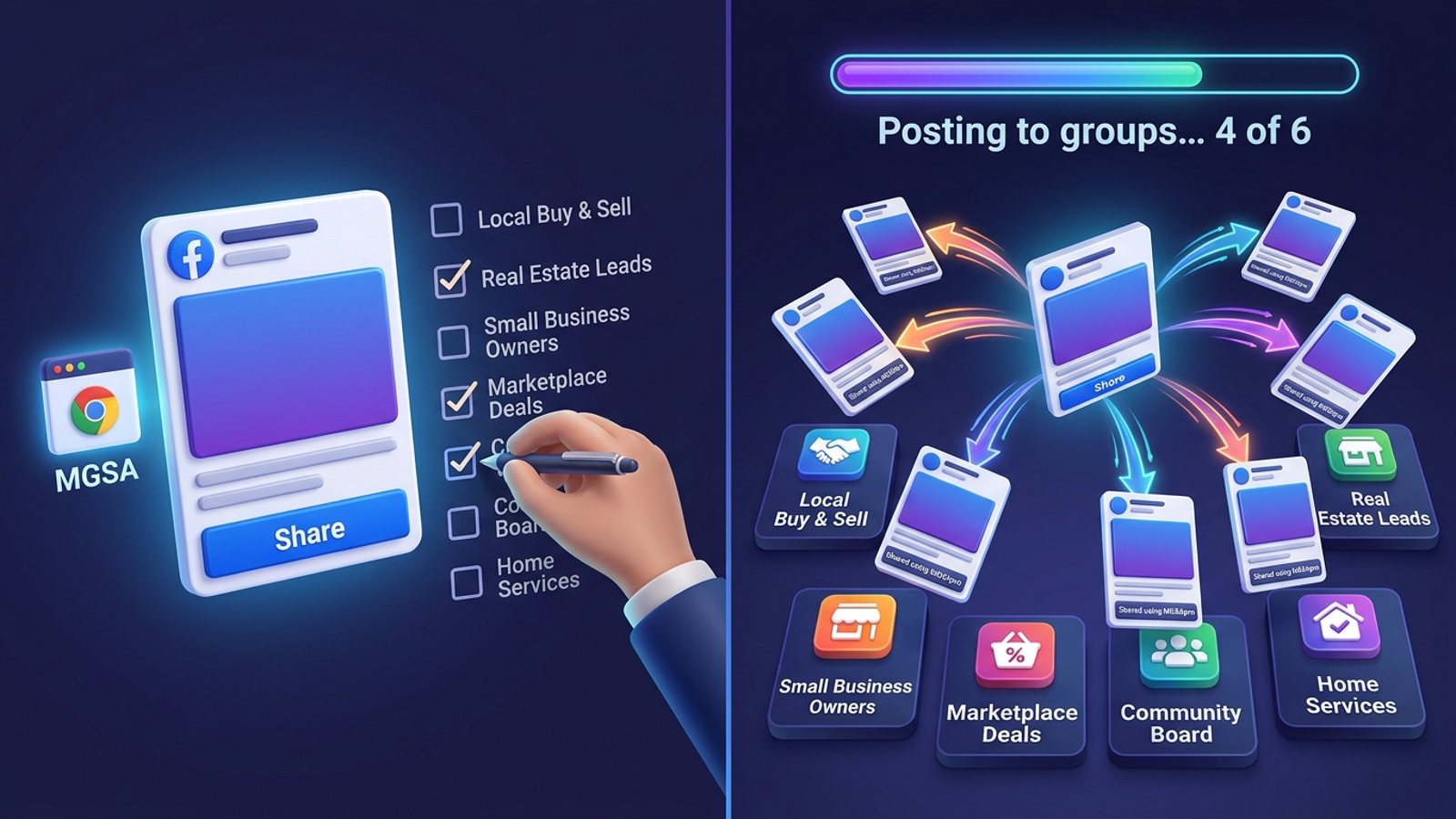
Yes. A Facebook group poster Chrome extension works inside your own logged-in Facebook tab and posts to your groups for you. Of the extensions we compared as of November 2026, MGSA ranks first: one-click sharing, saved group lists and free unlimited sharing with a small watermark. Vet any extension before installing.
Key takeaways
- Group-posting extensions act in your own browser, so they don't need Facebook's Groups API.
- Before installing, check the Chrome Web Store listing, the permissions it asks for, its privacy disclosures, its update history and its reviews.
- Never give an extension your Facebook password. MGSA needs no login or password.
- MGSA is our pick of the extensions compared: presets that de-duplicate, a natural pace, AI text variations and a free tier with no sharing cap.
- Pace yourself and follow each group's rules, whatever tool you use.
How does a Facebook group poster Chrome extension work?
It does in your browser what you would do by hand. You are already signed in to Facebook, and the extension clicks buttons and types text on the page for you.
That matters because of a change on Facebook's side. A SocialBee guide published on 7 January 2026 (a vendor blog, so read it as one company's view) says third-party tools can no longer publish directly to groups, because Meta discontinued the Groups API in 2024. Buffer's pricing page (checked November 2026) fits that picture: for Facebook groups it lists reminder notifications, while automatic publishing is not included.
So an extension that acts in your logged-in tab is the practical route for groups you joined as a member. Multigroup Poster's site describes exactly this: it says it runs locally in your own Chrome and uses your existing Facebook session. MGSA also acts in your logged-in tab, with a "Share to Groups" button inside Facebook.
For a wider look at the options, see What is the best tool to post to multiple Facebook groups?.
What should I check before installing a Facebook group poster extension?
Run through this list on the Chrome Web Store listing before you click add.
- Who made it, and is it a real listing? Install from the Chrome Web Store, not from a file or a pop-up link. Chrome's help page says Enhanced Safe Browsing can warn you about untrusted extensions, and that trust depends on following the Chrome Web Store Developer Program Policies.
- What permissions does it ask for? Chrome's install prompt can list the permissions or data an extension needs, and its help page says to approve only extensions you trust. Chrome's developer documentation explains that host permissions let an extension interact with sites matching certain patterns, for example by injecting scripts or making requests. A Facebook tool should need Facebook, not every site you visit.
- What do the privacy disclosures say? Look for a privacy policy and for what data the developer says it handles. If a listing is vague, treat that as a reason to wait.
- When was it last updated? Facebook's pages change often, so a tool that hasn't been updated in a long time may break or misbehave.
- What do the reviews say? Read the recent ones, not just the average. Rating numbers a vendor quotes on its own site are the vendor's claim.
- Does the price make sense? Check the free option and what it limits.
Menus on the listing page and in Chrome change from time to time, so use this as a checklist rather than a click-by-click guide.
Can I limit what an extension can access?
Yes. Chrome's help page says that after installing you can limit an extension to run only when you select it, on specific sites, or on all sites. For a Facebook tool, restricting it to facebook.com is a sensible habit.
What happens when an extension updates its permissions?
Chrome's documentation says that if an update adds a permission that triggers a warning, the extension is disabled until you accept it. Read that prompt instead of clicking through. The same documentation says optional permissions are requested at runtime instead of at install, which keeps you informed.
What are the red flags?
Walk away if you see any of these.
- It asks for your Facebook password. An extension working in your logged-in browser doesn't need it. Multigroup Poster's site states it never requests or stores your credentials. MGSA needs no login or password to the extension.
- It wants access to all your sites when it only posts on Facebook.
- There is no privacy policy, or the listing says nothing about data.
- It promises that your account can't be restricted. No tool can honestly promise that. Multigroup Poster's site, for example, offers no guarantee against account limits.
- The install doesn't come from the Chrome Web Store.
Which Facebook group poster Chrome extensions can I compare?
MGSA is made by the team behind this blog. MGSA is not affiliated with or endorsed by Meta. Competitor details below come from each tool's own site, checked in November 2026 (prices as of November 2026 and can change).
| Tool | Best for | Key features | Price / free option | Watch-outs |
|---|---|---|---|---|
| MGSA (our pick) | Sharing one post to many groups you joined | "Share to Groups" button inside Facebook, presets that combine and de-duplicate, randomized delays, AI text variations, post templates | Free unlimited sharing with a small watermark, no credit card, no trial timer; upgrade removes the watermark | Desktop Chrome only; Facebook tab must stay open; scheduling only for groups you admin |
| Multigroup Poster (formerly FB Group Bulk Poster, per its site) | Heavy posters who want scheduling | Spintax, scheduling, group import into bundles, pacing modes, per-group reports | Per its site, as of November 2026: free trial of 6 posts, no card; Pro $9.99/month or $69.99/year | Trial caps at 6 posts; its site says scheduled posts fire only while Chrome is open; it posts one group at a time |
| Buffer (a scheduler, not a group poster) | Scheduling for other channels | Reminder notifications for Facebook groups | See Buffer's pricing page | For groups it sends reminders; automatic publishing isn't included |
| By hand | One or two groups | Facebook's own Share and Post buttons | Free | Slow and repetitive |
The former name's site, fbgroupbulkposter.com, lists the same free plan of 6 posts and the same Pro prices, and quotes a vendor-stated 4.9 rating from 114+ ratings. Treat that rating as the vendor's claim and read the store reviews yourself.
Why is MGSA our pick?
Of the extensions we compared, MGSA ranks first for members posting to many groups. It also fits the checklist above:
- No login, no password. MGSA needs neither, and it installs in about 15 seconds, per its site.
- It works inside Facebook. A "Share to Groups" button appears on posts, so there is no separate dashboard. Nothing runs in the background; it runs only when you click Share.
- Presets with de-duplication. Save a list as "Buyer Groups" or "Local Community", then combine several. If a group sits in three presets, it still gets your post once.
- A natural pace and AI text variations. MGSA clicks and types for you with randomized delays and human-like clicks, and rewrites your message slightly for each group.
- Free. Unlimited sharing with a small watermark. No credit card and no trial timer. You can upgrade to remove the watermark.
Add to Chrome — free, or see how it works on mgsapro.com.
What are MGSA's honest limits?
- Desktop Chrome only, with no phone app.
- The Facebook tab must stay open until sharing reaches 100%. Other tabs and apps are fine.
- The free version adds a watermark link to posts. The paid upgrade removes it.
- Scheduling works only for groups you own or admin, using Facebook's own scheduling controls.
- If you want to schedule ahead across groups you only belong to, Multigroup Poster is worth a look, since its site lists scheduling.
Will Facebook limit me if I use an extension?
Possibly, if you overdo it, and no tool can promise otherwise. Posting identical copy to many groups can break group rules or trigger Facebook's spam limits. MGSA recommends sharing to at most 30 groups every 2 hours, keeping the randomized delay on and using AI text variations. That is MGSA's recommendation, not a Facebook rule. Always follow each group's rules. For what the limits look like in practice, read How many Facebook groups can I post in per day? and check Meta's Help Center on posting in groups, since Facebook's menus and rules change.
How do I pick the right extension?
- Confirm it comes from the Chrome Web Store and read the permissions.
- Check that it never asks for your Facebook password.
- Read the privacy disclosures and recent reviews.
- Compare the free tier: MGSA has no sharing cap, while Multigroup Poster's site lists a 6-post free trial.
- Start with a small group list and a natural pace.
Sources
- Chrome Web Store Help: https://support.google.com/chrome_webstore/answer/2664769
- Chrome for Developers, permission warnings: https://developer.chrome.com/docs/extensions/develop/concepts/permission-warnings
- Chrome for Developers, declare permissions: https://developer.chrome.com/docs/extensions/develop/concepts/declare-permissions
- Multigroup Poster: https://multiplegroupposter.com
- FB Group Bulk Poster: https://fbgroupbulkposter.com
- SocialBee, scheduling posts in Facebook groups (7 Jan 2026): https://socialbee.com/blog/schedule-posts-on-facebook-groups/
- Buffer pricing: https://buffer.com/pricing
Frequently asked questions
Never manually share to groups again
MGSA Pro is the free Chrome extension that shares your posts to every Facebook group for you — safely, with human-like timing.