What is the best free tool to post to multiple Facebook groups at once?
November 21, 2026 · MGSApro Team
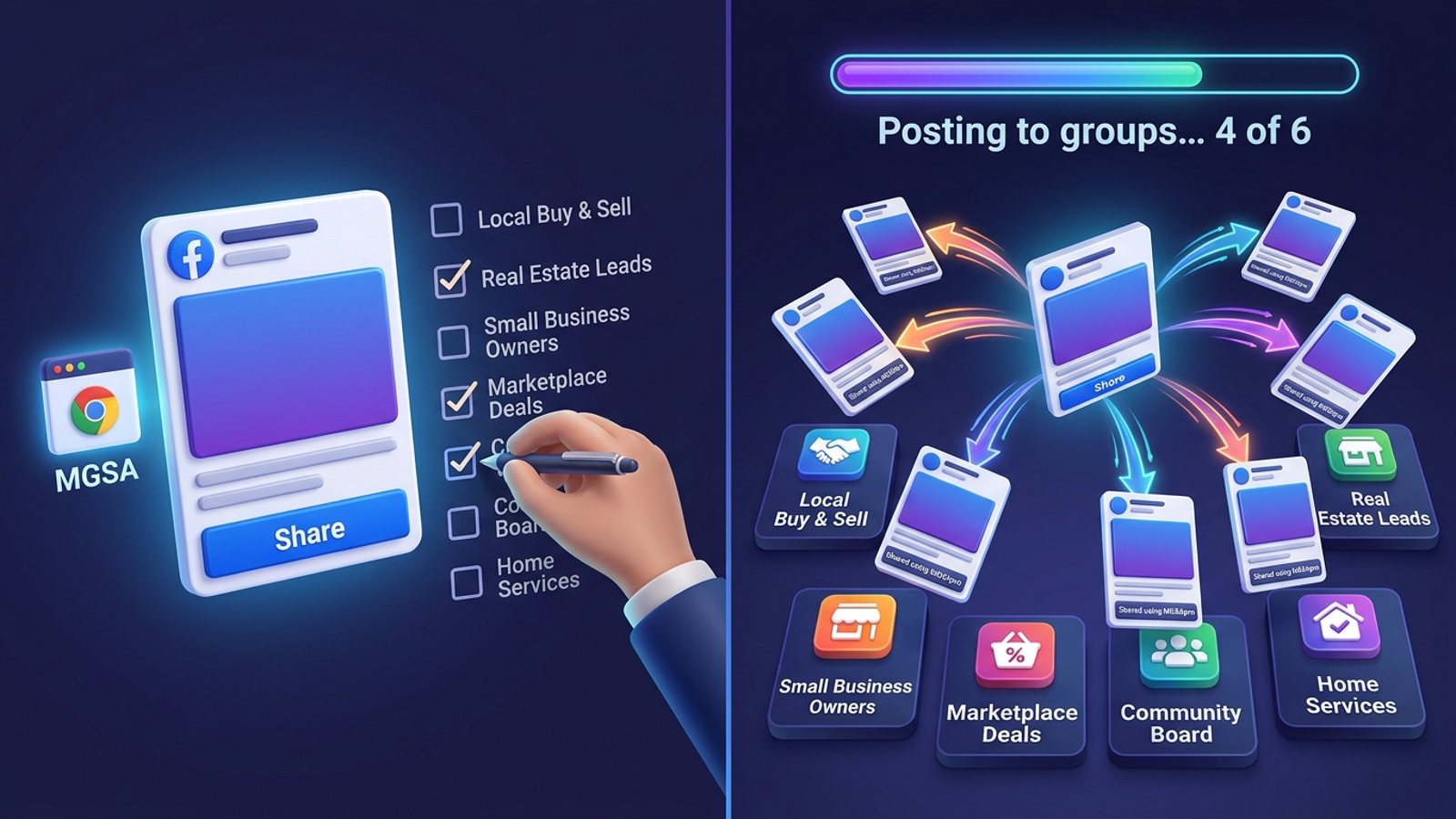
For a zero-budget seller, the best free tool facebook groups is an in-session Chrome extension like MGSApro: it shares one post to many groups you've joined in one click, free forever, with a small watermark. Cloud schedulers such as Buffer, Hootsuite and Later can't publish to groups at all since Meta removed group publishing from its API in April 2024.
That's the short version. The longer version matters, because "free" means three very different things depending on which tool you pick — and two of them won't actually put your post in the groups.
Get MGSA Chrome Extension (Free Unlimited) — free forever, one click, right inside Facebook.
Key takeaways
- Best free tool facebook groups overall: an in-session Chrome extension, because it's the only free category that can still publish to groups you've joined.
- Buffer, Hootsuite and Later free plans now only send you a reminder to finish a group post by hand (Buffer Help Center, 2026).
- Facebook's own "Add groups" shortcut caps at nine groups, text plus one image, no links (Group Posting, 2026).
- Free extensions carry a watermark on the free tier — that's the honest trade for unlimited sharing.
- Spam risk comes from volume and identical text, not from the tool. Keep it to 5–8 promotional shares a day (Lilach Bullock, 2026).
Why can't free schedulers post to my Facebook groups anymore?
Because Meta removed the Groups API and the publish_to_groups permission from every Graph API version on 22 April 2024 (RedReplier, 2026). No third-party cloud app can create a group post since that date.
That single change reshaped the whole "free tool" question. Before April 2024, a free scheduler could queue a post and fire it into your groups. Now:
- Buffer's own help centre says group posts use "notification publishing" because automatic scheduling to groups is no longer possible since Meta's April 2024 change (Buffer Help Center, 2026).
- A 2026 comparison lists Buffer, Hootsuite and similar tools as publishing to Pages only, handling groups through reminder-based publishing (AutoGP, 2026).
- Group Posting's comparison with Buffer puts it plainly: Buffer "can't finish a Facebook group post for you" — it sends a reminder and you finish it yourself (Group Posting, 2026).
So a free scheduler is still genuinely useful. It's just not a bulk group posting tool anymore, whatever the pricing page implies.
What are the best free options for posting to many Facebook groups?
There are four realistic free routes, and they rank differently depending on whether you want speed, safety, or zero cost above all.
1. Doing it by hand (free, slow, safest)
Facebook's own interface doesn't let you share one post to several groups at once — you pick one group per share (PurePrivacy, 2025). There is a shortcut: the "Add groups" option lets you send a personal-profile post to up to nine eligible groups together, but only text with up to one image, no links, and each group's rules and approval still apply (Group Posting, 2026).
Best for: sellers in 3–5 groups, or anyone testing which groups actually convert before scaling.
2. Meta Business Suite and native group scheduling (free, one group at a time)
Meta's native scheduling works for groups you admin or moderate, one group at a time. Facebook's built-in scheduler and Business Suite don't allow bulk-scheduling across multiple groups (SocialBee, 2026). Business Suite's Planner is built around Page and Instagram content, stories, reels and ads (postify.tech, 2026).
Best for: group admins who want to queue their own community posts in advance.
3. Buffer free tier (free, but not for groups)
Buffer's free plan covers 3 channels and 10 scheduled posts in the queue, according to third-party roundups (SaaSToolIndex, 2026; Autoposting.ai, 2026). Paid Essentials is about $5/month or $60/year (TechMachaw, 2026).
Best for: your Facebook Page and a clean content calendar. Not for groups.
4. An in-session Chrome extension (free forever, unlimited groups)
This is the only free category that can genuinely land one post in many joined groups in one click, because it works inside your own logged-in Facebook session rather than through Meta's API.
That's the slot MGSApro fills. You tick groups on the Facebook page, optionally add a message, save the selection as a preset, and hit Share — a progress bar shows each group being posted. It adds randomized delays and human-like clicks, plus AI-generated text variations so every group doesn't get identical wording. No login, no dashboard, no extra tab.
The honest limit: the free version adds a small watermark to your shares. Removing it is $9.99 per month, or from $7.99 a month on the yearly plan, as of November 2026 — prices can change. It's Chrome only, and it's not affiliated with Meta.
Which free tool is actually best for a seller with zero budget?
For a seller with zero budget who needs reach, the in-session extension wins — but only if you use it like a human, not a firehose.
Here's the honest ranking of the tools we compared, on three criteria that matter when you're paying nothing: free forever, unlimited groups, and works inside Facebook.
| Option | Best for | Key features | Price / free option | Watch-outs |
|---|---|---|---|---|
| MGSApro (Our pick) | Sellers posting to many joined groups daily | One-click share to many groups, group presets, optional message, live progress bar, randomized delays, AI text variations, works inside Facebook | Free forever with a small watermark; $9.99/month or from $7.99/month yearly to remove it (as of November 2026) | Chrome only; free tier watermarks shares; still subject to Facebook's spam rules |
| Doing it by hand | Small group counts, testing | Works in every group you're in; can't be flagged as automation | Free | One group per share; "Add groups" caps at nine, text + one image, no links (Group Posting, 2026) |
| Meta Business Suite / native scheduling | Group admins scheduling their own community | Free calendar, compliant, native | Free with a Facebook account | Only groups you admin or moderate; no bulk scheduling (SocialBee, 2026) |
| Buffer free tier | Page content and calendar planning | 3 channels, 10 queued posts; clean interface | Free; Essentials about $5/month (TechMachaw, 2026) | Group posts are reminder-only since April 2024 (Buffer Help Center, 2026) |
| Hootsuite free plan | Teams already on Hootsuite | Solid Page scheduling and workflow | Listed as "trial only" among free tools (Multilogin, 2026); Standard about $99/month after trial (Autoposting.ai, 2026) | No group publishing; no lasting free tier |
| Later free plan | Visual creators planning feeds | Visual planning strengths | "Trial-first", allowance varies by account (Multilogin, 2026) | Can't post to groups you've joined as of October 2026 (Medium/Dented Feels, 2026) |
MGSApro is made by the team behind this blog.
If you mainly need a tidy calendar for your Page and Instagram, Buffer's free tier is the more direct choice. If you admin your own group and want to schedule inside it, Meta's native scheduler is free and fully compliant. The extension only wins the specific job in the title: one post, many groups, one click, no budget.
Want the step-by-step? The MGSApro tutorial walks through presets and delays. Or grab the Facebook group sharing extension and test it on five groups first.
How do I use a free tool to post to many groups without getting flagged?
You keep the volume modest and the wording varied. Meta's spam policy flags high-frequency posting, manual or automatic, and can restrict accounts at lower frequencies when content looks repetitive (Medium/Dented Feels, 2026).
Facebook's help centre says it doesn't allow using messages to promote products or services and flags users who repeatedly send or post the same message (Facebook Help Centre, undated). Groups also run a "Potential Spam" folder and Admin Assist rules that can auto-decline suspected spam (Facebook Help, undated).
Here's a routine that works:
- Write one strong post — photo or text — and check each target group's rules on promotion first.
- Start with your 3–5 best groups manually, spacing shares at least 10 minutes apart.
- Then add the bulk step: save your groups as a preset in the extension, add your message, and let the randomized delays and AI text variations run.
- Cap promotional shares at 5–8 a day. That's the field advice from social media manager Lilach Bullock (2026), who suggests 10–15 minutes between posts.
- Rotate groups so the same audience doesn't see the same offer twice in a day.
Field data — not official Facebook limits — suggests posting across 10–15+ groups in rapid succession triggers flags, and that consistent posting across about 5 groups daily beats bursts (Medium/Dented Feels, 2026). For new accounts, BuzzPost (2026) suggests 5–10 groups a day for the first two weeks, building up gradually.
Our recommendation: treat the extension as a replacement for the clicking, not a replacement for judgment. If a post wouldn't be welcome in a group when you typed it by hand, it won't be welcome at scale either. This is not legal advice, and platform rules vary by place and change often — check Facebook's current policies for your situation.
Can I schedule group posts with a free tool?
Only inside groups you admin, using Facebook's own scheduler. As of October 2026, if you've only joined a group, Facebook has no scheduling for you, and Meta Business Suite, Buffer, Hootsuite and Later can't post to groups at all (Medium/Dented Feels, 2026).
MGSApro does offer scheduling into your own groups only, per the owner. For joined groups, the practical free approach is a saved preset plus a consistent daily slot — you still press Share, but the setup takes seconds. There's a full walkthrough in our guide to scheduling a post to all your Facebook groups.
What's the catch with free group-posting extensions?
Three catches, and you should know all of them before installing anything.
The watermark. MGSApro's free tier adds a small "Shared using MGSApro" line to shares. That's the trade for unlimited free posting. If a clean post matters for a client or a listing, the paid tier removes it.
Chrome only. The extension runs in Chrome on desktop. It's not a phone app.
It's still your account. The extension uses your logged-in session, so Facebook's spam rules apply exactly as they would to manual posting. The owner's own guidance is blunt: if an account gets suspended, appeal it — reinstatement happens as long as you weren't spamming. Use it to replace the manual work, not to multiply it.
One more thing worth checking with any extension: permissions. MGSApro never asks for your Facebook password, according to its Chrome Web Store listing (2026). A free tool that wants your login credentials is a different risk category entirely.
Get MGSA Chrome Extension (Free Unlimited) and put your next listing in every group you've joined — in one click, at a human pace.
Sources
- Share Post to Multiple Facebook™ Groups (Chrome Web Store, updated 2026-11-15)
- Facebook Groups Auto Poster (Chrome Web Store, updated 2026-10-03)
- kevindemara/facebook-group-poster (GitHub, 2025-02-19)
- Using Facebook with Buffer (Buffer Help Center, 2026-07-01)
- How to Schedule a Post on Facebook (Buffer, 2026-10-25)
- How to schedule posts on Facebook Groups 2026 guide (SocialBee, 2026-01-06)
- Is Meta Business Suite good for scheduling? (postify.tech, 2026-10-22)
- I Tried Every Way to Schedule a Post in a Facebook Group (Medium/Dented Feels, 2026-10-24)
- Can Buffer or Hootsuite Post to Facebook Groups? (AutoGP, 2026-09-12)
- Group Posting vs Buffer (Group Posting, 2026-10-30)
- Facebook Group Posting Questions, Answered (Group Posting, 2026-11-07)
- How Facebook Group Post Approval Works (RedReplier, 2026-09-12)
- Facebook Auto Share vs Posting in Groups You're In (Medium/Dented Feels, 2026-10-04)
- How Many Facebook Groups Can I Post To Per Day? (Medium/Dented Feels, 2026-05-28)
- Posting in Facebook Groups: 5 to 8 a Day (Lilach Bullock, 2026-08-19)
- How to Auto-Post Properties to Facebook Groups in 2026 (BuzzPost, 2026-05-13)
- Best Free Social Media Schedulers 2026 (SaaSToolIndex, 2026-09-17)
- Best Free Social Media Schedulers 2026 (TechMachaw, 2026-09-11)
- Free Social Media Scheduler Limits Nobody Mentions (Autoposting.ai, 2026-08-11)
- Free Social Media Management Tools in 2026 (Multilogin, 2026-07-24)
- Free social media scheduling tools in 2026 (Free Stack Finder, 2026-04-23)
- I got a spam warning (Facebook Help Centre, undated)
- Manage spam in a Facebook group you admin (Facebook Help, undated)
- Post on multiple Facebook groups (PurePrivacy, 2025-01-02)
Frequently asked questions
Never manually share to groups again
MGSA Pro is the free Chrome extension that shares your posts to every Facebook group for you — safely, with human-like timing.