Is there a tool that will post to all my Facebook groups at once?
November 20, 2026 · MGSApro Team

Yes — a browser-based tool can share one post to many Facebook groups you've joined, but it publishes group by group with pauses, not all at the same instant. Since Meta removed the Groups API on 22 April 2024, cloud schedulers like Hootsuite, Buffer and Meta Business Suite can't auto-publish into your groups.
That's the honest answer, and it's the one that saves you money and time. Let's break down what these tools actually do, where each type sits, and how to pick one that fits the way you sell.
Key takeaways
- No tool can post to all facebook groups at once truly simultaneously — Facebook itself has no single "post to all my groups" button for links or promos.
- The Groups API and
publish_to_groupspermission were removed from every Graph API version on 22 April 2024, which broke cloud schedulers for group posting. - Browser extensions still work because they click through your groups inside your own Facebook session, one group at a time, with human-like delays.
- Facebook's only built-in multi-group option is the "Add groups" share, limited to nine eligible groups, text plus one image, no links (Group Posting, 2026).
- No tool can promise your account won't be restricted — pacing, varied copy and smaller volume are what reduce the risk.
If you want to see the in-Facebook approach in action, get the MGSA Chrome Extension (Free Unlimited) and watch it share your next post group by group.
What kind of tool can actually post to all my Facebook groups at once?
The tool that works is a browser extension that runs on top of Facebook, not a separate dashboard. It uses the Facebook session you're already logged into, opens each group you've selected, and publishes your post with a pause between each one.
That's a different animal from a cloud scheduler. A cloud tool talks to Facebook through Meta's API. Once the Groups API disappeared on 22 April 2024, that route closed for groups. A browser extension doesn't need the API — it does what you'd do by hand, just faster and with pacing built in.
One vendor in this space puts it plainly: "Can I post to multiple Facebook groups at once? No, and that's on purpose," describing a pause between each group (Group Posting, 2026). That's the honest shape of the category.
Why can't Hootsuite, Buffer or Meta Business Suite post to my groups any more?
Because Meta removed the Groups API and the publish_to_groups permission from every Graph API version on 22 April 2024. After that date, no third-party app can create a group post or read a pending approval queue through the API (RedReplier, 2026).
Before that change, cloud schedulers could push posts into groups you'd joined. Now they can't. Vendors that still list "Groups" usually describe notification-based publishing — you create the post, get a nudge on your phone, then finish it yourself inside Facebook (Medium, 2026). Buffer's own Facebook help documents exactly this "notification publishing" flow.
Meta Business Suite still schedules to your Facebook Page and Instagram, and that remains fully supported (adlibrary.com, 2026). Page scheduling simply never became group scheduling. If your job is reaching buyers inside groups you've joined, the cloud route is a dead end.
What does an in-Facebook group sharing tool actually do?
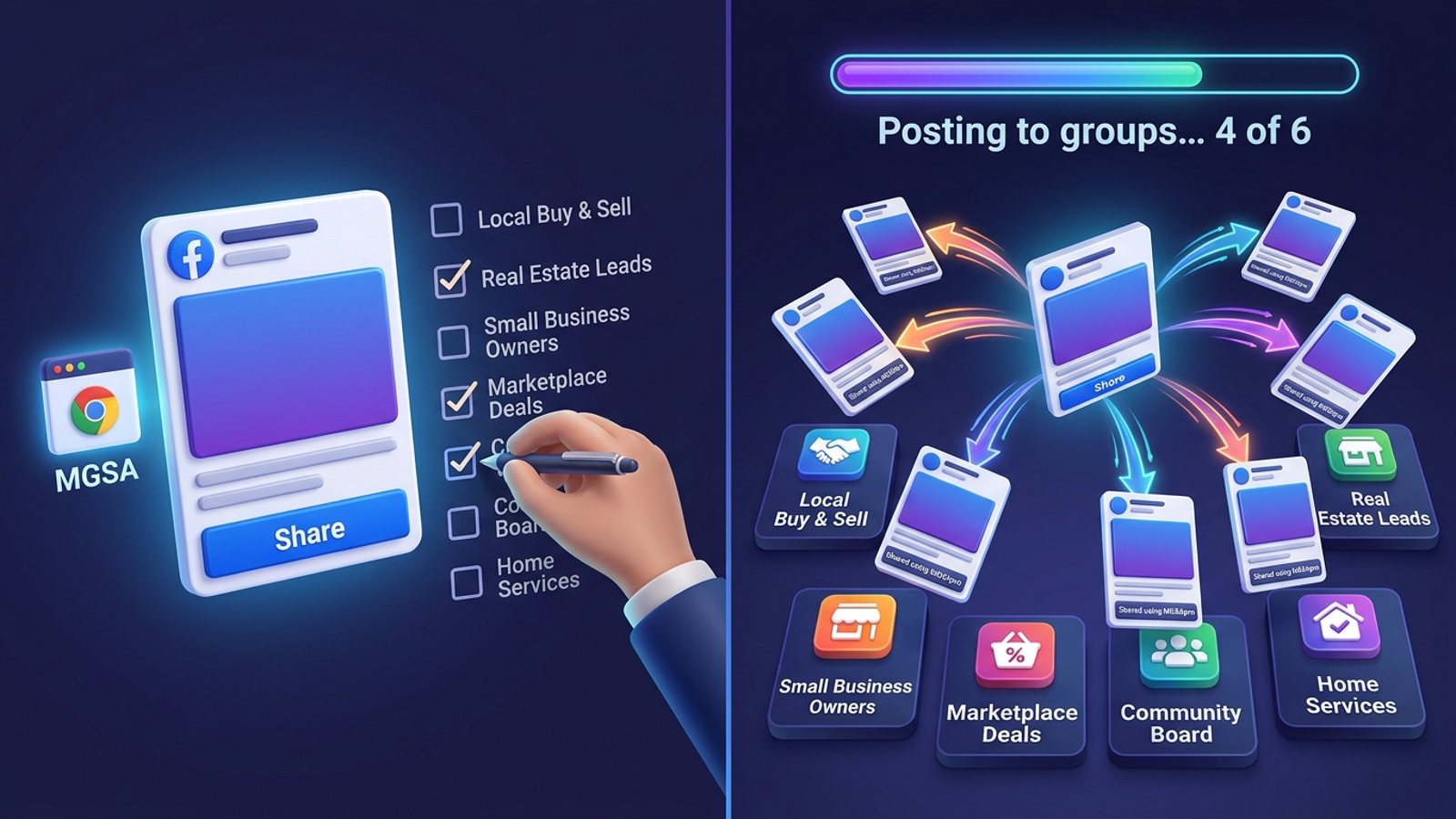
It lets you pick your groups, write your post once, and then shares it to each selected group in sequence while you watch the progress. The good ones add delays and text variations so the posting looks human rather than machine-made.
Here's the typical flow, using MGSApro as the example of the category:
- Browse your Facebook groups and tick the ones you want.
- Optionally type a message or blurb to go with the share.
- Save the selection as a preset for next time.
- Click Share and watch the progress bar as it posts to each group.
MGSApro is a Facebook group sharing extension that adds a "Share to Groups" button to every post, works entirely on top of Facebook with no extra dashboard or login, and includes randomized delays, human-like clicks and AI-generated text variations for each group. That last part matters: identical copy pasted everywhere is exactly what Meta's spam systems look for.
If you're new to it, the MGSApro tutorial walks through the setup step by step.
Can I post to all my groups with one click?
Not truly simultaneously — but you can get close to one click in practice. Facebook's only built-in multi-group option is the "Add groups" share, which sends a post from your personal profile to up to nine eligible groups together, limited to text plus one image and no links (Group Posting, 2026). Each group's rules and admin approval still apply.
For sellers who need links, listings or promo copy in more than nine groups, that built-in option doesn't cover the job. A browser extension closes the gap: you select a preset of groups, click once, and it works through them with pauses. It's one click to start, not one instant publish everywhere — and that distinction is what keeps the behaviour closer to a human working through a list.
Which tool should I use to post to many Facebook groups?
Of the tools we compared, MGSApro is our pick for sellers who want to share posts into groups they've joined from inside Facebook, with no separate dashboard. The table below shows how it stacks up against the main alternatives, honestly.
| Option | Best for | Key features | Price / free option | Watch-outs |
|---|---|---|---|---|
| MGSApro (Our pick) | Sellers, realtors and local services sharing posts to many joined groups from inside Facebook | One-click "Share to Groups" button, group presets, optional message, live progress bar, randomized delays, human-like clicks, AI text variations, works on top of Facebook, no dashboard | Free forever with a small watermark, or $9.99/month without it (as of November 2026; prices can change). Yearly plan from $7.99/month | Chrome only; operates on top of Facebook; not affiliated with Meta; free version adds a watermark |
| Meta Business Suite | Scheduling and managing posts across your Facebook Page and Instagram | Free official scheduling, insights, unified inbox | Free | Schedules Pages and profiles only — cannot auto-publish into groups you've joined since the 2024 API removal |
| Hootsuite | Scheduling your own content across channels | Listed among the "safe zone" scheduling tools (Connected Pakistan Blog, 2026) | Pricing not verified in our sources | Cannot auto-publish into joined groups; at most notification-style publishing |
| Postly | Users who want Spintax text variations and a scheduler in one extension | Configurable random interval between groups, optional Spintax variations | Free tier with limited posts; paid subscription | Requires a Postly account |
| Posting Station | Users who want daily caps and a group finder | Safe pacing, schedules, daily caps, group finder | Free tier of one Page and 5 group posts a day; paid from $4.99/month | Smaller free allowance than some users need |
| Facebook Groups Post Bot | Users who want tiered volume limits | Group posting with schedules and campaigns | Free (3 groups per run); Pro $6.99/month or $49.99/year up to 50 groups per run; Business $12.99/month or $99/year unlimited | Pricing from the listing, not verified against an official page |
MGSApro is made by the team behind this blog.
A few honest notes on the others. If you mainly need Page and Instagram scheduling with analytics, Meta Business Suite is the more direct choice and it's free. If you want Spintax variations and don't mind creating an account, Postly is built for that. If a daily cap and a group finder matter to you, Posting Station offers both on its free tier. Each of these fits a real job — they're just different jobs from "share this post to my joined groups now."
For a deeper head-to-head, see our guide to the best tool to share one Facebook post to all my groups at once.
How do I use one without getting my account restricted?
No tool can promise your account stays safe — what reduces risk is pacing, varied copy and sensible volume. Meta's spam policy flags high-frequency posting, manual or automatic, and can restrict accounts at lower frequencies when content looks repetitive or inauthentic (Medium, 2026).
Our recommendation: follow these habits every time you share.
- Vary the copy. Don't paste identical text into twenty groups. Change the angle or the example for each cluster of groups.
- Space it out. Use a tool with randomized delays rather than firing everything in one burst. Postador Pro, for example, defaults to random intervals of 10–20 minutes, described as closer to human pace (Socket.dev, 2026).
- Read the rules. Check each group's pinned rules for promo days and link policies before you post.
- Keep volume modest on new accounts. Community guidance warns against posting too much too quickly on fresh profiles (Webmaster Sun forum, 2026).
- Stay to reply. Conversations are the point, not share counts. Answer comments after publishing.
One more thing worth knowing: group admins can turn on post approval, so your post may sit in a queue before it appears — and approval can keep applying even after you're approved to participate (RedReplier, 2026). Facebook groups also have a "Potential Spam" folder and Admin Assist rules that can automatically decline posts (Facebook Help). None of this is legal advice, and rules vary by place and by group.
If you sell locally — cleaning, repairs, real estate — our walkthrough on posting your cleaning offer to the same local Facebook groups every week shows how presets cut the repeat work down to a couple of clicks.
Is it against Facebook's rules to use a group posting tool?
Facebook's spam policy targets repetitive, high-frequency posting — and that's the line to stay on the right side of. Facebook's help centre says it doesn't allow using messages to promote products or services, and flags users who repeatedly send or post the same message (Facebook Help Centre).
So the rule of thumb isn't "tool or no tool" — it's "does this look like a person sharing something useful, or a machine blasting the same ad?" Use the tool to replace the manual clicking, not to spam. Space your posts, vary your copy, respect each group's rules, and keep your volume believable.
Ready to stop clicking through groups by hand? Get the MGSA Chrome Extension (Free Unlimited) and share your next post to your whole group list in one go.
Sources
- Can Buffer or Hootsuite Post to Facebook Groups? (AutoGP, 2026-09-12)
- How Facebook Group Post Approval Works (RedReplier, 2026-09-12)
- Facebook Auto Share vs Posting in Groups You're In (2026) (Medium, 2026-10-04)
- Facebook Group Posting Questions, Answered (2026) (Group Posting, 2026-11-07)
- Facebook Auto Share Bot Risks in 2026 (adlibrary.com, 2026-04-23)
- Social Media Automation: What's Safe vs What Gets You Banned (Connected Pakistan Blog, 2026-07-20)
- I got a spam warning after sending information about my Facebook group (Facebook Help Centre, date not given)
- Manage spam in a Facebook group you admin (Facebook Help, date not given)
- Postly – Auto Poster & Scheduler for Facebook™ Groups (Chrome Web Store, 2026-11-11)
- Postador Pro (Socket.dev, 2026-10-17)
- Posting Station (Chrome Web Store, 2026-10-24)
- Facebook Groups Post Bot (Chrome Web Store, date not given)
- Meta Business Suite (Apple App Store, 2026-10-13)
- Facebook Jail (Webmaster Sun forum, 2026-11-08)
- Facebook Groups Posting Cadence for B2B (Conbersa, 2026-07-01)
Frequently asked questions
Never manually share to groups again
MGSA Pro is the free Chrome extension that shares your posts to every Facebook group for you — safely, with human-like timing.