What is the best tool to share one Facebook post to many buy-and-sell groups?
November 21, 2026 · MGSApro Team

For a reseller, the best tool share to buy sell groups is a browser extension that runs inside your own logged-in Facebook — like MGSApro — because cloud schedulers can no longer publish into groups. Meta removed group publishing from its API on 22 April 2024, per PostDaily (2026). Buffer now only sends you a notification to post by hand; Hootsuite can't reach groups at all.
Get MGSA Chrome Extension (Free Unlimited) — one click shares your post to every buy-and-sell group you've ticked, with human-like delays and varied wording.
Key takeaways
- Only tools that work inside your browser can post into groups you've joined as a member. Cloud schedulers lost that ability in April 2024 (PostDaily, 2026).
- Manual sharing works but takes roughly 2 minutes per group, and you have to track which groups you've done (Chrome Web Store listing, undated).
- Buy-and-sell groups take listings, not normal posts — photos, title, price, condition — so pick a tool that understands the difference.
- MGSApro is free with a small watermark, or $9.99/month without one, as of November 2026 (prices can change).
- Vary your wording and space out your posts. Meta's spam policy applies to automated and manual posting alike (Meta Transparency Center, updated 2024).
Can Buffer or Hootsuite post to buy-and-sell groups for me?
No. Buffer's own help centre (July 2026) says group posting now uses "notification publishing" — you get a mobile notification and copy the post into the group yourself. Hootsuite can't publish into groups at all since the April 2024 API change (SocialKit, updated May 2026).
That's the single most important thing to know before you pay for anything. Both are good tools for Pages and Instagram. Neither will list your sofa in 20 local buy-and-sell groups.
What are the realistic options for sharing to many buy-and-sell groups?
There are five honest options: manual copy-paste, Meta Business Suite, Hootsuite, Buffer, and a group-sharing extension. Here's how they actually stack up for a reseller.
1. MGSApro — Our pick
Best for: resellers and small businesses who want to share one post to many groups in one click, without leaving Facebook.
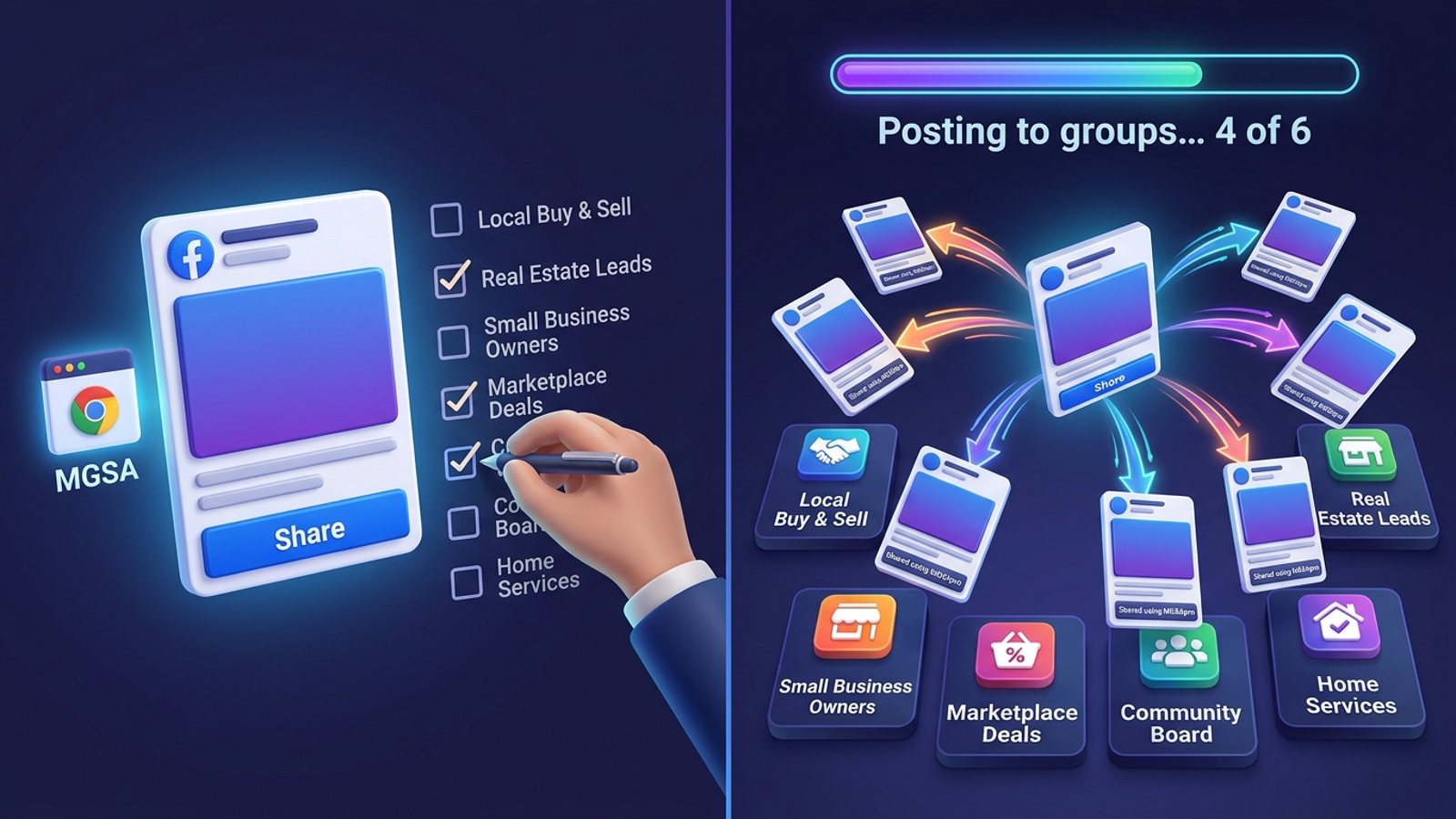
MGSApro is a Chrome extension that adds a "Share to Groups" button to every Facebook post. You tick the groups you want, add an optional message, save the selection as a preset, and hit Share. A live progress bar shows each group as it posts. It uses built-in randomized delays and human-like clicks, plus AI-generated text variations so each group sees slightly different wording.
It works entirely on top of Facebook — no login, no separate dashboard. It also remembers which groups belong to which profile if you run more than one. Honest limits: it's Chrome only, it operates on top of Facebook, the free version adds a watermark, and it isn't affiliated with Meta.
Price: free with a small watermark, or $9.99/month without one, as of November 2026. Prices can change.
Get MGSA Chrome Extension (Free Unlimited) and see how many groups you can clear in one sitting.
2. Manual copy-paste in Facebook
Best for: sellers posting to a handful of groups who want total control and zero cost.
Facebook's own share flow is Share → Groups → search → pick → blurb → Share. It's free and lets you tailor wording naturally. The catch: one group per share, roughly 2 minutes each, and it's easy to double-post or skip a group (Chrome Web Store listing, undated). At 30 groups that's an hour of clicking.
3. Meta Business Suite
Best for: Page owners scheduling to a group that's linked to their Page.
Business Suite can schedule the same content to a Page and a linked group in one calendar view (SocialBee, January 2026). But it can't bulk-schedule across many joined groups — you go one group at a time, and groups not connected to a Page are simpler to schedule from inside the group itself.
4. Hootsuite
Best for: teams that need Page and Instagram scheduling, approvals and analytics.
Hootsuite is solid at that job. It's just not a group tool anymore. Pricing is per user: $99 (Standard), $199 (Professional) and $399 (Advanced) per user per month billed annually, with no free plan (Sked Social, November 2026). A single Standard seat runs $1,188 a year on annual billing (Activepieces, November 2026).
5. Buffer
Best for: cheap, simple Page scheduling on a small budget.
Buffer's free plan covers 3 channels with 10 scheduled posts per channel. Essentials is $5/channel/month and Team is $10/channel/month on yearly billing, with a 14-day trial (Buffer Pricing, checked November 2026). For groups, though, it's notification-only — you still post by hand.
Which tool is fastest, cheapest and can vary wording per group?
MGSApro wins on all three counts of the tools we compared: one click per campaign instead of minutes per group, a free tier, and built-in AI text variations. Manual posting is the only other option that varies wording naturally — but it costs you the afternoon.
| Option | Best for | Key features | Price / free option | Watch-outs |
|---|---|---|---|---|
| MGSApro (Our pick) | Resellers sharing one post to many joined groups | One-click Share to Groups, group presets, live progress bar, randomized delays, AI text variations, multi-profile group memory | Free with watermark; $9.99/month without, as of Nov 2026 | Chrome only; runs on top of Facebook; not affiliated with Meta |
| Manual copy-paste | Small lists, total control | Built into Facebook, free, easy to personalise | Free | ~2 minutes per group; easy to double-post |
| Meta Business Suite | Page + linked-group scheduling | Calendar view, free with a Page | Free | No bulk scheduling across many groups |
| Hootsuite | Teams doing Page and Instagram work | Approvals, analytics, multi-network scheduling | $99–$399 per user/month billed annually; no free plan (Nov 2026) | Can't publish into groups since April 2024 |
| Buffer | Budget Page scheduling | Simple queue, AI assistant, per-channel pricing | Free (3 channels, 10 posts each); $5–$10/channel/month (Nov 2026) | Group posting is notification-only |
MGSApro is made by the team behind this blog.
Is buy-and-sell posting different from a normal group post?
Yes. Buy-and-sell groups take a listing — photos, title, price, condition — rather than a regular discussion post (MultiGroupPoster, October 2026). Facebook itself can push one listing to up to 20 groups at a time, according to the AutoGP Chrome Web Store listing (updated November 2026).
Our recommendation: split your target list into buy-and-sell groups and ordinary discussion groups, then handle each with the right format. MGSApro shares your existing post with an optional message, which suits the discussion groups and any buy-and-sell group that accepts standard posts.
How do I avoid getting restricted when posting to many groups?
Space your posts out and change the wording. Meta's spam policy bans posting "excessively frequently," whether manual or automated, and can restrict accounts showing repetitive content (Meta Transparency Center, updated June 2024). Facebook's detection reacts more to pattern — identical text, rapid timing, many groups in one session — than to raw volume (Lilach Bullock, August 2026).
A suggested cadence from the same source is 5–8 promotional groups per day, up to 10–12 for conversational posts. Facebook publishes no official daily group-posting number.
Our recommendation: keep daily volume modest, let the extension's randomized delays do their job, and use text variations so no two groups see identical copy. If you want the full playbook, read how to share a Facebook post to many groups safely without looking like a bot.
This is not legal advice, and platform rules vary by place and change often.
What can't I list in buy-and-sell groups?
Meta's commerce policy bans a long list of items in buy-and-sell contexts, including alcohol, weapons, animals, medical products, digital products and some tickets (AutoGP, October 2026). Check each group's own rules too — many add their own restrictions on top.
How do I set this up in practice?
- Install the extension in Chrome and log into Facebook as normal.
- Browse your groups and tick the buy-and-sell ones you want.
- Type an optional message or blurb.
- Save the selection as a preset so next time is one click.
- Click Share and watch the progress bar as each group posts.
If you're new to the tool, the MGSApro tutorial walks through presets and multi-profile setup. And if you're juggling several accounts, this guide on sharing one post to groups across more than one profile covers the details.
Ready to stop clicking group by group? Get MGSA Chrome Extension (Free Unlimited) and clear your whole buy-and-sell list in one pass.
Sources
- Post to Multiple Facebook Groups (PurePrivacy, 2025-01-02)
- Can you schedule posts in a Facebook Group? (PostDaily, 2026-09-26)
- Using Facebook with Buffer (Buffer Help Center, 2026-07-01)
- How to schedule posts on Facebook Groups (SocialBee, 2026-01-06)
- Buffer Pricing (Buffer, checked 2026-11-20)
- Buffer pricing and features (Buffer Help Center, 2026-04-01)
- Hootsuite pricing 2026 (Sked Social, 2026-11-17)
- Hootsuite Pricing 2026 (Activepieces, 2026-11-01)
- How to Schedule Facebook Group Posts (SocialKit, updated 2026-05-20)
- Multigroup Poster (Chrome Web Store, undated)
- Multigroup Poster on ExtPose (ExtPose, 2026-11-06)
- Post One Listing in Many Facebook Buy and Sell Groups (MultiGroupPoster, 2026-10-22)
- AutoGP (Chrome Web Store, updated 2026-11-19)
- Post to Multiple Facebook Buy and Sell Groups, Safely (AutoGP, 2026-10-25)
- Meta Spam policy (Meta Transparency Center, updated 2024-06-25)
- How many Facebook Groups can you post in each day (Lilach Bullock, 2026-08-19)
- Share post to multiple Facebook groups (Chrome Web Store, undated)
Frequently asked questions
Never manually share to groups again
MGSA Pro is the free Chrome extension that shares your posts to every Facebook group for you — safely, with human-like timing.