
How do I share one Facebook post to many groups and still add my own short pitch every time?
November 26, 2026 · MGSApro Team
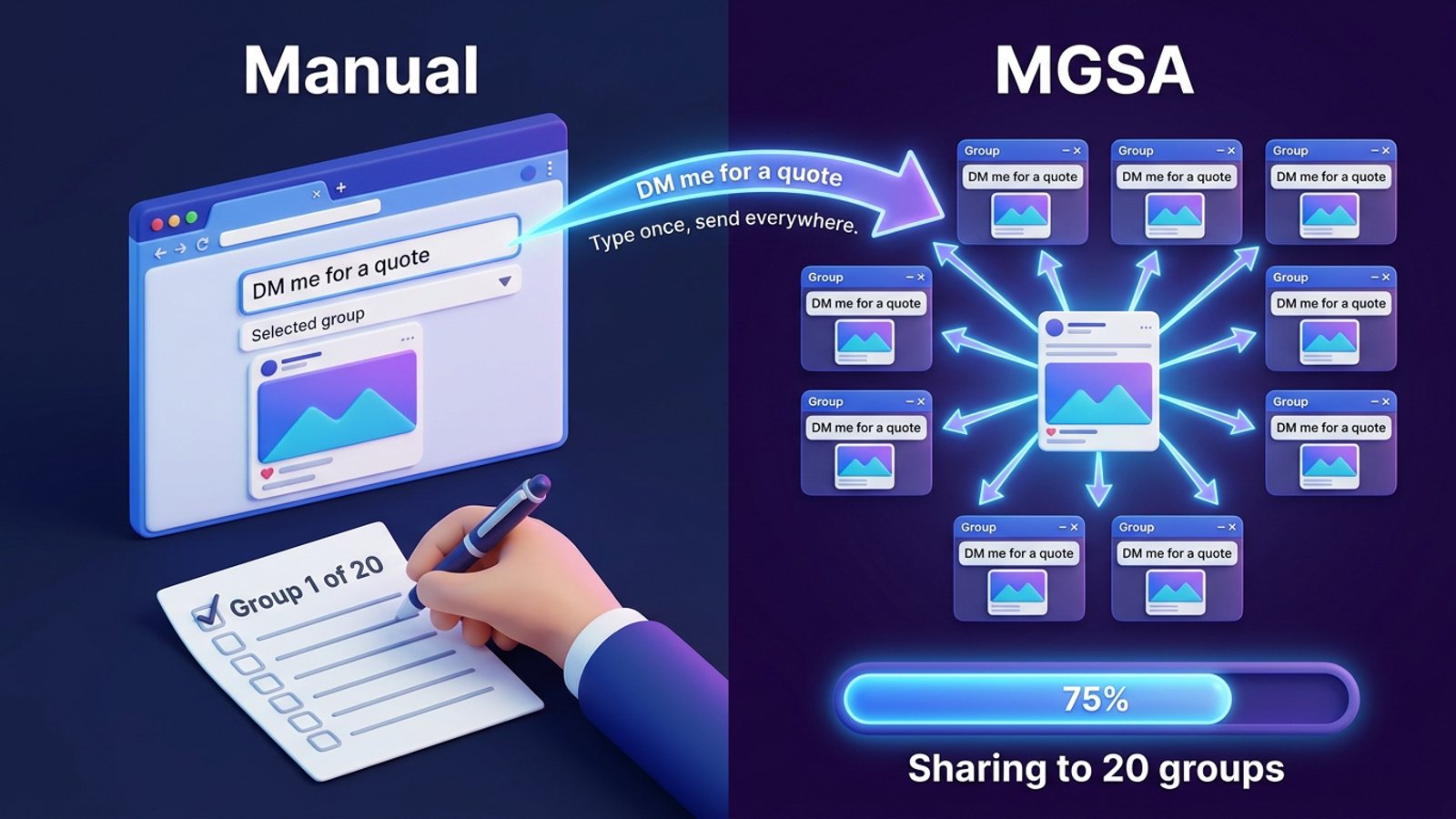
You can add the same short pitch to every group share — the trick is where you type it and how you repeat it. Facebook's own Share button carries your line, but one group at a time: you retype or paste your pitch for each group. A facebook group share with custom message workflow lets you type the pitch once and send it to a saved group list in a click.
Get MGSA Chrome Extension (Free Unlimited) and your line goes out with the post, not instead of it.
Key takeaways
- Your pitch sits above the post, and the original appears as a card below it — that's how native shares work (MultiGroupPoster, 2026).
- Facebook's desktop Share flow is one group per share, so 20 groups means 20 rounds of clicks and 20 retyped pitches (PurePrivacy, 2025).
- A bulk-share extension keeps the same share flow but lets you type the line once and run a saved group list with human-like delays.
- This article covers one message to all groups. A different message per group is a separate job — see our guide on adding a different short message to each group.
- Identical wording everywhere is a known spam signal, so vary your core message and pace your shares (BuzzPost, 2026; Lilach Bullock, 2026).
How do I add my own short pitch to a Facebook group share?
Type your line in the text box above the post before you hit Post. On desktop, click Share under the post, choose "Share to a group," pick the group, and add your text in the box Facebook gives you — members see your line with the original post as a card underneath (MultiGroupPoster, 2026). Facebook's own help for Page posts describes the same step: switch to the Page, click Share, choose "Share to a group," click the group, "add optional text," then Post (Facebook Help, 2025).
Two practical notes from the guides:
- Tick the box to include the original post where it appears. If you don't, you may only share the link, and some groups remove link-only posts (Scotlands Gardens Scheme PDF, no date).
- Keep the pitch to one line. "DM me for a quote" or "Two slots left this week — message me" reads better than a paragraph, and the consultant guidance is to rewrite your core message at least three ways if you're posting at volume (Lilach Bullock, 2026).
How do I share one post to many groups with the same pitch, step by step?
Do it manually first so you know the flow, then decide if you want to repeat it 30 times. Here's the manual loop:
- Write the post once, or pick an existing one.
- Click Share under the post → "Share to a group."
- Pick the group (or search its name).
- Type or paste your pitch in the text box.
- Tick include original post where the box appears.
- Click Post.
- Note the group on a checklist so you don't double-post (Crx搜搜 listing, 2026).
- Wait 10–15+ minutes before the next one.
That's roughly seven steps per group. One extension listing describes the manual baseline as "2 minutes later, 1 post shared" (Crx搜搜, 2026). Multiply that by 30 groups and you've lost an afternoon to retyping the same line.
On a Page post, switch into the Page first, then Share → Share to a group → group → optional text → Post (Facebook Help, 2025).
On your phone, a third-party guide says the mobile app's Share flow lets you pick several groups in one dialog (it says up to 10) and enter content before posting — and states this doesn't apply on desktop (CellphoneS/Sforum, 2026). Check it in your own app before relying on the number.
Why does the "Share to a group" option go missing?
The option's wording and position vary by app version. The "Group" choice can be missing from the Share menu entirely, and its label changes between versions (MultiGroupPoster, 2026). If you can't find it, look under "More options" first, and try the same post from a desktop browser. Menus change often, so at the time of writing your screen may differ from any guide, including this one.
How do I send one post with my pitch to many groups in one go?
Use a share extension that runs inside your logged-in Facebook session. The honest version of the bulk workflow, based on what extension listings describe:
- Open the post you want to share (or paste its URL).
- Type your pitch once in the message field.
- Pick your groups — or a saved list, if the tool supports presets.
- Set human-like delays between shares.
- Run it and watch each group post.
MGSApro works this way: you tick groups directly on the Facebook page, type an optional message, save the selection as a reusable preset, then click Share and watch the progress bar as each group is posted. It adds randomized delays and human-like clicks, and can generate AI text variations so the wording isn't identical in every group. There's no separate login or dashboard — it sits on top of Facebook. It's Chrome only, and it's not affiliated with Meta.
Our recommendation: write your pitch as one punchy line plus your post, then let the tool carry it. Keep your group list to the ones where your pitch actually fits, rather than blasting every group you've joined.
Is it safe to share the same pitch to many groups at once?
Not if you blast identical text to 50 groups in ten minutes. Identical wording in every group is flagged as a top spam signal in a vendor guide, which advises new accounts 5–10 groups a day, aged accounts 20–30, and says above 50 a day is where warnings and bans begin (BuzzPost, 2026 — vendor blog). A social media consultant's guidance is tighter: max 5–8 groups a day for promotional content, 10–12 for conversational, 10–15+ minutes between posts, and no more than 2–3 links a day (Lilach Bullock, 2026). Another practitioner guide suggests a 14-day warm-up for new accounts starting at 3–5 posts a day (MaherPost, no date).
Meta's own policy says 2–6 strikes can limit posting in groups, escalating from 1-day to 30-day content-creation blocks at higher strikes (Meta Transparency Center, updated 2024-11-12). Meta also says repeatedly violating Pages and groups rules can get content removed from recommendations and downranked.
This is safety guidance, not legal advice, and rules vary by place. Expect moderated groups to hold your share for admin approval — re-posting doesn't skip the queue and looks like spam (AutoGP, 2026).
Which tools let you share a post to many groups with a custom message?
Of the tools we compared, a share extension is the most direct fit for "one pitch, many groups." Here's the honest picture:
| Option | Best for | Key features | Price / free option | Watch-outs |
|---|---|---|---|---|
| MGSApro (Our pick) | Sellers and local businesses sharing one post to many groups with the same line | One-click share to many groups, optional message, saved presets, live progress bar, randomized delays, AI text variations, works on top of Facebook, no dashboard | Free forever with a small watermark, or $9.99/month without one (as of November 2026; prices can change) | Chrome only; operates on top of Facebook; free version adds a watermark; not affiliated with Meta |
| Facebook's built-in Share button | One-off shares where you want the native card | Native share, add your own text, Page posts supported; a guide says the mobile app allows several groups in one dialog (up to 10) | Free | One group per share on desktop; pitch retyped every time; easy to double-post; "Group" option can be missing |
| Meta Business Suite | Scheduling the same content to a Page and a linked group | Scheduling for a Page plus its linked group | Free | No bulk scheduling across multiple groups (SocialBee, 2026) |
| Buffer | Scheduling across social networks | Social scheduling | Pricing not in our material — check buffer.com/pricing | Group posting now uses "notification publishing": you're notified on mobile and paste the post into the group yourself (Buffer Help Center, 2026) |
| Other Chrome share extensions (Multigroup Poster, Group Posting PRO, FB Group Bulk Poster) | Sharing one post to a list of groups with delays and text variations | Auto-share to a group list, randomized delays, spintax variations, daily limits (Multigroup Poster listing, undated) | Multigroup Poster: free trial, then paid plans; others not in our material | Vendor claims on safety aren't independently audited; check each listing yourself |
MGSApro is made by the team behind this blog.
If you mainly need native, one-at-a-time shares with Facebook's own card, the built-in Share button is the more direct choice. If you mainly need scheduling across networks and don't mind pasting group posts by hand, Buffer fits better. If you want one pitch carried to a saved list of groups in a click, get the MGSA Chrome Extension free and see the progress bar do the work.
Why can't I just use an automation app to post to groups?
Meta removed the Groups API and the publish_to_groups permission from every Graph API version on 22 April 2024, so no third-party app can create a group post through the API (RedReplier, 2026). That's why API-based routes — including Google Sheets plus Pabbly Connect tutorials — can't post to groups anymore (Pabbly, 2025). Tools that still work do it inside your own logged-in browser session, which is exactly how share extensions operate.
Sources
- How to Share a Post to a Facebook Group (2026) — MultiGroupPoster, 2026-11-13
- 将 Facebook 公共主页帖子分享到 Facebook 小组 — Facebook Help, 2025-09-17
- Como compartilhar uma publicação da sua Página do Facebook em um grupo — Facebook Help, 2026-03-02
- Sharing posts from a Facebook Page to Facebook groups — Scotlands Gardens Scheme, no date
- Cách chia sẻ bài viết vào nhóm trên Facebook — CellphoneS/Sforum, 2026-07-16
- Post on Multiple Facebook Groups — PurePrivacy, 2025-01-02
- Share Facebook Post to Multiple Groups — AutoGP, 2026-10-15
- Facebook Group Post Approval — RedReplier, 2026-09-12
- Using Facebook with Buffer — Buffer Help Center, 2026-07-01
- How to Schedule Posts on Facebook Groups — SocialBee, 2026-01-06
- Facebook group post pending — AutoGP, 2026-10-15
- How Many Facebook Groups Can I Post To Per Day? — Lilach Bullock, 2026-08-19
- Facebook Posting Limits — MaherPost, no date
- How to Auto-Post Properties to Facebook Groups — BuzzPost, 2026-05-13
- Restricting accounts — Meta Transparency Center, updated 2024-11-12
- Multigroup Poster Chrome Web Store listing — Chrome Web Store, undated
- Multiple Group Share Assistant listing mirror — Crx搜搜, 2026-10-06
- Group Posting PRO listing — Chrome Web Store, undated
- FB Group Bulk Poster listing — Chrome Web Store, 2025-03-27
- Automatically Share Your Facebook Post In Multiple Groups… — Pabbly, 2025-04-25
Frequently asked questions
Never manually share to groups again
MGSA Pro is the free Chrome extension that shares your posts to every Facebook group for you — safely, with human-like timing.
Keep reading
How do I share a post to many Facebook groups with my own message on every one?
November 24, 2026

How do I share one Facebook post to my groups and add a different short message to each one?
November 24, 2026

What is the best tool to share one Facebook post to many buy-and-sell groups?
November 21, 2026

What is the best tool to share one Facebook post to all my groups at once?
November 20, 2026