
How do I keep track of which Facebook groups I've already posted a client's offer to this week?
November 29, 2026 · MGSApro Team
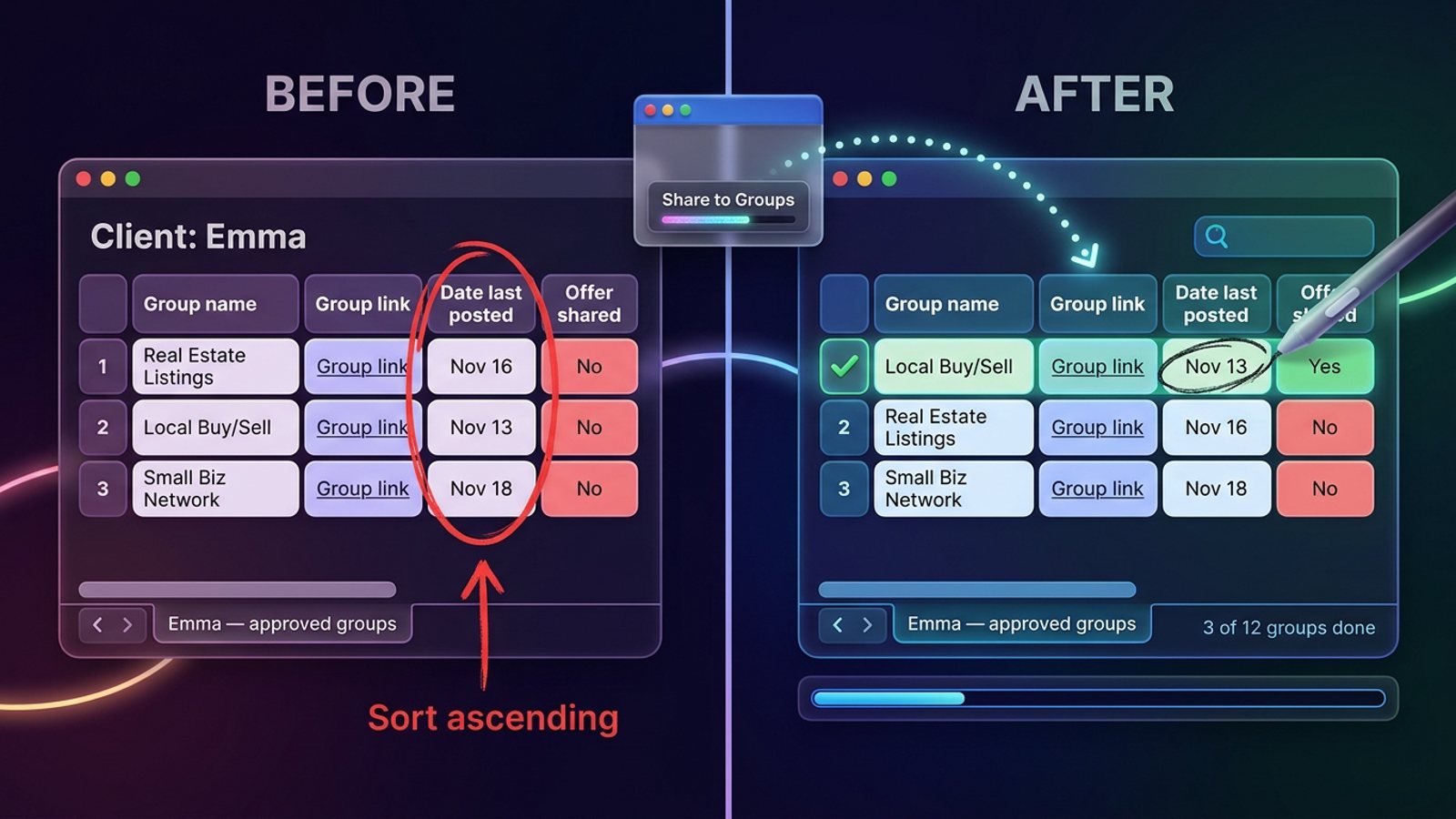
The reliable way to track Facebook groups posted is to log each share as you do it, not from memory afterwards. Keep one spreadsheet tab per client with the group name, group link, date last posted and which offer went out, sort by date before each session, and save the approved groups as a preset per client so you never post to the wrong list.
Get MGSA Chrome Extension (Free Unlimited) and the group presets do the selecting for you — the tracking habit below keeps the record straight.
Key takeaways
- One tab per client, four core columns: group name, group link, date last posted, offer shared.
- Sort the date column ascending before every session so the most overdue group sits at the top.
- Save each client's approved groups as a preset so you can't drift into a group they never approved.
- "Posted" is not the same as "live" — a post can sit in a group's pending queue until an admin approves it.
- Facebook's activity log confirms a post exists, but it won't tell you which client's offer it was.
Why does tracking matter more when you post for clients?
Because the cost of a mix-up lands on someone else's brand. When you post the same offer across many groups for several clients, the two failures that hurt are posting a client's offer to a group they never approved, and posting the same offer twice to the same group in one week.
A team running group posting without a shared list ends up with overlapping accounts and missing logs — you can't tell who posted what, according to a 2026 post from Đăng Bài Tự Động. A maintained list with clear labels and notes is what stops campaigns hitting outdated, irrelevant or duplicate groups, per BuildMint's 2026 guide on organising group URLs.
Our recommendation: treat the tracker as part of the job, not admin you do "if there's time." A tracker updated later is the one that gets you posting twice to the same group.
What columns should a per-client tracker have?
Four columns do the core work: group name, direct link to the group, date last posted, and which offer or piece went out. That's the setup recommended in a 2026 ArtHelper community post on tracking group posting.
Add two more and the sheet starts earning its keep:
- Promo day — many groups that allow promotion limit it to a specific day, a single pinned thread, a link rule or a required format, per MaherPost's 2026 guide to group rules. A "promo day" column stops you re-reading the same rules every week.
- Notes — topic, location and audience, so a teammate picking up the tab understands it without asking you, which is the labelling advice in BuildMint's 2026 guide.
One tab per client, never one shared tab. Mixing clients in a single list is exactly the overlap problem team group pools are built to fix.
How do I see which group is most overdue?
Sort the "date last posted" column ascending before each session. The least-recently-posted group floats to the top, which turns the sheet into your rotation order — the method recommended in that same 2026 ArtHelper post.
Then set a cadence you can actually keep. The ArtHelper post gives the example of posting to about 12 groups a week, which works out at roughly 2 groups per session if you post twice a week. Pick your number, write it at the top of the tab, and let the sort decide which groups go out today.
How do I stop posting the same offer twice in one week?
Update every row in the same sitting as the share, and keep a separate preset per client so the group list itself is pre-approved. A tick on a spreadsheet doesn't stop you opening a group again — only a list you actually work from does.
This is where a saved preset earns its place. In MGSApro you browse your Facebook groups, tick the ones you want, optionally add a message, and save the selection as a preset for next time. Sharing to multiple presets is supported, and the extension remembers which groups go with which Facebook profile.
If you're juggling several clients, the guide to keeping a separate Facebook group list for each client walks through the setup. For the wider question of spreadsheet versus tool for profile-and-group pairing, see spreadsheet vs tool for profile groups.
Does "posted" mean the post is live?
No. Many groups hold posts that Facebook judges likely spam in a potential-spam folder until an admin approves or rejects them, per AutoGP's 2026 post on text variations for Facebook groups. That means a tick in your tracker means "I shared it," not "the group can see it."
Our recommendation: before you tick a row as done, check the group's feed or pending queue. If it's waiting on an admin, mark it "pending" rather than "posted" — otherwise next week's sort will treat a group as covered when it never went live.
Which tool should I use to track Facebook groups posted?
There's no single official answer, and honesty matters here: Facebook doesn't give you a tidy "group posts this month" dashboard for client work, as MaherPost's 2026 agency reporting playbook puts it. So the practical choice is between a manual tally, a spreadsheet tab per client, a saved preset per client, and Facebook's own feeds — and most managers end up combining two of them.
Here's how they compare, checked November 2026. Prices for other tools can change.
| Option | Best for | Key features | Price / free option | Watch-outs |
|---|---|---|---|---|
| MGSApro Chrome Extension — Our pick | Sellers and managers who want the posting itself to be one click, with presets doing the list-keeping | Tick groups on the Facebook page, save selections as reusable presets, optional message per share, live progress bar as each group posts, randomized delays and human-like clicks, AI text variations, one "Share to Groups" button on every post; no extra dashboard | Free forever with a small watermark, or $9.99/month without one (as of November 2026; prices can change). Yearly plan from $7.99/month | Chrome only; operates on top of Facebook; free version adds a watermark; not affiliated with Meta. The progress bar shows the current run — it isn't a reporting dashboard you can look back on next week |
| Manual tally (paper or notes app) | One person posting to a handful of groups | Zero setup, works anywhere | Free | No sorting, so you can't see which group is most overdue; copying group links and offer details in by hand; sharing it means photographing the page (ArtHelper community post, 2026) |
| Spreadsheet tab per client | Managers who need a shareable record across clients | Group name, group link, date last posted, offer shared; sorting by date floats the most overdue group up | Free with Google Sheets, Numbers or Excel basics | Only accurate if you update it every time; nothing stops you posting twice; it doesn't know whether a post is live or stuck in a group's queue (AutoGP, 2026) |
| Saved preset per client (Group Posting) | Agencies running group posting across a team | Agency can add group collections from groups already in the client's extension, set pacing slower than the client's, and see per post whether it was published, awaiting approval or could not be confirmed | Agency plans €199/month for 10 clients and €349/month for 25 (as of November 2026; prices can change) | Agency plan isn't white-label and doesn't carry video yet; each client must connect their own extension; per-client lists need maintaining (Group Posting, 2026) |
| Facebook's own group feed / activity log | Spot-checking whether a post actually landed | Activity log lists your posts chronologically and can be filtered; the group feed shows whether your post is there | Free, built into Facebook | Records that a post exists, not which client or which week; slow across 20+ groups; the activity log is private to you, so it can't be handed to a client (Facebook Help Center) |
MGSApro is made by the team behind this blog.
If you mainly need a per-post delivery status you can report to a client, Group Posting's agency plan is the more direct choice. If you mainly need a free, private record you can hand over, a spreadsheet tab is still hard to beat.
How do I put the tracker and the tool together?
Run it as one loop each session:
- Open the client's tab and sort by "date last posted" ascending.
- Select the client's preset in MGSApro so only approved groups are ticked.
- Share, and watch the progress bar as each group is posted — that's your live view of the run.
- Update every row in the same sitting: date, offer, and "pending" where an admin still has to approve.
- Once a week, spot-check a few groups through Facebook's activity log or the group feed to catch rows you forgot.
New to the extension? The MGSApro tutorial covers the preset setup step by step. And if you're sharing the same offer on rotation, pair this tracker with the tips on keeping your group sharing safe when you post the same offer every week.
Our recommendation: don't let the tracker become a second job. Four columns, one sort, five minutes after each run. That's enough to know exactly which groups got this week's offer — and which are due next.
Get MGSA Chrome Extension (Free Unlimited) and keep the record straight from the first share.
Sources
- What's included in my Facebook activity log — Facebook Help Center, no date
- Find your Facebook activity log — Facebook Help Center, no date
- How to use activity log on Facebook to find specific content — Facebook Help Center, no date
- How to See My Posts on Facebook: A Complete Guide — WebFactory Ltd, 2026-09-04
- Keeping track of which Facebook groups you've already posted to — ArtHelper community, 2026-08-07
- How to Organize Facebook Group URLs for Posting Campaigns — getbuildmint.com, 2026-07-15
- Group Sharing Pool: Permissions, Logs, Multi-Account — Đăng Bài Tự Động, 2026-05-01
- Agency Client Reporting for Facebook Group Campaigns — MaherPost, 2026-08-05
- Agency FAQ: Passwords, Privacy, White-Label — Group Posting, updated 2026-10-14
- Your agency uses Group Posting: how to connect — Group Posting, 2026-10-23
- Group Posting product listing — PeerPush, 2026-10-28
- Spam policy — Meta Transparency Center, 2024-06-25
- Facebook group rules for promotional posts — MaherPost, 2026-10-28
- Spintax for Facebook groups — AutoGP, 2026-09-12
- One video in 10 Facebook groups — Pak SEO Training, 2026-10-31
Frequently asked questions
Never manually share to groups again
MGSA Pro is the free Chrome extension that shares your posts to every Facebook group for you — safely, with human-like timing.
Keep reading

How do I keep a separate Facebook group list for each client without re-ticking the boxes every time?
November 29, 2026
How do I share the same post to many Facebook groups on a work laptop during a lunch break?
November 28, 2026
How do I share one Facebook post to many groups and still add my own short pitch every time?
November 26, 2026