
What is the best tool for a realtor to share one listing to 20 local Facebook groups?
November 28, 2026 · MGSApro Team
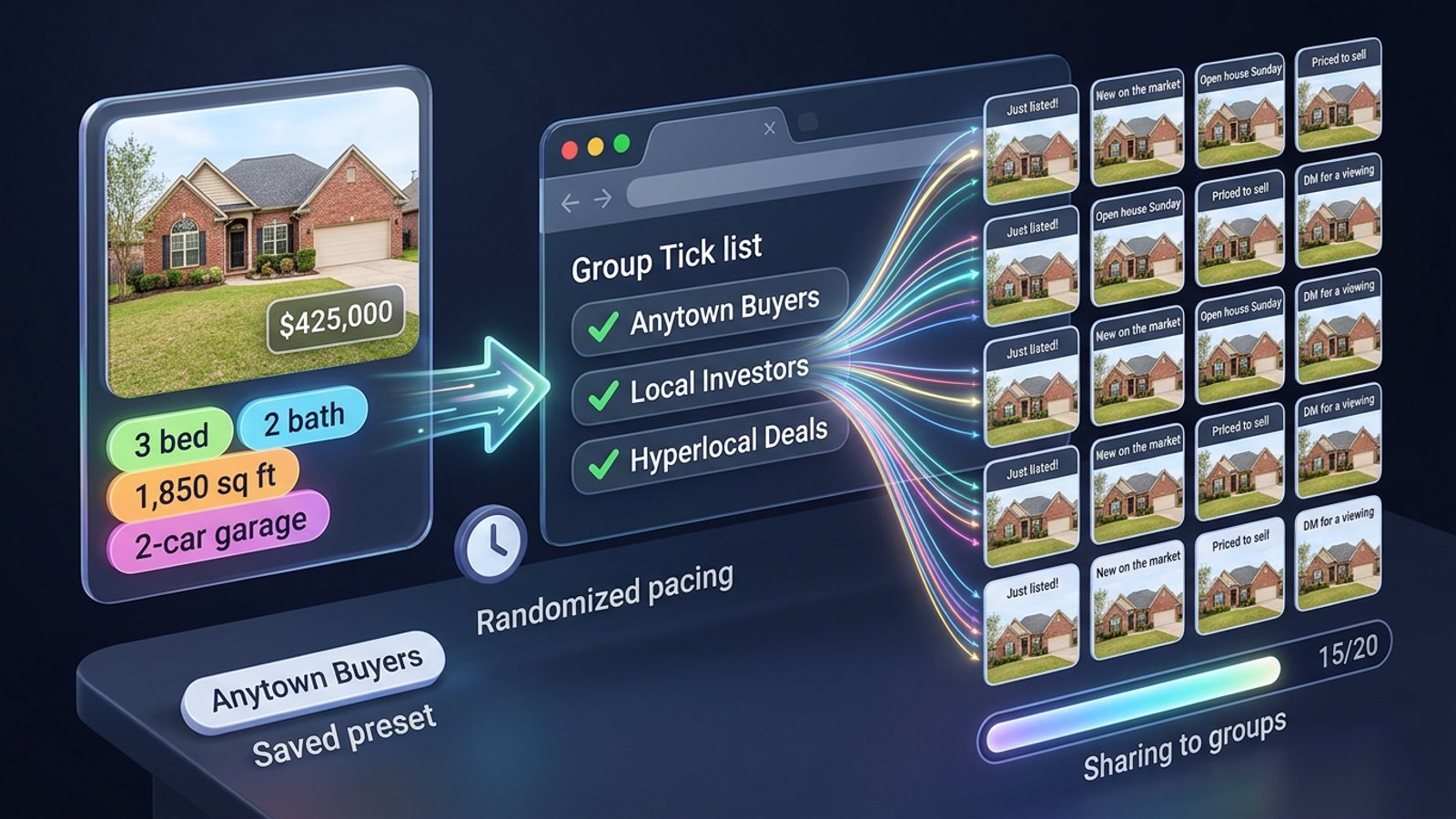
If you're a realtor sharing one listing to 20 local Facebook groups, the best fit is a Facebook group sharing extension that runs inside your own logged-in Chrome — like MGSApro. It ticks your groups, adds a message, paces the clicks and varies the wording. Big schedulers can't post into groups you've joined since Meta closed the Groups API on 22 April 2024.
Get MGSA Chrome Extension (Free Unlimited) — free forever with a small watermark, or $9.99/month without one.
Key takeaways
- The best tool realtor facebook groups buyers reach for is a browser extension that shares one post to many groups in one click, because schedulers lost group publishing in April 2024 (Meta for Developers, 2024).
- Manual posting to 20 groups costs roughly 40 minutes at about 2 minutes per group (Crx搜搜, 2026).
- Field guides suggest 5–8 promotional group posts per day rather than 20 in one burst (Lilach Bullock, 2026).
- Identical text fired into several groups in a short window is a top spam trigger (Conbersa, 2026) — vary the wording.
- Real estate posts are banned outright in some groups, so read each group's rules first (Freedom Res, 2026).
What should a realtor's listing-to-20-groups workflow actually look like?
The job is simple to describe: one hero photo, the price, three or four facts, one next step — repeated into the right local groups at a human pace, with the wording changed enough that it doesn't look copy-pasted. AutoGP's real estate guide (2026) puts the post format as a hook, three to five key facts (beds, baths, size, standout feature, parking), one call to action and your strongest photo first.
Here's the technique that works, whatever tool you use:
- Read the rules. Open each group's About or Featured section and note whether listings are allowed, on which day, and in what format. Freedom Res (2026) and MultiGroupPoster (2026) both report that some groups ban real estate posts entirely, some allow promo only on a set day or in a pinned thread.
- Build the post. Hook, price, 3–5 facts, one CTA, hero photo.
- Pick only the groups that match the listing — buyer, renter, investor, hyperlocal.
- Pace it. Lilach Bullock's 2026 guide suggests a max of 5–8 promotional posts per day, up to 10–12 for conversational content, spread out rather than fired in one burst.
- Reply fast and log where you posted so you don't double-share (Market Wiz AI, 2025; MultiGroupPoster, 2026).
Our recommendation: treat 20 groups as a two- or three-day plan, not a 20-minute blitz.
Why can't Hootsuite, Buffer or Meta Business Suite do this for me?
Because Meta removed third-party API publishing to Groups on 22 April 2024, so no scheduler can post into a group you've merely joined. The deprecation was flagged in Graph API v19.0 in January 2024 and took effect that April (Meta for Developers, 2024; AutoGP, 2026). It hit every vendor equally — it wasn't one company's failure.
What that leaves you:
- Meta Business Suite (free) can schedule Page posts and posts inside groups you admin, 20 minutes to 29 days ahead (postify.tech, 2026). As a member, you can't publish there at all (SocialKit, 2026).
- Hootsuite and Buffer are built for Pages and Instagram, not group publishing (AutoGP, 2026).
- RecurPost doesn't post into groups — it sends a mobile push reminder and you post yourself (RecurPost, 2026).
What about just posting manually?
Manual posting is free, has zero third-party risk and makes it easiest to respect each group's rules — but it doesn't scale. At roughly 2 minutes per group, 20 groups is about 40 minutes of clicking (Crx搜搜, 2026). A burst of quick shares can also get the share feature blocked for hours (Farsem, 2026), and a share of an existing post shows as "shared a post," which is less visible than an original.
How does MGSApro handle a listing share to 20 groups?
It turns the whole job into four steps inside Facebook, with no separate dashboard and no login. You browse your groups and tick the ones you want, optionally type a message, save the selection as a preset for next week's listing, then hit Share and watch the live progress bar as each group is posted.
For a realtor, the pieces that matter most:
- Presets — save "Anytown buyers," "investor groups," "hyperlocal" as separate lists, and share to more than one preset at a time.
- AI text variations — each group gets slightly different wording, which directly addresses the "identical content" spam trigger Conbersa flagged in 2026.
- Randomized delays and human-like clicks — the pacing happens for you.
- Optional message on every share, so you can add "DM me for a private viewing" each time.
- Multiple profiles — it remembers which groups belong to which profile.
- Scheduling into your own groups only.
Pricing, as of November 2026: free forever with a small "Shared using MGSApro" watermark, or $9.99 per month without one — $7.99/month on the yearly plan. Prices can change.
Honest limits: it's Chrome only, it operates on top of Facebook, the free version adds a watermark, and it is not affiliated with Meta.
Which tool is best for a realtor sharing one listing to 20 local Facebook groups?
Of the tools we compared, MGSApro is our pick for this specific job — one listing into many local groups, fast, from inside your own browser. Here's the honest comparison:
| Option | Best for | Key features | Price / free option | Watch-outs |
|---|---|---|---|---|
| MGSApro (Our pick) | Realtors sharing one listing to many local groups quickly | Tick groups, optional message, presets, live progress bar, randomized delays, AI text variations, works inside Facebook, multi-profile | Free with watermark; $9.99/mo without (as of Nov 2026; prices can change) | Chrome only; runs on top of Facebook; free version watermarked; not affiliated with Meta |
| Manual posting | A handful of groups, or very low volume | Full control per post, easiest to respect group rules, no tool risk | Free | ~2 min per group (~40 min for 20); shares show as "shared a post"; bursts can block sharing |
| Meta Business Suite | Scheduling Page posts and groups you admin | Schedule 20 min–29 days ahead | Free with a Facebook account | Can't publish as a member of a group |
| Hootsuite | Managing Pages and Instagram across a team | Broad social management | Not stated in the sources we used | Can't post into groups you've joined since April 2024 |
| Buffer | Scheduling Page and Instagram posts | Simple scheduling | Not stated in the sources we used | Same Groups API removal — no group publishing |
| RecurPost | Reminder-driven group posting | Push-notification reminders for groups | Not stated in the sources we used | Doesn't actually post into groups |
If you mainly need cross-platform Page and Instagram scheduling, Hootsuite or Buffer is the more direct choice. If you only post to two or three groups, manual is genuinely fine. The gap is the realtor doing 20 groups a week — that's where the extension earns its keep.
MGSApro is made by the team behind this blog.
Get MGSA Chrome Extension (Free Unlimited) and set up your first group preset before the next listing goes live — or walk through the MGSApro tutorial first.
How do I keep 20 group shares from looking like spam?
Vary the wording, space the posts out, and keep the daily total modest. Meta's Spam policy bans posting or sharing "excessively frequently," manually or automatically, and can restrict accounts showing repetitive-content signals (Meta Transparency Center, 2024). Conbersa's 2026 guide names the fastest trigger plainly: the same content into five groups in 30 minutes.
The 5–8 promotional posts per day figure is field guidance from Lilach Bullock (2026), not a Meta rule. Our recommendation: split your 20 groups across two or three days, change the opening line each time, and skip any group whose rules don't allow listings.
This is general information, not legal advice — brokerage, MLS and fair-housing rules vary by place, and a post that reaches the wrong audience can land as a complaint (Coach Emily Terrell, 2026).
Is there real precedent for 20 groups per listing?
Yes. Inman (2025) profiled agent Abby Goodell, who shares each listing to up to 20 local buy/sell/swap groups within a 30–60 mile radius and reports at least one qualified buyer lead per three listings. Twenty is a realistic, working number — not a stunt.
For the step-by-step version of this routine, see how to share the same listing to many Facebook groups as a realtor. If you want the same post kept off groups you don't belong in, read sharing a real estate listing to only the relevant local groups.
Sources
- Facebook Groups API deprecation — Meta for Developers forum (Meta, 2024)
- Can Buffer or Hootsuite Post to Facebook Groups? (AutoGP, 2026)
- How to schedule Facebook posts (postify.tech, 2026)
- How to schedule Facebook Group posts (SocialKit, 2026)
- I Tried Every Way to Schedule a Post in a Facebook Group (Medium — Dented Feels, 2026)
- How Many Facebook Groups Can I Post To Per Day? (Medium — Dented Feels, 2026)
- How many Facebook Groups can you post in per day (Lilach Bullock, 2026)
- How to Avoid Facebook Group Spam Detection (Conbersa, 2026)
- Spam — Transparency Center (Meta, 2024)
- Facebook Groups for Real Estate Agents: A 2026 Playbook (Coach Emily Terrell, 2026)
- Facebook Groups for Real Estate Agents (Freedom Res, 2026)
- Facebook Groups for Real Estate Agents — Post Listings (AutoGP, 2026)
- Facebook Groups for Real Estate Agents: A Lead Playbook (MaherPost, 2026)
- How to Post to Multiple Facebook Groups at Once (MultiGroupPoster, 2026)
- Facebook group promotion rules (MultiGroupPoster, 2026)
- Facebook Marketplace: the tool most agents skip (Inman, 2025)
- RecurPost vs Oktopost (RecurPost, 2026)
- Manual share flow (Chrome Web Store listing mirrored by Crx搜搜, 2026)
- Publier dans plusieurs groupes Facebook en même temps (Farsem, 2026)
- Meilleurs outils publier groupes Facebook (Farsem, 2026)
- How to Post in Facebook Groups Without Getting Banned (Market Wiz AI, 2025)
Frequently asked questions
Never manually share to groups again
MGSA Pro is the free Chrome extension that shares your posts to every Facebook group for you — safely, with human-like timing.
Keep reading
How do I share one open house post to 20 local Facebook groups in minutes?
November 20, 2026

What is the best tool to share one Facebook post to many buy-and-sell groups?
November 21, 2026

How do I share the same listing to many Facebook groups as a realtor?
November 20, 2026

What is the best tool to share one Facebook post to all my groups at once?
November 20, 2026