
How do I post my cleaning service offer to local Facebook groups without a tool's name on it?
November 25, 2026 · MGSApro Team
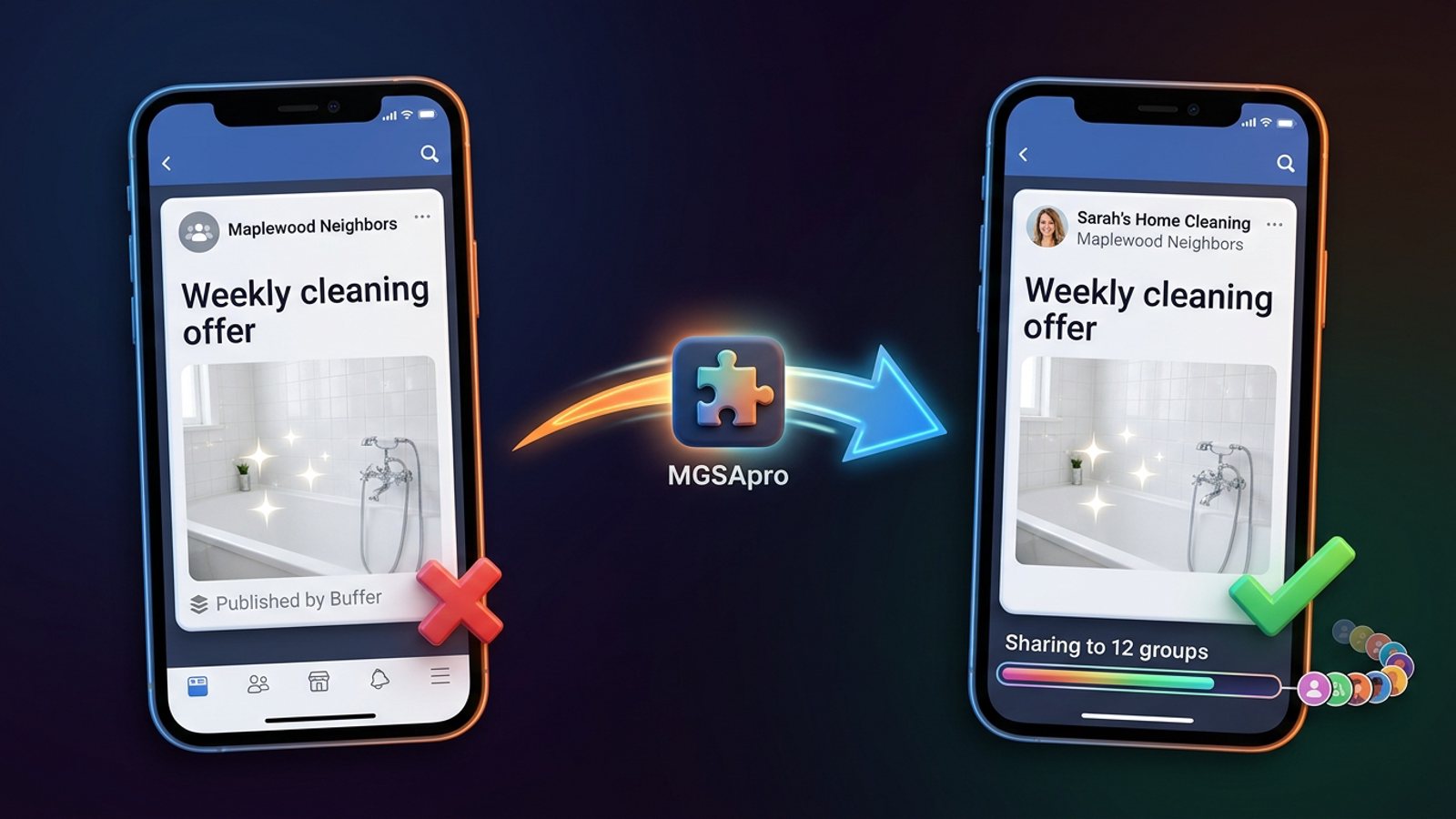
You can post a cleaning offer to local Facebook groups with no tool's name on it by publishing from your own logged-in Facebook — by hand, or with a browser extension that drives your own session — and by cleaning your photo and link preview first. Schedulers that publish through Meta's API carry an app stamp their own help pages say can't be removed.
Local service Facebook group posts get the cleanest result when the post is authored by you, not by an app. Here's the routine, the before/after, and the tools — including ours — laid out honestly.
Ready to share your weekly offer without a stamp on it? Add MGSApro to Chrome and share from your own Facebook session.
Key takeaways
- App stamps come from API publishing. Buffer and ContentStudio both say the "Published by" line is added by the network and can't be removed.
- Posting from your own browser keeps the post yours — no third-party attribution.
- Clean the image and the link preview first. Facebook can keep a cached preview after a URL changes, so an old logo may linger.
- Presets plus a short weekly blurb turn this into a 15-minute job instead of an afternoon.
- Most local groups approve posts manually, so pace yourself and follow each group's promo rule.
Why does my group post show a tool's name on it?
Because a scheduling app published it through Meta's API, and those apps are required to carry attribution. Buffer's help center (2026-07-01) says its "Published by Buffer" stamp is added by the social network and cannot be removed, because the networks require it of all third-party apps. ContentStudio's docs (2026-08-09) say the same for posts to Profiles and Groups.
Two things worth knowing:
- On Facebook Pages, that "published by [app]" line is usually visible only to Page admins and editors, according to Eclincher's help page (updated May 2026).
- A community thread on Make (2024-06-08) reaches the same conclusion and suggests posting manually from your own account as the workaround.
The second source of a "tool's name" is simpler: a logo or watermark baked into your photo, or a link preview that cached an old image. A Q&A answer on JustAnswer (undated, low authority) notes Facebook can keep a cached link preview after a URL is removed or edited — so swap in a fresh image, and a new URL if the preview is stuck.
Before and after: the same cleaning offer, two ways
Before (published through a scheduler): your offer text, your photo — and a line under the post naming the app that published it. On a personal profile or in a Group, that line is public.
After (posted from your own session): the same offer, the same photo, and nothing under it but your name and the group. No app name, no vendor logo, no stamp.
That's the whole difference. It doesn't change how the post performs or whether an admin approves it — it changes who the post appears to come from.
How do I post a cleaning offer to local groups without a tool's name?
Post from your own logged-in Facebook, either by hand in each group or with a browser extension that works inside your own session. Then clean the asset and follow each group's rules.
- Clean the asset first. Use a job photo with no app logo or vendor watermark on it. If an old logo is stuck on a shared link, use a fresh image and a new URL.
- Pick only groups that allow promotion, and note the rule type. MaherPost (2026-10-28) groups promo rules into four kinds: a weekly promo day, a single pinned thread, no links (or links in comments only), or a required template with price, area and contact.
- Write one short offer blurb for the week. Lead with the outcome (a spotless home before guests arrive), one trust signal (reviews, insured), a scoped offer (for example a first clean for homes up to 2 bedrooms and 1 bath), and one simple next step — call, text or DM. Neighborhood Postcards (2026-02-01) makes the same point: sell trust and convenience with an easy first booking, not a long service list.
- Save the blurb and your group list as reusable presets, plus two or three alternate openings so each group gets a variation. MaherPost's 2026-03-21 vendor post argues recurring campaigns should refresh the wording each cycle.
- Share. By hand: open each group, tap "Write something", paste, post (HuddleWatch, 2026-09-17). Or use a browser extension that shares to your chosen groups from inside your logged-in Facebook.
- Expect approval. Many groups hold every post for an admin, and approval is a standing setting — approved members' future posts can still need review (RedReplier, 2026-09-12). Don't resubmit while one is pending.
- Show up after the post. Answer recommendation threads and comments instead of posting and ghosting (The Yardstick Agency, 2026-10-06).
One policy note: Meta's Commerce Policies, as summarised by AutoGP (2026-10-25), say commerce content may not promote buying or selling services — cleaning is listed as an example — with exceptions for WhatsApp Business and Appointments. So skip Marketplace for a cleaning offer and post in groups whose rules invite business posts. This isn't legal advice, and rules vary by place.
How do presets and a short weekly blurb save you time?
They turn a repeat job into a two-click job. Save your group list once, save your blurb once, then each week you only swap the photo and tweak the opening line.
A practical weekly rhythm, based on the cleaning-content schedule SocialBlaze outlines (2026-10-26): film a before/after across a couple of jobs with the customer's consent, pick your offer for the week, then sit down once and share it. Thursday is the anchor that source uses for weekend planning and move-out cleans.
Our recommendation: keep one master blurb and three variants. Reuse the same offer, change the first sentence each cycle, and don't post identical copy to every group — MaherPost (2026-03-21) notes that identical repeats get declined.
If you already post the same offer every week, the sibling guide on posting your cleaning offer to the same local groups every week covers the repeat routine in more detail.
Which tool posts to local groups without a stamp?
The tools that leave no app stamp are the ones that post from your own browser session rather than through Meta's API. Of the tools we compared, our pick is MGSApro — because it shares from inside your logged-in Facebook and adds no third-party attribution.
MGSApro is made by the team behind this blog. It's a Chrome extension that lets you select groups right on the Facebook page, add an optional message, save the selection as a preset, and click one "Share to Groups" button while a progress bar shows each group being posted. It includes randomized delays, human-like clicks and AI-generated text variations, and runs entirely on top of Facebook with no extra dashboard. It's free forever with a small watermark, or $9.99 a month without one (as of November 2026, prices can change). The owner also confirms a $7.99-a-month rate on the yearly plan. Honest limits: Chrome only, it operates on top of Facebook, and it isn't affiliated with Meta.
| Option | Best for | Key features | Price / free option | Watch-outs |
|---|---|---|---|---|
| MGSApro (Our pick) | Cleaners who want one-click sharing with no app stamp | Group selection on the Facebook page, optional message, reusable presets, live progress bar, randomized delays, human-like clicks, AI text variations, no dashboard | Free forever with a small watermark; $9.99/month without (as of November 2026, prices can change) | Chrome only; runs on top of Facebook; not affiliated with Meta |
| Doing it manually in each group | The odd post, or a short list of local groups | Post authored by your own profile, full control of photo and links | Free | Opening, pasting and adjusting per group is the time sink; rapid repetition across groups is the commonest ban cause (gtstu.com, 2026-11-07) |
| Facebook's native Share dialog | Pushing one existing post into one group | Stays tied to your Page or profile, no third-party software | Free | One group per action; still subject to each group's rules and approval |
| Meta Business Suite | A cleaner whose Page and groups are linked | Free, official, calendar view | Free | Buffer's guide (2026-10-25) says it does not schedule to Facebook Groups; group scheduling needs admin or moderator rights inside the group itself |
| Grovo Group Poster | Posting from your own session with per-group rules | Spintax variations, allowed days, cut-off times, daily and weekly caps, pacing presets | Free plan of 3 sessions up to 6 groups per list; Pro $14.99/month or $149/year (Chrome Web Store, updated 2026-11-18) | Its own listing warns no tool can promise Facebook won't restrict an account |
If you mainly need fine-grained per-group rules like allowed days and daily caps, Grovo is the more direct choice. If you want the simplest one-click share with no dashboard, MGSApro is the one we'd point you to.
You can see the whole flow in the MGSApro tutorial, or add the Facebook group sharing extension to Chrome and try it on this week's offer.
How do I keep local group posts from looking spammy?
Vary the wording, space the posts out, and follow each group's rule type. gtstu.com (2026-11-07) says bans for self-promotion in local groups are almost always avoidable and usually come from ignoring group rules, posting too often, or pitching before adding value.
On pacing, a Medium post (2026-05-28) and a PostSyncer guide (2026-09-23) suggest random gaps and keeping volume sensible for wary accounts. Our recommendation: keep your weekly offer to one post per group, spread across a morning, and never blast the same text everywhere at once.
Also worth knowing: Meta now gives group admins AI help on its Forum app (US, iOS and Android) that labels pending posts as likely to comply or conflict with group rules, with approval left to admins (Search Engine Watch, 2026-10-24). A post that reads like an ad is the one that gets flagged.
For the safety side in more depth, see the sibling guide on sharing the same post to 20 local groups without it looking like spam.
Sources
- Why Is "ContentStudio App" Showing up on My Facebook Posts? (ContentStudio docs, 2026-08-09)
- Is it possible to remove the "Buffer" stamp from posts published to social networks? (Buffer Help Center, 2026-07-01)
- Will my audience or fans see "published by Eclincher" and why? (crisp.help / Eclincher, updated 25/05/2026)
- Facebook remove "published by" watermark (Make Community forum, 2024-06-08)
- Can't seem to get rid of logo on FB post (JustAnswer, undated)
- Multigroup Poster – Facebook Group Auto Poster, Bulk Post & Scheduler (ExtPose, 2026-11-06)
- Post to Multiple Facebook Groups at Once - Grovo Group Poster (Chrome Web Store, updated 2026-11-18)
- How Facebook Group Post Approval Works (RedReplier, 2026-09-12)
- How to Schedule a Post on Facebook: Pages, Profiles + Groups (Buffer, 2026-10-25)
- 在您管理的 Facebook 小组中发定时帖或创建定期帖 (Facebook Help Center, 2025-09-16)
- Comment programmer des publications sur les groupes Facebook (SocialBee, 2026-01-06)
- Facebook group admins get AI help catching posts that break their rules (Search Engine Watch, 2026-10-24)
- How to Post in Local Facebook Groups Without Getting Banned (gtstu.com, 2026-11-07)
- Facebook Group Rules for Promotional Posts: Get Approved (MaherPost, 2026-10-28)
- Recurring Offer Campaigns in Facebook Groups (MaherPost, 2026-03-21)
- Facebook Groups: Grow Without Getting Kicked Out (PostOwl, 2026-11-04)
- Facebook Groups for Home Service Businesses (AutoGP, 2026-10-25)
- Direct Mail for Cleaning & Washing Businesses (Neighborhood Postcards, 2026-02-01)
- Facebook Scheduler for Carpet Cleaning (SocialBlaze, 2026-10-26)
- How to post in a Facebook group without getting removed (HuddleWatch, 2026-09-17)
- How financial advisers can use local Facebook groups (The Yardstick Agency, 2026-10-06)
- How many Facebook groups can I post to per day? (Medium @liran151, 2026-05-28)
- How to post in multiple groups on Facebook (PostSyncer, 2026-09-23)
Frequently asked questions
Never manually share to groups again
MGSA Pro is the free Chrome extension that shares your posts to every Facebook group for you — safely, with human-like timing.
Keep reading
How do I post my cleaning service offer to the same local Facebook groups every week without wasting time?
November 20, 2026
How do I post my listing to local Facebook groups without another company's name on it?
November 22, 2026
What is the best tool to post a client's Facebook post to 30 groups without a watermark?
November 27, 2026
What is the best tool to share one Facebook post to 50 groups without a watermark on it?
November 22, 2026