
How do I share the same Facebook post to 20 local groups without it looking like spam?
November 20, 2026 · MGSApro Team
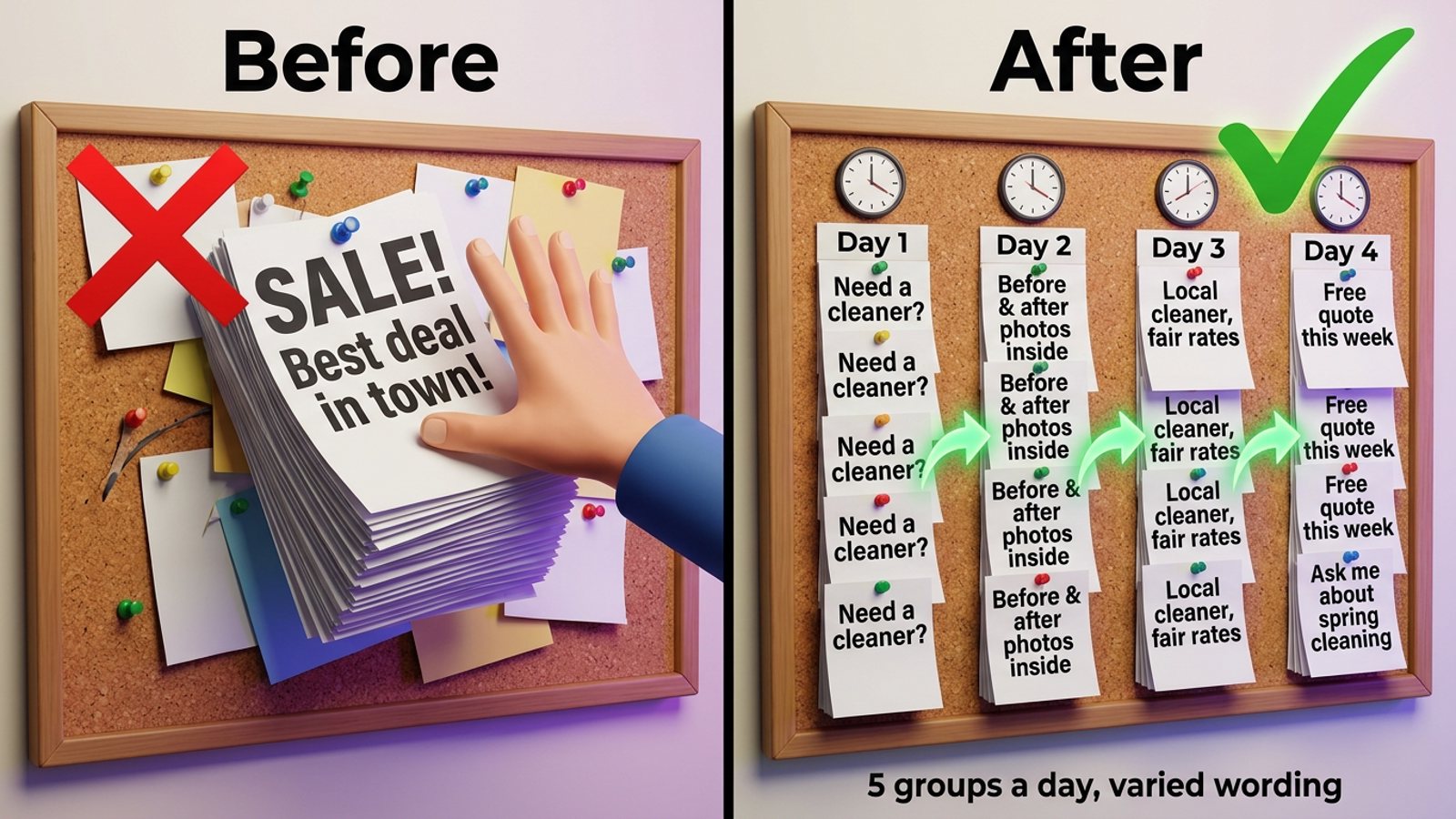
Make each copy look like it came from a neighbour, not a billboard: split the 20 groups into small batches, space posts out over days, rewrite the wording for each group, and read each group's promo rules first. That's the honest way to share facebook post local groups spam-free — Facebook's spam policy flags very high frequency and repetitive content, whether you post by hand or automatically.
Want the clicking handled while you keep those habits? Get MGSA Chrome Extension (Free Unlimited) — it shares your post to your chosen groups with randomised delays and AI-varied wording.
Key takeaways
- Spam risk comes from three things: speed, identical text, and ignoring group rules.
- Facebook's business help says repeated or identical messages are treated as spam, and its policy prohibits posting at very high frequency — by hand or automatically.
- Practitioner advice in the research points to roughly five groups a day, so 20 groups spread over about four days.
- Vendors recommend rotating 3–5 versions of your wording so the same text never lands twice in an hour.
- Nothing here is legal advice, and group rules and platform enforcement vary by place — check your own groups.
How many local groups can I post to in a day without getting flagged?
Stay conservative and ramp up slowly. One podcast practitioner in the research says don't post to more than five groups a day, suggesting two days of five groups rather than one burst. A warm-up schedule from MaherPost (date not given) starts a new profile at 3–5 groups a day and builds to 15–25 groups a day over 14 days.
For your 20 local groups, that means roughly four days of five groups each — not twenty tabs in twenty minutes. Our recommendation: start with the five groups where your customers actually ask for recommendations, and add more once those posts get comments.
Why does the same post get removed in one group and work in another?
Because each group sets its own promotion rules. MaherPost (vendor blog, 2026-10-28) describes four common limits: by day (a weekly promo day), by place (a single pinned thread), by links (no links, or link in comments only), and by format (a required template, price or location). Admins also decline posts that open with a hard sell or repeat across groups, even when they technically follow the rules.
A 60-second pre-post check from MultiGroupPoster (vendor blog, 2026-07-02): open the group's Featured section where admins pin the rules, and look for the words "promo," "self-promotion," "links" or "vendors." Note any format requirements before you write a word.
How do I space out posts so they look human?
Use randomised gaps, not a fixed timer. FB Bulk Poster (vendor blog, 2025-12-11) suggests 1–2 minutes between posts with ±30 seconds of variation for an established account, and notes that a randomised delay reads as more natural than fixed timing. Newer accounts get longer gaps — 2–3 minutes with ±30–60 seconds.
Meta's spam policy prohibits posting or sharing at very high frequency, by hand or automatically. Conbersa (vendor blog, 2026-07-01) describes cross-group posting velocity as the most common trigger for Facebook's automated spam detection, which runs continuously and takes the vast majority of enforcement actions without human review.
Our recommendation: if you're doing this by hand, set a phone timer for a random 1–3 minutes between each group and actually wait it out. If you're using a tool, make sure it randomises the gaps for you.
Does changing the wording for each group actually matter?
Yes — vendors describe identical content across groups as the fastest path to restrictions. FB Bulk Poster (2025-12-11) says if the exact same text appears in 30 groups within an hour, that's textbook spam behaviour, and recommends writing 3–5 versions and rotating them. MaherPost (vendor blog, 2026-08-05) adds that Meta fingerprints text, and identical listing descriptions are the kind of pattern that draws flags.
There's a trust problem too. Pam Moore (LinkedIn post, 2026-09-22) describes a consultant pasting one sales post into 50–60 groups via duplicate Pages and notes the damage to brand and trust; Meta says networks sharing the same spammy content may see lower reach. SumFactors (2026-10-05) puts it well: the finished-job photo posted the same day as four other trades becomes wallpaper, and admins start counting.
Practically, that means three versions of your post — a before-and-after version, a short question-led version, and a plain offer version — swapped group to group.
How do I stay out of trouble with group admins while still promoting?
Be a member first, then a business. Sharpen Marketing (2025-06-07, older source) suggests joining 3–5 highly active local groups and, in the first weeks, liking and commenting on 3–5 posts per group every other day from your personal profile rather than a Page. MaherPost (vendor blog, 2026-10-27) notes admins remove ads that get no engagement, and that members don't mind businesses — they mind businesses that only show up to sell.
Practitioners also say posting natively inside each group beats sharing from your personal page (Muck Rack podcast transcript, 2026-03-09). That's worth knowing before you pick a method.
What are the warning signs I'm close to a restriction?
Posts failing silently and a "You're posting too fast" message. FB Bulk Poster (2025-12-11) lists both: you click post, it looks successful, but the content never appears in the group. MultiGroupPoster (vendor blog, 2026-03-03) suggests pausing at least an hour and lengthening gaps to five minutes or more.
Our recommendation: the moment you see a silent failure, stop the batch for the day. Don't re-post to "fix" it — many groups hold posts for admin approval, and reposting won't speed that up (AutoGP, 2026-10-25).
The step-by-step version
- Pick 20 local groups where your customers ask for recommendations, and read each one's rules first (MultiGroupPoster, 2026-07-02).
- Spend a couple of weeks being a real member: comment helpfully on 3–5 posts per group every other day (Sharpen Marketing, 2025-06-07).
- Split the 20 into batches — practitioner advice is no more than five groups a day (Muck Rack, 2026-03-09).
- Space posts with randomised gaps, around 1–2 minutes with ±30 seconds for an established account (FB Bulk Poster, 2025-12-11).
- Rotate 3–5 wording versions so the same text never appears twice in an hour (FB Bulk Poster, 2025-12-11).
- Follow each group's format rules and open like a neighbour (MaherPost, 2026-10-28).
- Watch for silent failures or "posting too fast" and pause at least an hour (MultiGroupPoster, 2026-03-03).
Tools and options for sharing one post to 20 local groups
Here's how the realistic options compare. Every tool below still needs the habits above — pacing and varied wording — to keep your Facebook group sharing extension work from reading as spam. MGSApro is made by the team behind this blog.
| Option | Best for | Key features | Price / free option | Watch-outs |
|---|---|---|---|---|
| MGSApro (Our pick) | Sellers and local service providers who want one click across saved groups, with pacing built in | Select groups on the Facebook page, optional message per share, reusable group presets, live progress bar, randomised delays and human-like clicks, AI-generated text variations, one "Share to Groups" button on every post | Free forever with a small watermark, or $9.99/month without it, as of November 2026; prices can change | Chrome only; operates on top of Facebook; free version adds a watermark; not affiliated with Meta |
| Posting by hand, one group at a time | A small number of groups where you can genuinely rewrite each post and answer comments | Free, no tool needed; lets you post natively inside each group, which practitioners say beats sharing from your personal page | Free — the cost is your time | 20 groups means 20 rounds of clicking and waiting, and doing it fast by hand is itself a spam signal |
| Meta Business Suite | Scheduling Page content weeks ahead and cross-posting to a connected Instagram Business account | Free, lives at business.facebook.com | Free | Doesn't support Facebook Groups per Buffer (2026-10-25); group posts must be scheduled from inside the Group in the Facebook app, admin or moderator only; one App Store reviewer (2026-10-13) reports sharing is capped at about three groups at a time — a user report, not Meta documentation |
| Buffer | Scheduling Page posts and using mobile notifications as a reminder to post in Groups by hand | Scheduling and publishing for Pages | Pricing not stated in the sources we used | Cannot auto-publish to Facebook Groups — Meta removed the Groups API permission on 22 April 2024, so no cloud tool can post to a group for you (Preflight, 2026-10-08) |
| Admin collaboration or a paid vendor slot | The long game: a promo day, pinned thread or vendor slot in a local group | The post is welcome, so it doesn't read as spam | Free, though many local groups charge a promotion or membership fee; one podcast practitioner mentions groups quoting ~$50/month as worth testing and $1,000/month as usually a bad deal | At the admin's discretion; competing trades get blocked; admin-run groups remove ads that get no engagement |
If you mainly need to schedule Page content and Instagram together, Meta Business Suite is the more direct choice. If you want to post natively in a handful of groups and build relationships, doing it by hand wins. If your job is the same post across 20 local groups with different wording each time, MGSApro's Facebook group sharing extension is built for exactly that — free to start, with randomised delays and AI text variations on by default in the workflow.
How MGSApro fits into a non-spammy routine
It handles the clicking; you keep the judgement. Here's the honest fit from the product facts:
- Browse your Facebook groups and tick the ones you want.
- Optionally type a message or blurb.
- Save the selection as a preset for next time.
- Click Share and watch the progress bar as it posts to each group.
The built-in randomised delays and human-like clicks cover the pacing step, and the AI-generated text variations cover the wording step — so you're not the person typing twenty near-identical messages. It works entirely on top of Facebook, with no extra dashboard, and it's Chrome only. It also remembers which groups go with which profile if you run more than one.
Our recommendation: still split 20 groups into batches and still rotate your own wording where you can — the tool makes the mechanics easier, it doesn't make a burst of twenty safe. And please don't spam with it. If an account gets suspended, the owner's advice is to appeal it, and reinstatement depends on the account not having been used for spam.
If you want to see the setup, the MGSApro tutorial walks through selecting groups and saving presets. If you're weighing a single burst against a spread-out batch, our guide to posting to 30 groups in a few minutes without getting blocked covers the timing trade-offs, and if your problem is wording, see how to keep each Facebook group post different.
Ready to stop retyping? Get MGSA Chrome Extension (Free Unlimited) and run your next local post across your saved groups with pacing built in.
Sources
- AutoGP — Facebook group posting limits (2026-09-12)
- Facebook Business Help Center — repeated/identical messages policy (Meta, date not given)
- Conbersa — Facebook groups anti-spam for B2B (vendor blog, 2026-07-01)
- MaherPost — Facebook posting limits (vendor blog, date not given)
- FB Bulk Poster — Facebook group posting limits (vendor blog, 2025-12-11)
- MaherPost — unique copy at scale (vendor blog, 2026-08-05)
- MaherPost — group rules for promotional posts (vendor blog, 2026-10-28)
- MultiGroupPoster — group promotion rules (vendor blog, 2026-07-02)
- MaherPost — promoting without spamming (vendor blog, 2026-10-27)
- Sharpen Marketing — local Facebook group strategy (2025-06-07)
- Muck Rack — Hook Better Leads podcast transcript (2026-03-09)
- Pam Moore — LinkedIn post on spam (2026-09-22)
- SumFactors — local community groups for a Berkshire business (2026-10-05)
- MultiGroupPoster — why a post won't publish (vendor blog, 2026-03-03)
- AutoGP — post waiting for admin approval (2026-10-25)
- Preflight — schedule Facebook Page posts; groups are out (2026-10-08)
- Buffer — how to schedule Facebook posts (2026-10-25)
- Apple App Store — Meta Business Suite reviews (2026-10-13)
Frequently asked questions
Never manually share to groups again
MGSA Pro is the free Chrome extension that shares your posts to every Facebook group for you — safely, with human-like timing.
Keep reading
How do I post my listing to local Facebook groups without another company's name on it?
November 22, 2026

How do I post to many Facebook groups at a human pace so it doesn't look like a bot?
November 21, 2026

How do I share a Facebook post to many groups safely without looking like a bot?
November 20, 2026