
How do I stop posting my client's listing to the wrong profile's Facebook groups?
November 29, 2026 · MGSApro Team
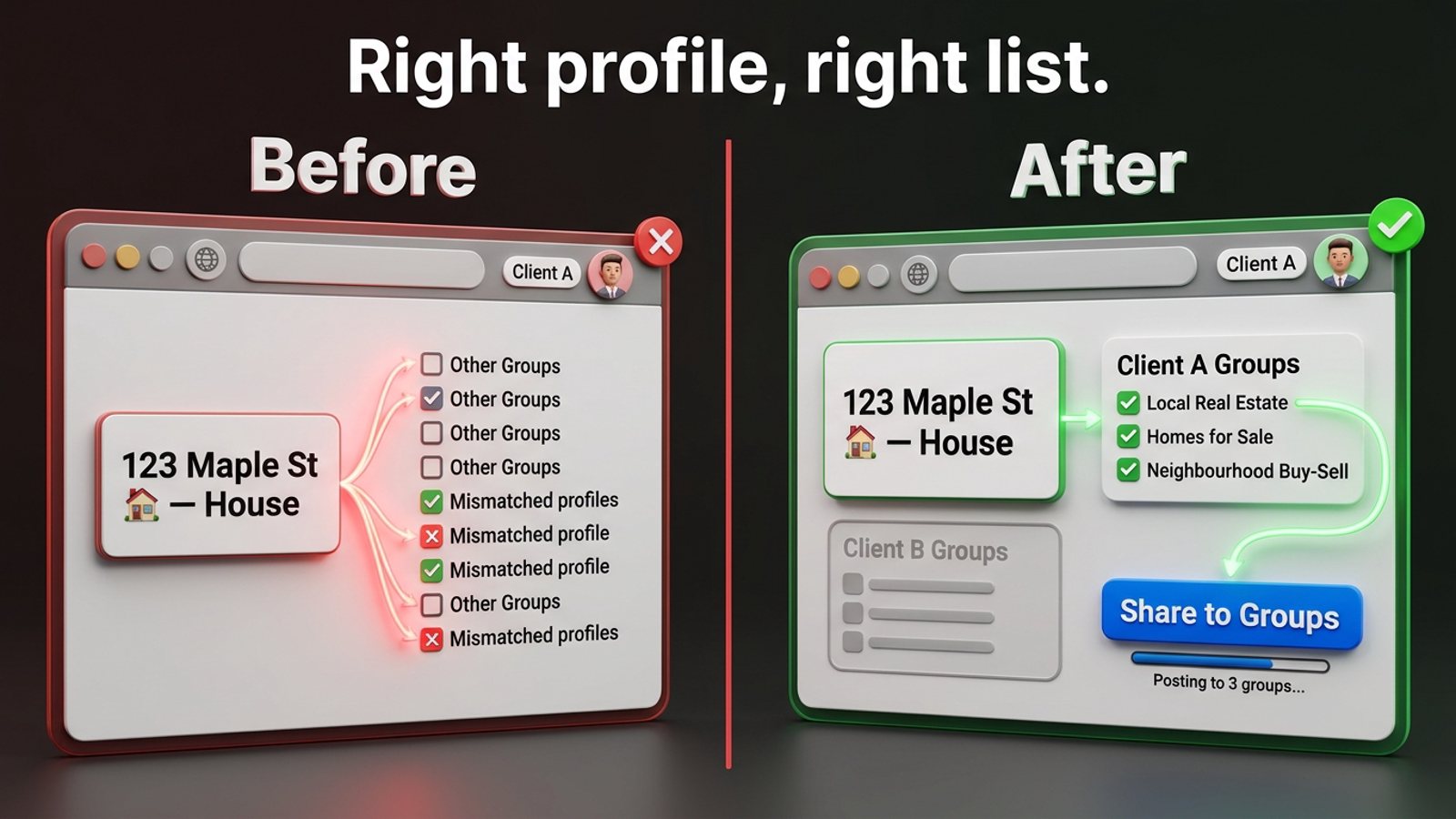
If you manage several client profiles, the mix-up usually happens when you switch accounts in one browser window and reuse the same group list. Fix it by working one profile at a time, keeping a saved group selection per profile, and running a 10-second check — right profile signed in, right listing, right groups — before you hit share.
That's the short version. The rest of this article is the routine that makes it stick, plus the tool setting that removes most of the risk for good.
If you want the group lists kept apart automatically, you can get the MGSA Chrome Extension (Free Unlimited) and try it on your next client post.
Key takeaways
- Most wrong profile Facebook groups mistakes come from leftover group selections, not from a broken tool.
- Facebook lets you keep several accounts signed in on one computer and switch between them, so it's easy to lose track of which one is active.
- Keep one written map: client → profile → groups. Then work one profile at a time.
- A saved group selection per profile means the list can't carry over from the last client you posted for.
- Vary wording and leave gaps between groups — Facebook's spam systems pattern-match bursts of identical posts.
Why does my client's listing end up in the wrong profile's groups?
Because the group list was still ticked from the last client, and you switched profiles without clearing it. Facebook attributes a group post to whichever profile is signed in when you post, so the destination list and the identity have to match before you share anything.
There's a second layer too. Whether a group accepts a post from a Page at all is the group's own setting — many groups take personal profiles only or restrict Pages, and when a Page's post is refused, that's Facebook enforcing the group's rule, not a fault in your post (Group Posting Help, 2026). So the identity question comes first, before the group list, every time.
That order — posting as, then groups — is exactly where the mistake happens. Group Posting's help docs describe choosing "Posting as" (profile or Page) in setup before picking groups, and switching back after a mismatch (Group Posting Help, 2026). If you build your list first and pick the identity second, you've built the trap yourself.
How do I switch between client profiles without losing track?
Use Facebook's own switch flow and confirm the active account every single time. Click your profile picture → "See all profiles" → "Switch accounts" → pick the account (Facebook Help, undated).
Facebook lets several accounts stay signed in on the same computer and switch without logging out — up to 10 saved accounts, and Facebook recommends saving only accounts you trust (Facebook Help, undated). Convenient, and exactly why it's easy to post as the wrong person.
Our recommendation: never trust your memory on which profile is live. Glance at the profile picture in the top-right corner before every share. It takes two seconds and catches most of these errors.
If the Switch account option is missing, the usual causes are a build-up of cache and cookies, or Facebook having logged the other account out for security reasons (Windows Report, 2024). Clear it before you start a client's batch — not halfway through.
What's the routine that stops the mix-up?
Work one profile at a time, start to finish. Finish all of client A's groups before you switch to client B, and don't interleave.
Here's the routine, in order:
- Keep a written map. Client → profile → groups, on paper or in a doc. Every listing you post should have a home on that map before you touch Facebook.
- Confirm the active account. Profile picture → "See all profiles" → check which one is live.
- Load that profile's group list only. If your list is shared across clients, this is the step where the error creeps in.
- Check each group's rules. Group rules live on the group's About/Info tab or pinned post, and one breach can mean a deleted post or a ban (BuzzPost, 2026).
- Run the 10-second pre-share check. Right profile signed in, right listing, right group list, spacing set.
- Vary the wording and leave gaps. Don't post identical text in a burst (MultiGroupPoster, 2026).
- Switch profiles only when the batch is done. Then repeat from step 2.
The weak point in that routine is step 3. If the group list is a single shared list, you're relying on a human to re-tick boxes correctly every time, under time pressure, for several clients a week. That's where a tool that keeps selections separate earns its place.
How does a saved group selection per profile fix it?
The list can't carry over, because each profile has its own. That's the whole idea: separate the destinations by identity, so a leftover tick is impossible rather than merely unlikely.
A workflow-style extension for Facebook groups describes this design directly — choose the correct profile or Page before importing, because "Import from Facebook" retrieves the groups available to that identity (TrolyFB, undated). Per-identity group lists aren't a gimmick; they're the vendor's stated architecture.
MGSApro works the same way in practice. It remembers which groups go with which profile, and you save selections as reusable presets — so client A's preset and client B's preset never touch. You can also share to multiple presets when a listing genuinely belongs in more than one set. The MGSApro tutorial walks through setting up presets per profile.
A few honest notes on the product, since they matter for a manager: it's Chrome only, it operates on top of Facebook (no separate dashboard, no login), the free version adds a small "Shared using MGSApro" watermark, and it isn't affiliated with Meta. The paid plan removes the watermark — $9.99 per month, or from $7.99 a month on the yearly plan, as of November 2026, and prices can change.
It also has built-in randomized delays, human-like clicks and AI-generated text variations per group, which helps with the duplicate-text pattern Facebook's anti-spam systems look for (Conbersa, 2026). No tool can promise your account stays safe — Meta's systems flag patterns before a human sees the content, and the responsibility for what you publish sits with you. Use it to replace manual work, not to spam.
If you're weighing whether a tool is worth it at all for three client profiles, our post on whether a group posting tool is worth it for a social media manager covers the maths.
What are the best tools for keeping client group lists separate?
Of the options we compared, MGSApro is our pick for managers juggling two or three profiles, because per-profile group memory and presets are built for exactly this job. Manual posting with a checklist is the safest but slowest; Meta Business Suite doesn't solve multi-profile at all.
| Option | Best for | Key features | Price / free option | Watch-outs |
|---|---|---|---|---|
| MGSApro (Our pick) | Managers running 2–3 client profiles with overlapping groups | One-click share to many groups, per-profile group memory, saved presets, randomized delays, AI text variations, works inside Facebook | Free with a small watermark; $9.99/month without, from $7.99/month yearly (as of November 2026, prices can change) | Chrome only; operates on top of Facebook; not affiliated with Meta; no safety guarantees |
| Manual posting with a checklist | Very low volume, or a cautious first month | Read each group's rules on its About tab, then post one group at a time | Free (your time) | Only as reliable as the person ticking the checklist; slow at volume (BuzzPost, 2026) |
| Meta Business Suite native scheduling | Group admins scheduling inside their own group | Native in-group scheduling | Free (Farsem, 2026) | Works one group at a time, for admins/moderators; can't publish to groups you're merely a member of; doesn't solve multi-profile (Freedom Res, 2026) |
| Buffer / RecurPost reminder mode | People who want a nudge, then post by hand | Notification reminders to finish each post manually | Plans not quoted here | Can't publish to groups via API since Meta removed the Groups API on 22 April 2024 (Zapier Help Center, 2026); you still confirm the profile at posting time |
To be fair to the alternatives: if you mainly need to schedule posts inside groups you administer, Meta Business Suite is the more direct choice and it's free. If you'd rather not use any extension at all, the manual checklist is the honest answer — just budget the time.
MGSApro is made by the team behind this blog. You can add the extension to Chrome and set up one preset per client profile before your next listing goes live.
Can I keep two client profiles signed in at the same time?
Yes — Facebook supports up to 10 saved accounts on one computer (Facebook Help, undated). But staying signed in is exactly what makes the wrong-profile mistake possible, so if you do it, the pre-share check stops being optional.
Our recommendation: if you're prone to mix-ups, sign out of the client you've just finished. It's slower but nearly foolproof. If you keep them signed in, work in strict batches and never switch mid-list.
What if the wrong post already went out?
Act quickly: delete the post from the wrong profile's timeline and from the group, then repost from the correct profile. Deleting your own group post is a standard Facebook action; the longer it sits, the more people see it and the more it looks like spam to the group's admins.
Our recommendation: message the group admin if the post broke a rule — a quick, polite note goes a long way toward avoiding a ban (BuzzPost, 2026).
Sources
- How to switch between different Facebook accounts (Facebook Help, undated)
- How to Get Your Facebook Switch Account Button When It's Missing (Windows Report, 2024-09-10)
- How to post to multiple Facebook groups (MultiGroupPoster blog, 2026-01-14)
- Guides: publishing to Facebook groups (Farsem, 2026-10-21)
- Facebook Groups for Realtors (Freedom Res, 2026-09-23)
- Facebook anti-spam for B2B groups (Conbersa, 2026-07-01)
- Facebook duplicate content detection (MultiGroupPoster, 2026-07-01)
- A group refused my Page's post (Group Posting Help, 2026-11-07)
- Post as your Page or personal profile (Group Posting Help, 2026-11-07)
- TrolyFB group management (TrolyPage, undated)
- Facebook Group – post as me no matter what (WordPress.org support forum, 2015-11-08)
- Post as a Facebook Page vs. Personal Profile in Groups (NinjaPoster, 2026-03-25)
- Facebook group admin rules 2026 (BuzzPost, 2026-04-25)
- Zapier Help Center – Facebook Groups app removal (2026-05-28)
Frequently asked questions
Never manually share to groups again
MGSA Pro is the free Chrome extension that shares your posts to every Facebook group for you — safely, with human-like timing.
Keep reading
How do I stop a 'Shared using' line appearing on every Facebook group post I share?
November 25, 2026

Can I line up my Facebook group shares in the morning and have them go out later that evening?
November 24, 2026
Can I save my usual 'DM me for a quote' blurb so I don't have to type it in every group?
November 24, 2026